Security settings of Windows Server
Last updated on
This guide provide a quick overview of some of the more relevant Windows Server security settings.
Local Group Policy (LGPO)
Section titled “Local Group Policy (LGPO)”The LGPO used in STACKIT provisioned Windows Server systems is based on our internal STACKIT-Policies and the recommended Microsoft Security Baselines, which are defined in their corresponding security baselines for Windows Server 2016 and Windows Server 2019 (see attached Excel below under workbook “Computer”).
-
MS Security Baseline Windows 10 and Server 2016.xlsx
-
MS Security Baseline Windows 10 v1809 and Server 2019.xlsx
All additional optimizations of the STACKIT security settings are listed in detail in the reference section Comparison of Local Policy Settings in STACKIT Windows Server. In the article the differences of the standard Microsoft LGPO is compared to the STACKIT LGPO settings for Windows Server 2016 and Windows Server 2019.
Overview
Section titled “Overview”A quick overview of some of the more relevant settings is given below:
Audit policy
Section titled “Audit policy”These security settings are based on Microsofts recommended security baseline for member server and are extended by stricter system hardening to meet the requirements of STACKIT security specifications.
Password complexity
Section titled “Password complexity”The passwords must meet the following complexity requirements:
- Passwords may not contain the user’s
samAccountName(account name) value or entiredisplayName(Full Name value). Both checks aren’t case-sensitive. - The password contains characters from three of the following categories:
- Uppercase letters of European languages (A through Z, with diacritic marks, Greek and Cyrillic characters)
- Lowercase letters of European languages (a through z, sharp-s, with diacritic marks, Greek and Cyrillic characters)
- Base 10 digits (0 through 9)
- Non-alphanumeric characters (special characters): (
\~!@#$%^&*\_-+=``|\(){}[]:;"'<>,.?/) currency symbols such as the Euro or British Pound aren’t counted as special characters for this policy setting. - Any unicode character that’s categorized as an alphabetic character but isn’t uppercase or lowercase. This group includes Unicode characters from Asian languages.
| Setting | Value | Description |
|---|---|---|
| MinimumPasswordLength | 14 | This security setting determines the least number of characters that a password for a user account may contain. |
| Maximum Password Age | 42 | This security setting determines the period of time (in days), that a password can be used before the system requires the user to change it. |
| LockoutDuration | 5 | This security setting determines the number of minutes a locked-out account remains locked out before automatically becoming unlocked. |
| ResetLockoutCount | 5 | This security setting determines the number of minutes that must elapse after a failed logon attempt before the failed logon attempt counter is reset to 0 bad logon attempts. |
| LockoutBadCount | 5 | This security setting determines the number of failed logon attempts that causes a user account to be locked out. A locked-out account cannot be used until it is reset by an administrator or until the lockout duration for the account has expired. |
| InactivityTimeoutSecs | 900 | Windows notices inactivity of a logon session (RDP/Console), and if the amount of inactive time exceeds the inactivity limit, then the screen saver will run, locking the session. |
Standard Windows Secure Channel configuration
Section titled “Standard Windows Secure Channel configuration”To comply with the high IT security standards of STACKIT the following standard Windows Secure Channel configuration is applied for system hardening purpose on all provided versions of Windows Servers for external customers:
- Deactivation of Triple DES
- Minimum key length of Diffie-Hellman encryption set to 2048 bit
- Deactivation of SSL 2.0
- Deactivation of SSL 3.0
- Deactivation of TLS 1.0
- Deactivation of TLS 1.1
- Activation of TLS 1.2
Applies for: Windows Server 2016, Windows Server 2019
Info which registry keys will be set: Standard-SCHANNEL-Settings.txt
Windows Defender Auto Update configuration
Section titled “Windows Defender Auto Update configuration”Windows Defender is used as the standard antivirus application in all provided versions of Windows Servers for external customers in STACKIT.
To keep the virus pattern definitions up to date, the task Windows_Defender_Auto_Update is created in the task scheduler at the initial configuration step of an ordered Windows Server:
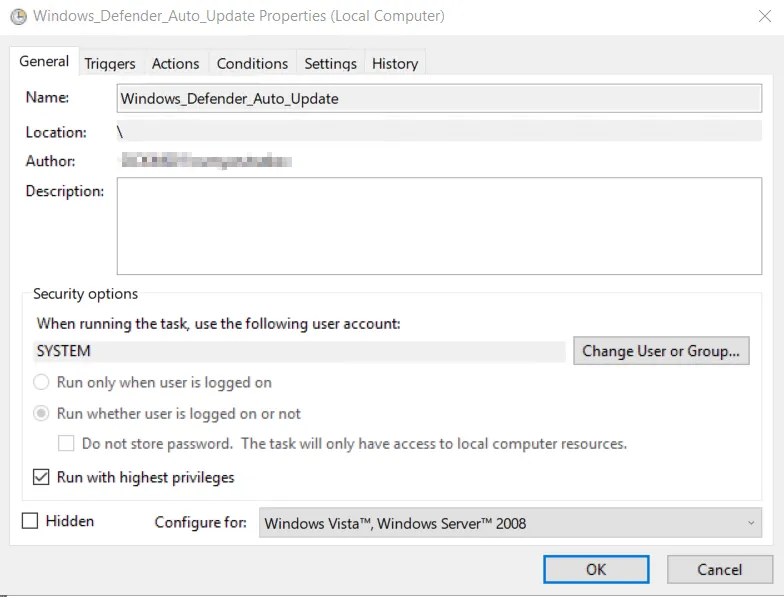
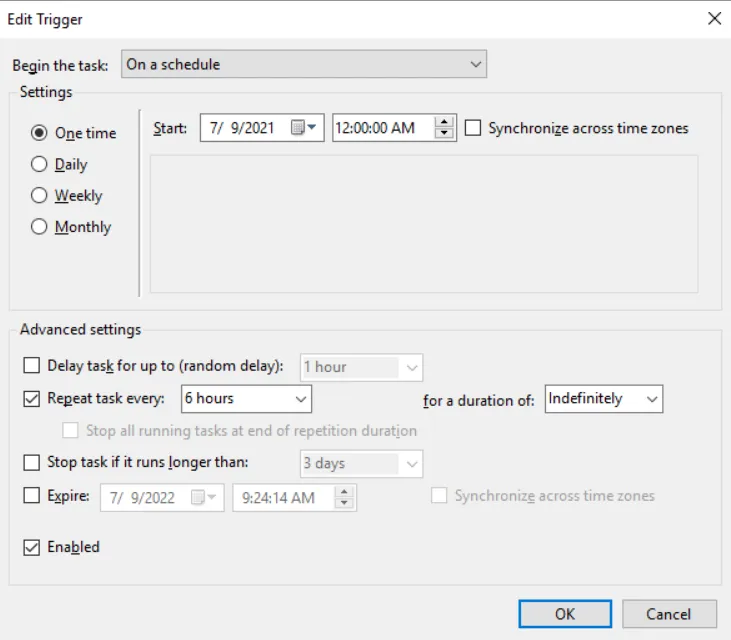
This scheduled task is already triggered by the system when the server is accessed the first time and repeats every 6 hours:
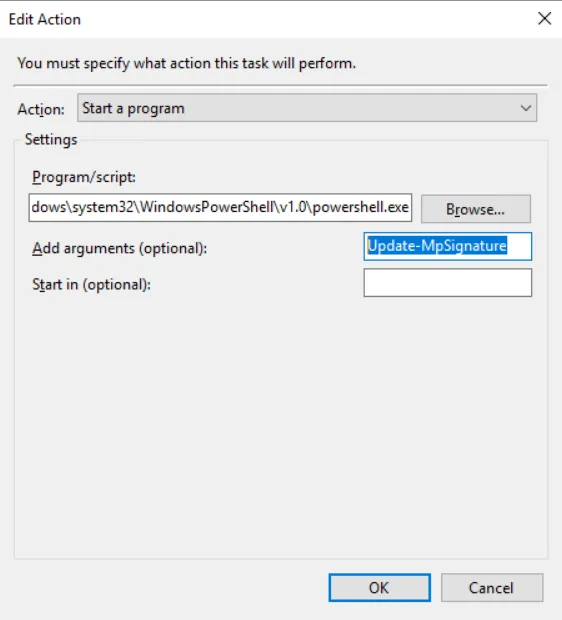
When the task gets run, the pattern will update itself via the native PowerShell cmdlet “Update-MpSignature” provided by Windows:
Additional security fixes provided in the images
Section titled “Additional security fixes provided in the images”For the following known vulnerabilities we provide a solution that is implemented in all images:
| Name | Available in image since |
|---|---|
SSL Medium Strength Cipher Suites Supported (SWEET32) | 2022-09-08 |
SSL RC4 Cipher Suites Supported (Bar Mitzvah) | 2022-09-08 |
Windows Speculative Execution Configuration Check | 2022-09-08 |
Windows PrintNightmare Registry Exposure CVE-2021-34527 OOB Security Update RCE (July 2021) | 2022-09-08 |