How to access additional frontends
Last updated on
At the Observability Service Dashboard we provide several additional frontend URLs at the API-Tab.
As we protect the URL against unauthorized access, you will get a 403 Forbidden status code when trying to call the UI.
To access an additional frontend, you need to modify the HTTP request header with your API credentials upon navigating the URL.
For example, you can use the browser extension simple-modify-headers Chrome / simple-modify-headers Firefox to achieve this.
Prerequisites
Section titled “Prerequisites”- Observability instance available and running
- API user created
- ModHeader extension installed
Encode API credentials
Section titled “Encode API credentials”Once you have created the API credentials, you have to encode it in base64.
Under MacOS and Linux you can use the following terminal command (replace the [username] and [password] placeholders with your API credentials).
echo -n '[username]:[password]' | base64
Alternatively, there are also encoder websites available. However, make sure these websites are trustworthy and guarantee the security of your data.
Set Authorization header
Section titled “Set Authorization header”After installing the ModHeader extension, we will do the following configuration:
- Click the ModHeader extension icon in your browser
- If there isn’t already a Request headers box where you can fill in a Name-Value pair, click the +Mod button and add a Request header.
- In the Name box, enter ‘Authorization’.
- In the Value box, enter ‘Basic’ + your base64 encoded username and password. (Reference)
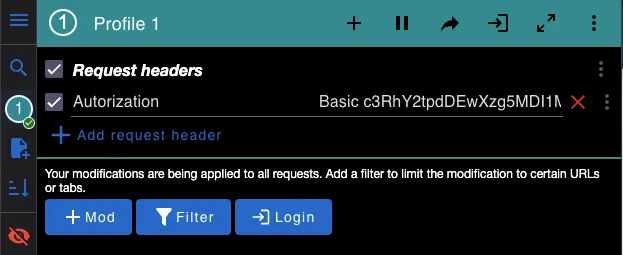
- Call the user interface of your choice.
- Pause the ModHeader extension again after usage.
Otherwise problems may arise when calling other websites.
Problems occurred?
Section titled “Problems occurred?”Here are some things you can do if you have trouble logging in:
- Clear browser cache.
- Look for typos.
- Check if you use the right header type (Request header, not Response header).
- Check if your credentials are encoded correctly.
- Try other credentials.