How to push logs Observability
Last updated on
Preconditions
Section titled “Preconditions”Generate STACKIT Observability instance credentials
Section titled “Generate STACKIT Observability instance credentials”To push logs to your STACKIT Observability instance, you must first create credentials via the API or the Portal. To generate credentials using the Portal, follow these steps:
- Go to the STACKIT Portal.
- Select your project.
- In the left sidebar, navigate to Observability.
- Select your existing Observability instance (or create a new one).
- In the left sidebar of the instance menu, click on API and then Credentials.
- Click Create credentials.
- Securely save the generated username and password, as you will need them for the agent configuration.
Generate Logs
Section titled “Generate Logs”First you have to create logs from your operating system, service, or application. Any log library can be used. There are two ways the logs can be handed over:
- Written to a log file
- Written to standard out
Pushing Logs to STACKIT Observability
Section titled “Pushing Logs to STACKIT Observability”Once the logs exist, they have to be collected and sent to your observability instance. STACKIT Observability supports two main protocols for log ingestion:
- OpenTelemetry (OTLP) Endpoint: The modern industry standard.
- Loki API Endpoint: The native Grafana Loki protocol.
Below you will find configuration examples for both approaches.
Option 1: Push logs via OpenTelemetry (OTLP)
Section titled “Option 1: Push logs via OpenTelemetry (OTLP)”STACKIT Observability supports ingesting OpenTelemetry logs over HTTP. You can configure the OpenTelemetry HTTP exporter (otlphttp) to send log data to your STACKIT Observability instance. Additionally, we need the basicauth extension to enable STACKIT access token authentication.
Make sure these features come bundled in the agent you are using. You can use the official OpenTelemetry Collector Contrib or Grafana Alloy (which uses the OpenTelemetry Collector under the hood and fully supports OTLP components).
Example: Setup using OpenTelemetry Collector
Section titled “Example: Setup using OpenTelemetry Collector”The following configuration file shows how to read logs from a local file, enrich them with resource attributes, and push them to the OTLP endpoint. You can extend it according to your requirements.
OpenTelemetry Collector configuration
Section titled “OpenTelemetry Collector configuration”Replace cluster, instanceId, username, and password with your STACKIT Observability credentials.
extensions:  basicauth/stackit:    client_auth:      username: "[username]"      password: "[password]"
receivers:  filelog:    include:      - /var/log/app/*.log    start_at: end
processors:  batch:    send_batch_size: 1000    timeout: 10s
  resource:    attributes:      - key: service.name        value: custom_service        action: insert      - key: detected.level        value: info        action: insert
exporters:  otlphttp/stackit:    endpoint: "https://logs.stackit[cluster].argus.eu01.stackit.cloud/instances/[instanceId]/otlp"    auth:      authenticator: basicauth/stackit
service:  extensions: [basicauth/stackit]  pipelines:    logs:      receivers: [filelog]      processors: [batch, resource]      exporters: [otlphttp/stackit]
Docker Compose
Section titled “Docker Compose”Use this docker-compose file to run the OpenTelemetry Collector in a docker container. It mounts your local config and the log directory into the container.
services: otel-collector: image: otel/opentelemetry-collector-contrib:latest container_name: otel-collector volumes: - ./config.yaml:/etc/otelcol-contrib/config.yaml:ro - /var/log/app:/var/log/app:ro restart: unless-stoppedOption 2: Push logs via Loki API
Section titled “Option 2: Push logs via Loki API”If you prefer using the native Loki API, you can use agents like Grafana Alloy or fluentbit with the Loki plugin. Below you can find example configurations of those tools.
Example: Setup using Grafana Alloy
Section titled “Example: Setup using Grafana Alloy”In this example we collect logs from different sources e.g. of a virtual machine.
Grafana Alloy collects all logs and send them to an Observability Loki instance.
Grafana Alloy configuration
Section titled “Grafana Alloy configuration”Replace cluster, instanceId, username, and password with your STACKIT Observability credentials.
local.file_match "node_logs" {  path_targets = [{      // Monitor syslog to scrape node-logs      __path__  = "/var/log/syslog",      job       = "node/syslog",      node_name = sys.env("HOSTNAME"),      cluster   = "[cluster]",  }]}
// loki.source.file reads log entries from files and forwards them to other loki.* components.// You can specify multiple loki.source.file components by giving them different labels.loki.source.file "node_logs" {  targets    = local.file_match.node_logs.targets  forward_to = [loki.write.loki_instance.receiver]}
logging {  level    = "info"  format   = "json"  write_to = [loki.write.loki_instance.receiver]}
loki.write "loki_instance" {  endpoint {    url = "https://logs.stackit[cluster].argus.eu01.stackit.cloud/instances/[instanceId]/loki/api/v1/push"    basic_auth {      username = "[username]"      password = "[password]"    }    retry_on_http_429 = true  }}
Docker Compose
Section titled “Docker Compose”Use this docker-compose file to run Grafana Alloy in a docker container. The Alloy UI and API is accessible over port 12345.
services: alloy: image: grafana/alloy:latest container_name: alloy command: - run - --server.http.listen-addr=0.0.0.0:12345 - --storage.path=/var/lib/alloy/data - /etc/alloy/config.alloy ports: - "12345:12345" volumes: - ./config.alloy:/etc/alloy/config.alloy:ro - /var/run/docker.sock:/var/run/docker.sock:ro - alloy-data:/var/lib/alloy/data restart: unless-stoppedvolumes: alloy-data:Example: Setup using fluentbit
Section titled “Example: Setup using fluentbit”In the second example we want to scrape container logs and use fluentbit for that.
fluentbit configuration
Section titled “fluentbit configuration”Replace cluster, instanceId, username, and password with your STACKIT Observability credentials.
[Output] Name loki Match * Tls on Host logs.stackit[cluster].argus.eu01.stackit.cloud Uri /instances/[instanceId]/loki/api/v1/push Port 443 Labels job=fluent-bit,env=${FLUENT_ENV} Http_User [username] Http_Passwd [password] Line_format json
[SERVICE] Parsers_File /fluent-bit/etc/parsers.conf # fluentbit needs a parser. This should point to the parser Flush 5 Daemon Off Log_Level debug
[FILTER] Name parser Match * Parser docker Key_name log
[INPUT] Name forward Listen 0.0.0.0 Port 24224
Parsers Configuration
Section titled “Parsers Configuration”[PARSER] Name docker Format json Time_Key time Time_Format %Y-%m-%dT%H:%M:%S.%L Time_Keep On Decode_Field_As json log log Decode_Field_As json level Decode_Field_As json ts Decode_Field_As json caller Decode_Field_As json msg msgDocker Compose
Section titled “Docker Compose”services: fluentbit: image: grafana/fluent-bit-plugin-loki:latest container_name: fluentbit_python_local volumes: - ./logging:/fluent-bit/etc # logging directory contains parsers.conf and fluent-bit.conf ports: - "24224:24224" - "24224:24224/udp"
app: build: context: ./app dockerfile: ./docker/local/Dockerfile image: app container_name: app privileged: true volumes: - ./:/app ports: - "3000:3000" command: sh -c 'air' logging: driver: fluentd # to make fluentbit work with docker this driver is neededExample: Setup using Kubernetes and fluentbit
Section titled “Example: Setup using Kubernetes and fluentbit”To send logs from one or more applications to Loki, you must install fluentbit in your cluster. This routes the output directly to your STACKIT Observability instance.
You can also send logs to multiple STACKIT Observability instances. Note that the URL in the fluentbit output plugin must contain your specific instance ID.
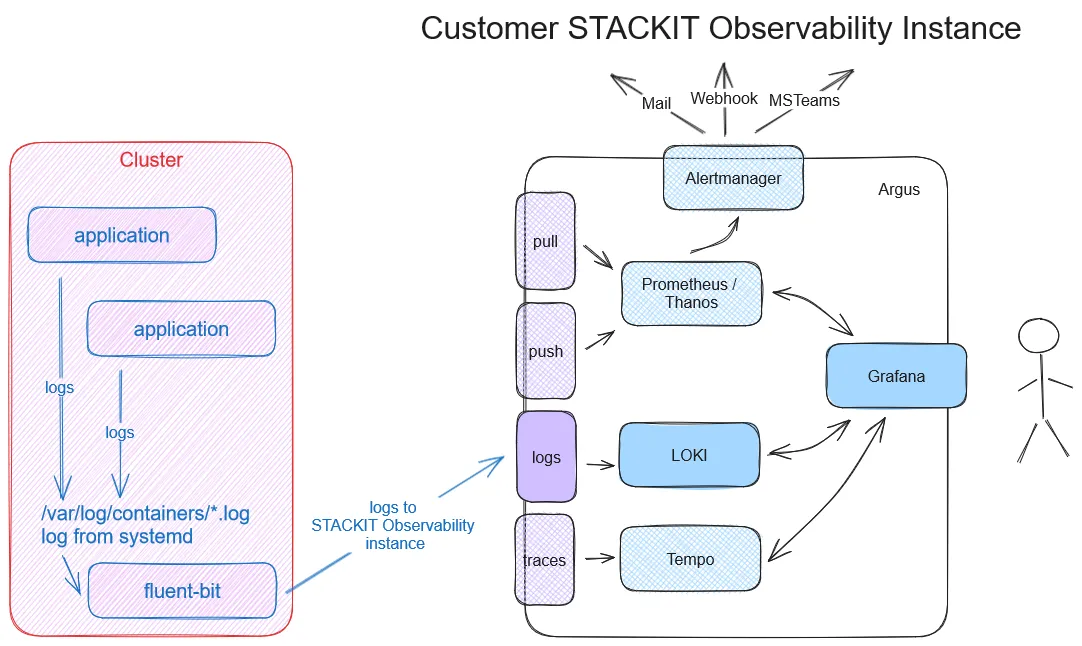
Deploy the following files in your Kubernetes cluster:
kind: NamespaceapiVersion: v1metadata: name: kube-loggingapiVersion: v1kind: ServiceAccountmetadata: name: fluent-bit namespace: kube-loggingapiVersion: rbac.authorization.k8s.io/v1kind: ClusterRolemetadata: name: fluent-bit-readrules:- apiGroups: [""] resources: - namespaces - pods verbs: ["get", "list", "watch"]apiVersion: rbac.authorization.k8s.io/v1kind: ClusterRoleBindingmetadata: name: fluent-bit-readroleRef: apiGroup: rbac.authorization.k8s.io kind: ClusterRole name: fluent-bit-readsubjects:- kind: ServiceAccount name: fluent-bit namespace: kube-loggingReplace username, and password with your STACKIT Observability credentials.
apiVersion: v1kind: Secretmetadata: name: fluent-bit-secrets namespace: kube-loggingtype: OpaquestringData: username: "[username]" password: "[password]"Replace cluster and instanceId with your STACKIT Observability credentials.
apiVersion: v1kind: ConfigMapmetadata:  name: fluent-bit-config  namespace: kube-logging  labels:    k8s-app: fluent-bitdata:  fluent-bit.conf: |    [SERVICE]        Daemon          Off        Flush           1        Log_Level       info        Parsers_File    /fluent-bit/etc/parsers.conf        Parsers_File    /fluent-bit/etc/conf/custom_parsers.conf        HTTP_Server     On        HTTP_Listen     0.0.0.0        HTTP_Port       2020        Health_Check    On
    [INPUT]        Name            tail        Path            /var/log/containers/*.log        Parser          cri        Tag             kube.*        Mem_Buf_Limit   5MB        Skip_Long_Lines On
    [INPUT]        Name            systemd        Tag             host.*        Systemd_Filter  _SYSTEMD_UNIT=kubelet.service        Read_From_Tail  On
    [FILTER]        Name                kubernetes        Match               kube.*        Merge_Log           On        Keep_Log            Off        K8S-Logging.Parser  On        K8S-Logging.Exclude On
    [OUTPUT]        name            loki        match           *        host            logs.stackit[cluster].argus.eu01.stackit.cloud        uri             /instances/[instanceId]/loki/api/v1/push        port            443        http_user       ${FLUENT_USER}        http_passwd     ${FLUENT_PASS}        tls             on        tls.verify      on        line_format     json        labels          job=fluent-bit        label_map_path  /fluent-bit/etc/conf/labelmap.json
  parsers.conf: |    [PARSER]        Name        cri        Format      regex        Regex       ^(?<time>[^ ]+) (?<stream>stdout|stderr) (?<logtag>[^ ]*) (?<message>.*)$        Time_Key    time        Time_Format %Y-%m-%dT%H:%M:%S.%L%z
  custom_parsers.conf: |    [PARSER]        Name           docker        Format         json        Time_Key       time        Time_Format    %Y-%m-%dT%H:%M:%S.%L        Time_Keep      On        Decode_Field_As json log log        Decode_Field_As json level        Decode_Field_As json ts        Decode_Field_As json caller        Decode_Field_As json msg msg
labelmap.json: |- { "kubernetes": { "container_name": "container", "host": "node", "labels": { "app": "app", "release": "release" }, "namespace_name": "namespace", "pod_name": "instance" }, "stream": "stream" }apiVersion: apps/v1kind: DaemonSetmetadata: name: fluent-bit namespace: kube-logging labels: app.kubernetes.io/name: fluent-bit app.kubernetes.io/instance: fluent-bit-lokispec: selector: matchLabels: k8s-app: fluent-bit-logging template: metadata: labels: k8s-app: fluent-bit-logging spec: serviceAccountName: fluent-bit terminationGracePeriodSeconds: 10 containers: - name: fluent-bit image: "fluent/fluent-bit:latest" imagePullPolicy: Always command: - /fluent-bit/bin/fluent-bit args: - --workdir=/fluent-bit/etc - --config=/fluent-bit/etc/conf/fluent-bit.conf ports: - name: http containerPort: 2020 protocol: TCP livenessProbe: httpGet: path: / port: http readinessProbe: httpGet: path: /api/v1/health port: http volumeMounts: - name: varlog mountPath: /var/log - name: varlibdockercontainers mountPath: /var/lib/docker/containers readOnly: true - name: journal mountPath: /journal readOnly: true - name: fluent-bit-config mountPath: /fluent-bit/etc/conf env: - name: FLUENT_USER valueFrom: secretKeyRef: name: fluent-bit-secrets key: username - name: FLUENT_PASS valueFrom: secretKeyRef: name: fluent-bit-secrets key: password volumes: - name: varlog hostPath: path: /var/log - name: journal hostPath: path: /var/log/journal - name: varlibdockercontainers hostPath: path: /var/lib/docker/containers - name: fluent-bit-config configMap: name: fluent-bit-config tolerations: - key: node-role.kubernetes.io/master effect: NoScheduleCreate a small test application to produce some sample logs. For this example, we will deploy a NGINX webserver:
apiVersion: v1kind: PersistentVolumeClaimmetadata: name: my-pvcspec: accessModes: - ReadWriteOnce resources: requests: storage: 1Gi # Request 1 Gigabyte of storageapiVersion: apps/v1kind: Deploymentmetadata: name: nginx-deploymentspec: replicas: 3 selector: matchLabels: app: nginx template: metadata: labels: app: nginx spec: containers: - name: nginx image: nginx:latest ports: - containerPort: 80 volumeMounts: - name: data mountPath: /usr/share/nginx/html resources: limits: memory: "256Mi" cpu: "200m" requests: memory: "128Mi" cpu: "100m" livenessProbe: httpGet: path: / port: 80 initialDelaySeconds: 15 periodSeconds: 10 readinessProbe: httpGet: path: / port: 80 initialDelaySeconds: 5 periodSeconds: 5 volumes: - name: data persistentVolumeClaim: claimName: my-pvcNext, verify that your deployed pods are running successfully:
$ kubectl get namespacesNAME STATUS AGEdefault Active 6dkube-logging Active 4d3hkube-node-lease Active 6dkube-public Active 6dkube-system Active 6d
$ kubectl get pods -n kube-loggingNAME READY STATUS RESTARTS AGEfluent-bit-c9b8d 1/1 Running 0 23h
$ kubectl get pods -n defaultNAME READY STATUS RESTARTS AGEnginx-deployment-58fc999d7b-56jrq 1/1 Running 0 9m2snginx-deployment-58fc999d7b-5gkwz 1/1 Running 0 9m2snginx-deployment-58fc999d7b-gxbfr 1/1 Running 0 9m2s
Once everything is running, open Grafana and use the Loki data source to confirm that your logs are arriving:

References
Section titled “References”- fluentbit and Kubernetes
- fluentbit Loki output
- fluentbit helm-charts (use fluent-bit-0.43.0 or higher)
- fluentbit docker image (use 2.2.2 or higher)