Basic concepts of the Certificate API
STACKIT Certificate API integrates with STACKIT Application Load Balancer (ALB) to help you manage TLS/SSL certificates securely and efficiently. This integration ensures encrypted communication between clients and your applications running behind STACKIT Application Load Balancer.
By using STACKIT Certificate API, you can:
- Store TLS/SSL certificates securely.
- Manage certificates dynamically.
- Retrieve and use stored certificates when creating HTTPS listeners for the ALB.
- Enable encrypted communication for applications behind the ALB.
Certificate name
Section titled “Certificate name”A unique name you assign to each TLS/SSL certificate.
Public key (certificate)
Section titled “Public key (certificate)”The public part of the TLS certificate, issued by a Certificate Authority (CA) or self-signed. Clients use this certificate to establish secure connections and verify your application’s authenticity.
Private key
Section titled “Private key”The secret key paired with the public certificate. The private key is required for decryption and to establish secure TLS connections. The system stores this key securely—never share it.
Certificate ID
Section titled “Certificate ID”A unique identifier for each TLS/SSL certificate stored in STACKIT Certificate API.
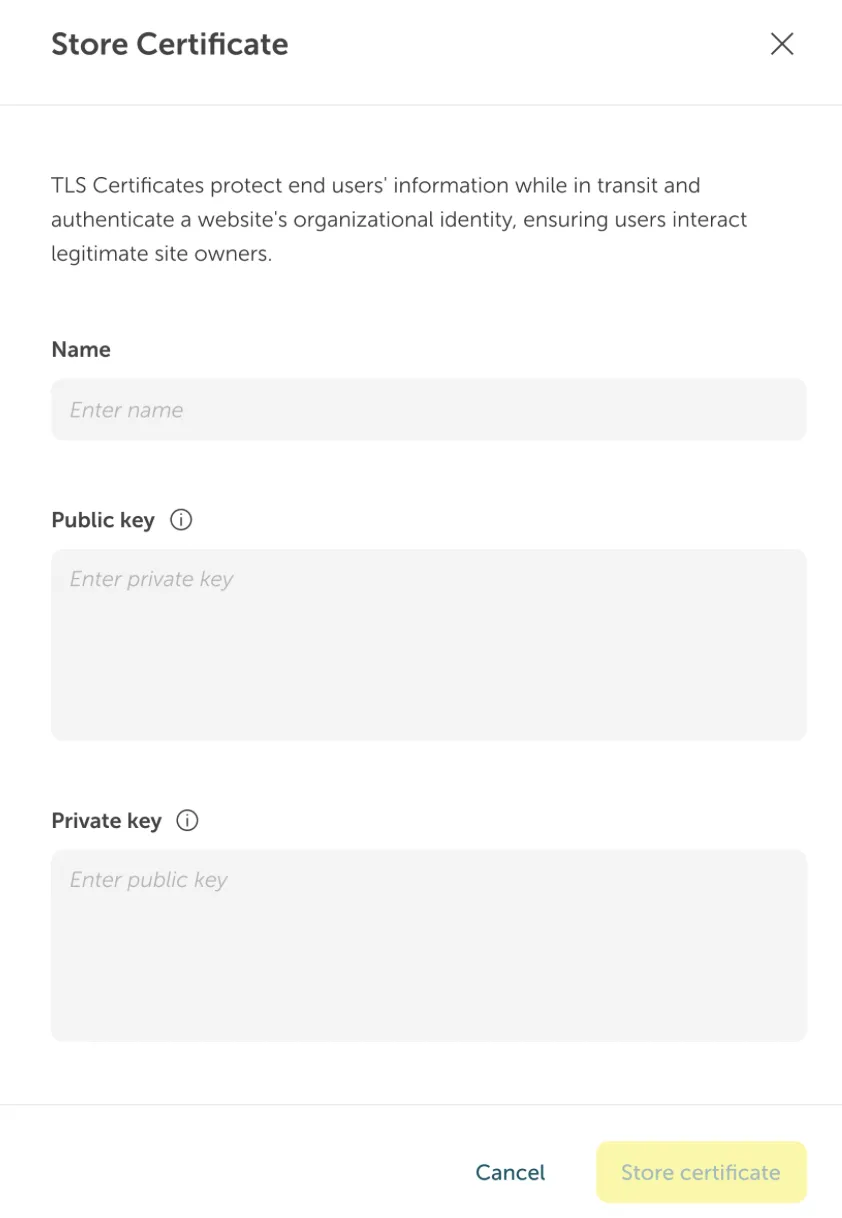
How certificate management works
Section titled “How certificate management works”This section explains how to store a TLS certificate and use it with STACKIT Application Load Balancer.
Store a TLS certificate via the STACKIT Portal
Section titled “Store a TLS certificate via the STACKIT Portal”- Enter a certificate name.
- Enter the public certificate (public key).
- Enter the private key.
- Certificate API stores the certificate securely and returns a certificate ID.
Use a stored certificate with STACKIT Application Load Balancer
Section titled “Use a stored certificate with STACKIT Application Load Balancer”- Provide the certificate ID when you create an HTTPS listener.
- The ALB retrieves the certificate and private key to enable encrypted traffic.
For more details, refer to the STACKIT Certificate API documentation.