Automated vulnerability scanning with Trivy
Zuletzt aktualisiert am
Ensuring container images are free from known security vulnerabilities is a critical part of a secure software supply chain. STACKIT Container Registry integrates the powerful open-source scanner Trivy to provide automated, static analysis of container images, helping teams identify and remediate security risks before they reach production.
Introduction to Trivy
Section titled “Introduction to Trivy”Trivy is a comprehensive and versatile security scanner that can detect a wide range of security issues, including:
- Known vulnerabilities (CVEs): It scans operating system packages and application dependencies for vulnerabilities listed in public databases.
- Infrastructure as Code (IaC) misconfigurations: It can analyze Dockerfiles, Kubernetes manifests, and Terraform files for security best practice violations.
- Hardcoded secrets: It can find sensitive information like passwords and API keys embedded within image layers.
- Software bill of materials (SBOM): It can generate an inventory of all software components within an image.
Within STACKIT Container Registry, Trivy is the default, pre-installed scanner, providing out-of-the-box vulnerability detection capabilities.
How scanning works in Container Registry
Section titled “How scanning works in Container Registry”When a vulnerability scan is initiated, Container Registry instructs the integrated Trivy scanner to analyze the specified container image. Trivy inspects each layer of the image, identifies the installed OS packages and language-specific libraries, and compares this inventory against its regularly updated vulnerability database. The results are then displayed in the user interface, providing a detailed report of any findings.
Configuring project-level scan policies
Section titled “Configuring project-level scan policies”Project Admins can configure policies within a project to ensure that images are scanned consistently and that vulnerable images are prevented from being used.
- Navigate to the desired project and select the Configuration tab.
- Configure the following settings:
- Automatically scan images on push: When enabled, STACKIT CR will automatically trigger a vulnerability scan every time a new image is pushed to any repository within the project.
- Prevent vulnerable images from running: This acts as a security gate. When enabled, it prevents users from pulling any image that contains vulnerabilities at or above a specified severity threshold (e.g.,
High,Critical).

Running scans manually
Section titled “Running scans manually”Users with appropriate permissions (Project Admin or Maintainer) can trigger scans manually at any time.
- Navigate to the project and select the Repositories tab.
- Find the specific image artifact you want to scan.
- In the Vulnerabilities column, click the Scan button.
Interpreting the vulnerability report
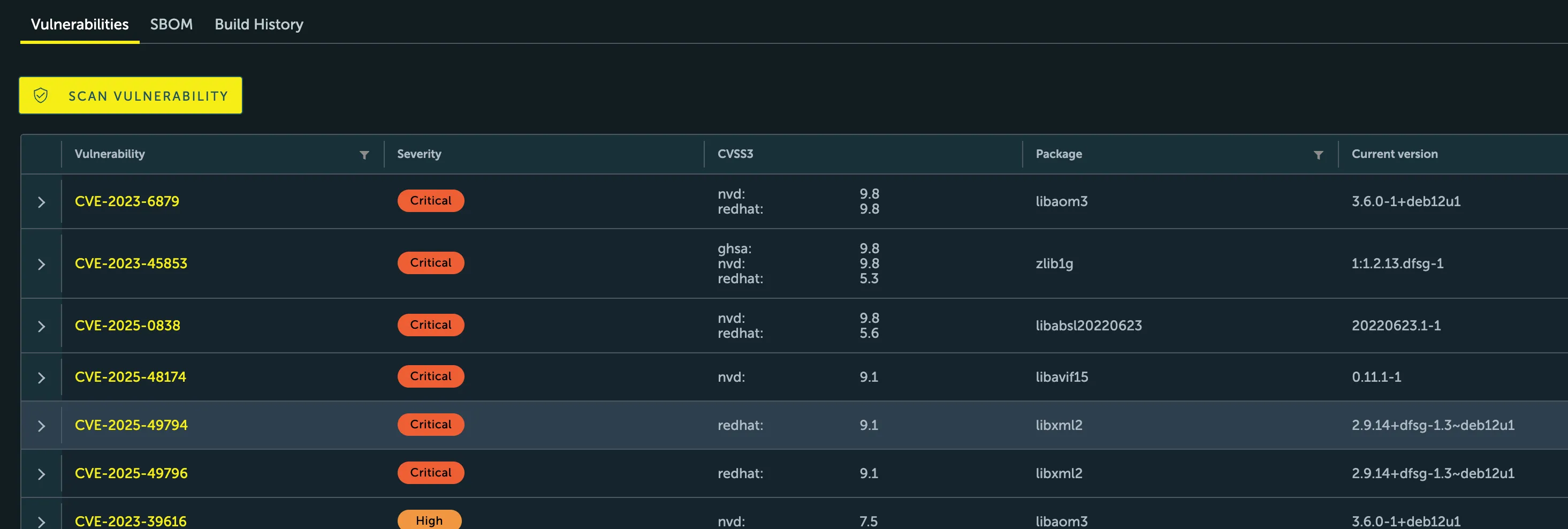
Section titled “Interpreting the vulnerability report”Once a scan is complete, the results are displayed in the Vulnerabilities column. Click on the artifact’s digest to view the detailed report, which provides the following information for each discovered vulnerability:
- CVE ID: The unique identifier for the vulnerability.
- Severity: The severity level (e.g.,
Critical,High,Medium). - Package: The name of the vulnerable package.
- Version: The version of the vulnerable package.
- Fixed Version: The version of the package that contains the fix, if available.
By integrating vulnerability scanning directly into the registry workflow, STACKIT CR empowers teams to adopt a “shift-left” security approach, identifying and addressing threats early in the development lifecycle.