Automating workflows with robot accounts
Zuletzt aktualisiert am
For CI/CD pipelines, infrastructure-as-code scripts, or any other form of automation, using personal user credentials is a security anti-pattern. STACKIT Container Registry provides a secure and manageable solution for programmatic access through robot accounts. These are non-human service accounts designed specifically for automation.
A project robot account’s permissions are strictly limited to the project in which it was created. This is ideal for a CI/CD pipeline that builds and pushes an image for a single application, as it ensures the pipeline cannot access any other projects.
Creating a project robot account
Section titled “Creating a project robot account”- Navigate to your project and select the Robot Accounts tab.
- Click New Robot Account.
- Provide a name and an optional description.
- Set an expiration date for the token. It is a security best practice to set an expiration period to enforce regular token rotation.
- Assign the specific permissions the robot account needs. For example, a build pipeline typically requires
repository:pushandrepository:pull.
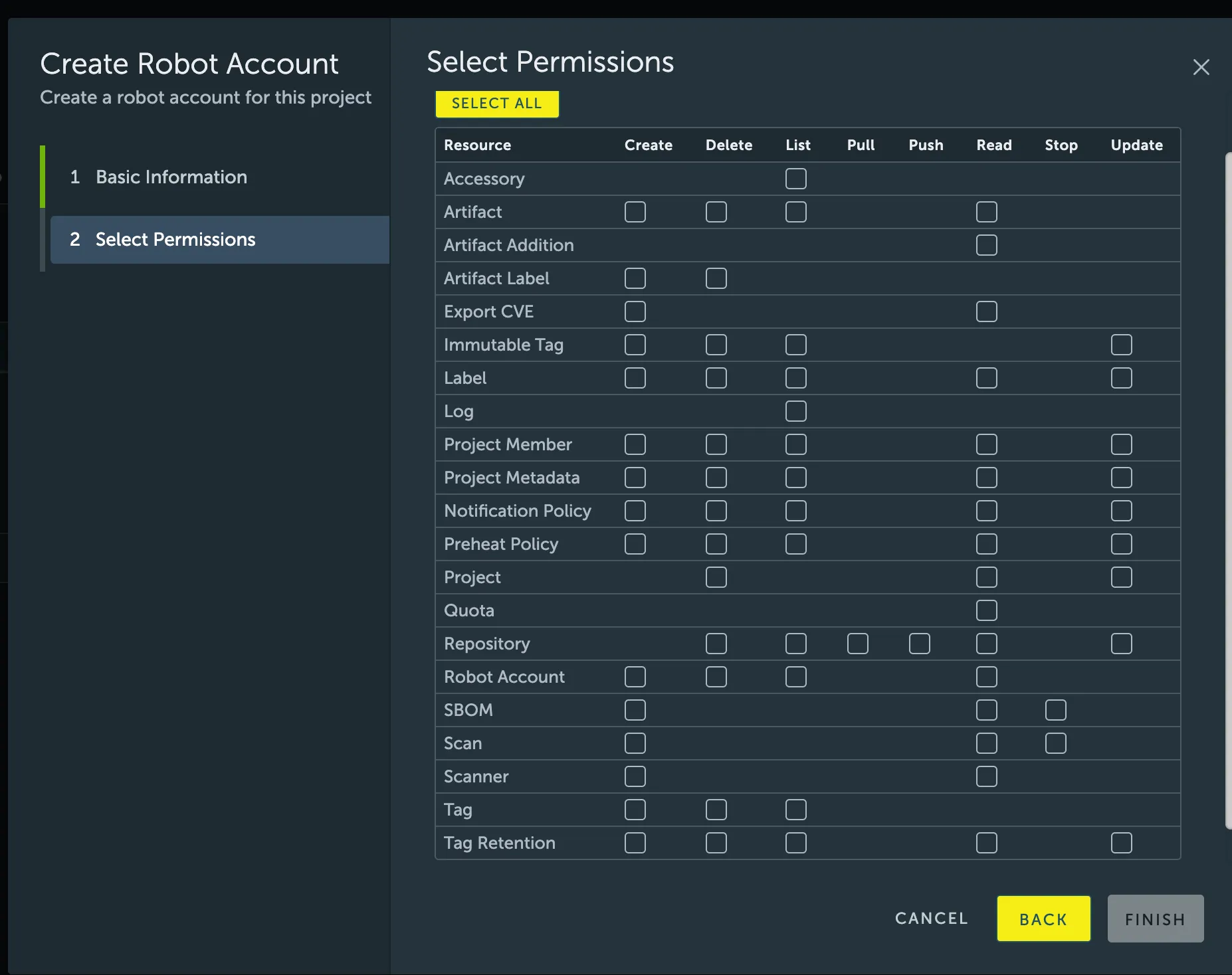
- After creation, you will be shown the robot account’s token (secret). You must copy or export this token immediately. It is not stored and cannot be retrieved later.
- Store this token securely in your CI/CD system’s secret manager.
Using the robot account
Section titled “Using the robot account”To authenticate in a script, use the docker login command with the robot account’s full name and its secret. The robot account’s name will follow the format <prefix><project_name>+<account_name>.
Bash
Important Note: If using a robot account, you must use a backslash “ in front of the $ character. For example, if the user is robot$testrobot, the syntax should be:
Bash
Robot account permission reference
Section titled “Robot account permission reference”The following table provides a reference for common permissions that can be assigned to a robot
| Resource | Action | Description |
|---|---|---|
| repository | pull | Allows pulling artifacts (images, charts) from a repository. |
| repository | push | Allows pushing artifacts to a repository. (Requires pull permission). |
| artifact | delete | Allows deleting an artifact from a repository. |
| artifact | read | Allows reading artifact metadata. |
| artifact-label | create | Allows adding a label to an artifact. |
| scan | create | Allows initiating a vulnerability scan on an artifact. |
| scan | read | Allows reading the vulnerability report of an artifact. |
| tag-retention | create | Allows creating a tag retention rule for a project. |