Use STACKIT OpenSearch API
Last updated on
In this tutorial you will learn how to manage service instances and service credentials in your STACKIT project using STACKIT OpenSearch API.
Prerequisites
Section titled “Prerequisites”In order to follow the steps described on this page, the following conditions need to be met:
-
Your organization has a customer account.
(See: Create a customer account) -
You have a User Account with the necessary permissions.
(See: Create a user account) -
You have a Project in your customer account.
(See: Create a Project) -
You have created a Service Account.
(See: Create a Service account) -
You have assigned the required project permissions to this service account.
(See: Assign permissions to a service account) -
You have created an Access Token for this service account.
(See: Assign authentication token to a service account) -
You can use cURL, a command line tool and library for transferring data with URL syntax.
(See: cURL website) -
You can use jq, a command-line JSON processor.
(See: jq website)
API use with curl
Section titled “API use with curl”Get service offerings
Section titled “Get service offerings”API call
curl --location --request GET 'https://opensearch.api.eu01.stackit.cloud/v1/projects/[projectId]/offerings' \| Variable | Description |
|---|---|
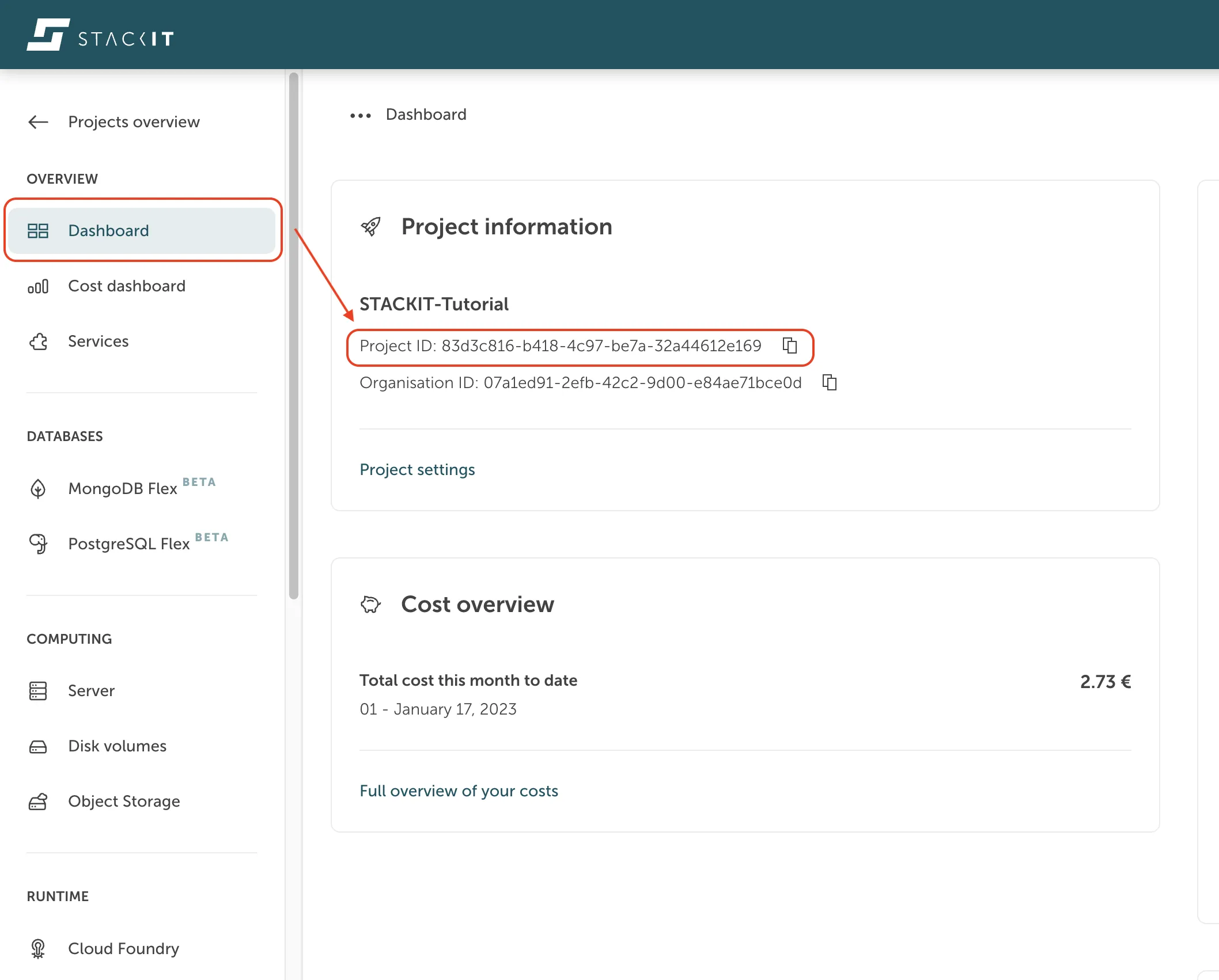
[projectId] | ProjectId can be retrieved from STACKIT Portal, navigating to your project dashboard within the section ‘Overview’ in the sidebar. |
[token] | The access token of your service account. |
Excerpt of the API response
{ "offerings": [ { "description": "OpenSearch is a fully managed search and analytics engine.", "imageUrl": "data:image/png;base64,iVBORw0...YII=", "documentationUrl": "", "quotaCount": 2, "latest": true, "name": "OpenSearch 2", "plans": [ { "description": "3 Nodes, 1 vCPU, 2 GB RAM, 10 GB Disk", "id": "9e4eac4b-b03d-4d7b-b01b-6d1224aa2d68", "name": "stackit-opensearch-1.2.10-replica", "free": false }, { "description": "3 Nodes, 1 vCPU, 4 GB RAM, 10 GB Disk", "id": "e5fbee3b-8237-415e-a783-3ab25a40eeda", "name": "stackit-opensearch-1.4.10-replica", "free": false }, { "description": "3 Nodes, 1 vCPU, 4 GB RAM, 50 GB Disk", "id": "28029780-2e42-41e7-9cc5-9ee15acd95f6", "name": "stackit-opensearch-1.4.50-replica", "free": false }, { "description": "3 Nodes, 2 vCPUs, 4 GB RAM, 10 GB Disk", "id": "8fa3d311-a5ff-464f-97cf-29a6fc159dbc", "name": "stackit-opensearch-2.4.10-replica", "free": false },... { "description": "1 Node, 4 vCPUs, 8 GB RAM, 50 GB Disk", "id": "913780f9-f5e6-4c9b-9e9a-864754fe8005", "name": "stackit-opensearch-4.8.50-single", "free": false } ],.. ]}Create service instance
Section titled “Create service instance”API call
curl --location --request POST 'https://opensearch.api.eu01.stackit.cloud/v1/projects/[projectId]/instances' \--header 'Content-Type: application/json' \--header 'Accept: application/json' \--header 'Authorization: Bearer [token]' \--data-raw '{ "planId": "[planId]", "instanceName": "[service_instance_name]", "parameters": {"sgw_acl": "[ip_list]"}}'[planId] | Service planId of the service offering you like to order. See previous API call ‘Get service offerings’.For example: planId for “stackit-opensearch-1.2.10-replica” would be “9e4eac4b-b03d-4d7b-b01b-6d1224aa2d68” |
|---|---|
| [service_instance_name] | Choose a meaningful name for your instance. |
| [ip_list] | Comma separated list of IP networks in CIDR notation which are allowed to access this instance.e.g. 193.148.160.0/19,45.129.40.0/21 |
API response
InstanceId of the created service instance, required for further API calls.
e.g.{"instanceId":"a8196380-da17-4789-aae6-b452442bef56"}
Get service instance by instanceId
Section titled “Get service instance by instanceId”API call
curl --location --request GET 'https://opensearch.api.eu01.stackit.cloud/v1/projects/[projectId]/instances/[instanceId]' \--header 'Accept: application/json' \--header 'Authorization: Bearer [token]' | jq.Delete service instance
Section titled “Delete service instance”API call
curl --location --request DELETE 'https://opensearch.api.eu01.stackit.cloud/v1/projects/[projectId]/instances/[instanceId]' \--header 'Accept: application/json' \--header 'Authorization: Bearer [token]'Create service credentials
Section titled “Create service credentials”API call
curl --location --request POST 'https://opensearch.api.eu01.stackit.cloud/v1/projects/[projectId]/instances/[instanceId]/credentials' \--header 'Accept: application/json' \--header 'Authorization: Bearer [token]' | jq.Example of API response
{ "id": "acb13963-2e83-4553-aba9-bd62aaf2be5a", "uri": "https://sed21b412-0.data.eu01.onstackit.cloud:49366", "raw": { "credentials": { "username": "*****", "password": "*****", "port": 49366, "host": "https://sed21b412-0.data.eu01.onstackit.cloud:49366", "hosts": [ "sed21b412-os-0-1.data.eu01.onstackit.cloud" ], "uri": "https://sed21b412-0.data.eu01.onstackit.cloud:49366", "cacrt": "-----BEGIN CERTIFICATE-----\nMIIFujC.....4ZfJ\n-----END CERTIFICATE-----", "scheme": "https" }, "routeServiceUrl": "", "syslogDrainUrl": "" }}Easier handling of API calls
Section titled “Easier handling of API calls”You can use one of several API testing and development tools to make working with the API more convenient.
Examples are:
or any other. Most tools support the import of the OpenAPI specification.