Create an NLB
Last updated on
STACKIT Network Load Balancers (NLBs) can be created via the STACKIT Portal, STACKIT API, or the STACKIT Terraform Provider.
Preparation
Section titled “Preparation”Before you create an NLB, there are some considerations you should make. Use the list below to decide and collect the information you need before you start:
- Naming: Choose a DNS-compliant name (lowercase, hyphens, numbers).
- Visibility: Decide whether the NLB is public or private. For public access, determine if you will attach an existing Public IP or let STACKIT assign one automatically. For private access, expect an automatically assigned private IP.
- Performance: Estimate the expected number of connections to the services/servers behind the load balancer, so you’re able to choose an appropriate service plan.
- Network: Determine the STACKIT Network where the NLB will operate. All targets must be in the same network as the load balancer.
- Security posture: If exposing admin or sensitive ports publicly, plan ACL rules (i.e. permitted source IP ranges).
- Ports and protocols (listeners): List the external ports you want to expose and the protocol for each (TCP or UDP). Optionally define a descriptive listener name per port/protocol.
- Target pools and targets: For each listener, define a target pool with a target port and the backend targets that will receive traffic. Collect each target’s IP address (and optional display name). Ensure every target resides in the same network as the NLB.
- Session persistence: Decide if multiple requests in a user session must reach the same target. If yes, enable session persistence (based on source IP). Enabling persistence switches the load balancing algorithm from Round Robin to Maglev.
- Health checks: Decide whether to keep sensible defaults or customize. Defaults typically are: Down after 3 checks, check interval 5 seconds, up after 1 check. If customizing, decide the desired interval and up/down thresholds.
Optionally, you can get an overview of the impending costs by using the STACKIT Pricing Calculator to estimate expenses based on your planned NLB configuration. When using the Portal, costs will be calculated and displayed dynamically in the UI during the creation process.
Process
Section titled “Process”Follow the steps below to create an NLB using your preferred method.
Visit the STACKIT Portal, select your desired project and follow these steps:
- In the sidebar under Networking, click on Network Load Balancer.
- Click the Create Network Load Balancer button.
- Fill in the required fields with the information you prepared earlier.
- Click the Order fee-based button to create the NLB.
Done! Your STACKIT Network Load Balancer is being created and will be ready to use shortly.
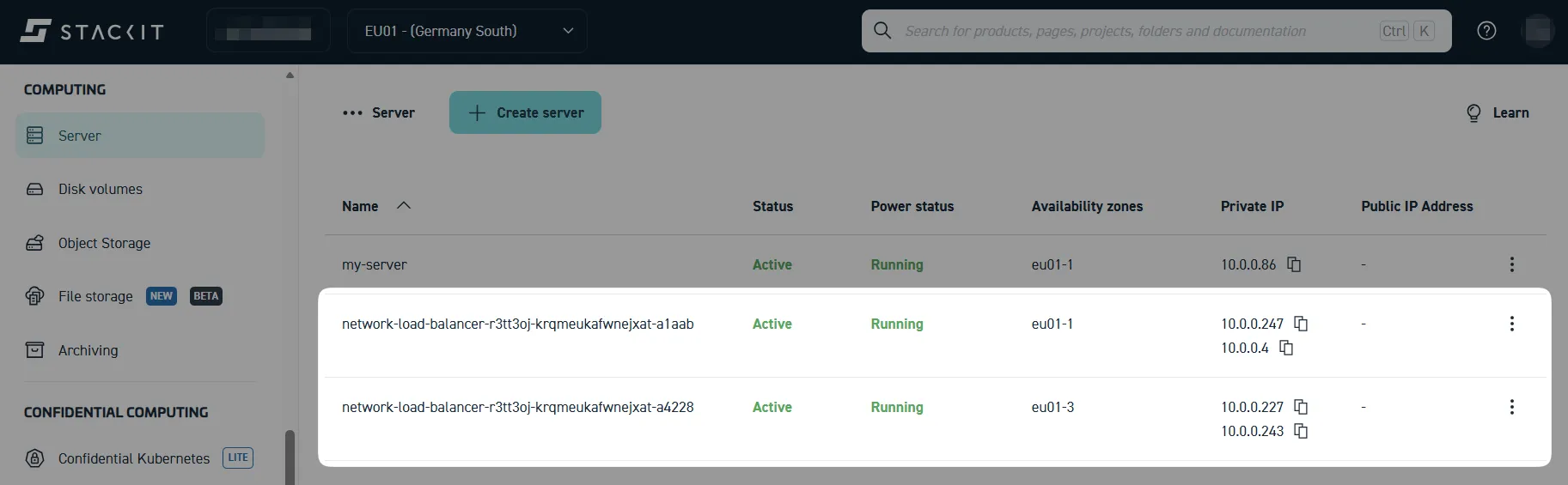
As a result, two new instances will appear under Computing > Server, as demonstrated below. These instances represent the load balancer nodes that handle incoming traffic and distribute it to your defined targets:
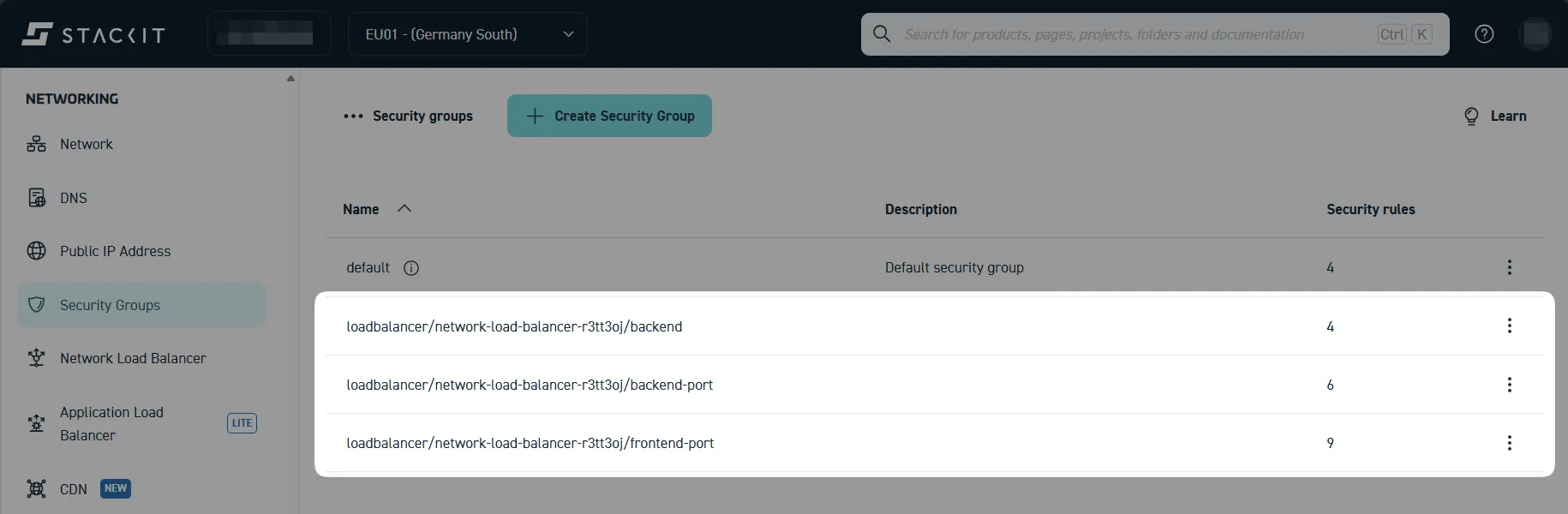
You may also find newly created security groups associated with your NLB under Networking > Security Groups. This will not be the case if you disabled the target security group assignment during NLB creation:
Prerequisites
Section titled “Prerequisites”In order to create a STACKIT Network Load Balancer via API, you need to acquire a temporary Bearer token for authentication under a Service Account.
- Read “Access services with a service account” to learn how to create a Service Account and generate a Bearer token.
- Read the STACKIT CLI Authentication Guide to learn more about possible CLI and environment setups that enable you to acquire Bearer tokens.
- Please refer to STACKIT Network Load Balancer API documentation to learn more about the available API endpoints, parameters and the structure of request/response bodies.
To validate this request functionality with real data, you can use UI-based API clients like Postman or Thunder Client, or command-line tools like cURL.
While direct API requests are useful for testing or creating resources programmatically via imperative scripts (e.g., Python or Go), for managing production infrastructure, it is highly recommended to use the STACKIT Terraform Provider. Terraform allows for declarative resource definition (Infrastructure as Code), handling the underlying API interactions—like the one detailed below—automatically in the background.
Request details
Section titled “Request details”Method: POST
Endpoint URL:
https://load-balancer.api.stackit.cloud/v2/projects/{projectId}/regions/{region}/load-balancersHeaders:
Content-Type: application/jsonAuthorization: Bearer <your_bearer_token>
Request body:
{ "name": "my-load-balancer-01", "networks": [ { "networkId": "2028e5d4-af4f-45e2-98df-502be37a4317 <UUID of the network where load balancer and targets reside>", "role": "ROLE_LISTENERS_AND_TARGETS" } ], "targetPools": [ { "name": "web-backend-pool", "targetPort": 8080, "targets": [ { "displayName": "web-server-01", "ip": "10.1.2.5 <Internal IPv4 address of the first target server>" }, { "displayName": "web-server-02", "ip": "10.1.2.6 <Internal IPv4 address of a second target server>" } ], "activeHealthCheck": { "healthyThreshold": 2, "interval": "3s", "intervalJitter": "3s", "timeout": "3s", "unhealthyThreshold": 2 } } ], "listeners": [ { "displayName": "http-listener", "port": 80, "protocol": "PROTOCOL_TCP", "targetPool": "web-backend-pool <Must match a 'name' defined in 'targetPools'>" } ], "options": { "privateNetworkOnly": true, "accessControl": { "allowedSourceRanges": [ "0.0.0.0/0 <CIDR range allowed to access this load balancer>" ] } }}The following examples demonstrate how to create an NLB using the official STACKIT Terraform Provider and stackit_loadbalancer resource. The first example shows a barebones definition, without network and target server, while the second example includes the creation of a network and server as prerequisites for the load balancer.
Barebones definition
Section titled “Barebones definition”terraform { required_providers { stackit = { source = "stackitcloud/stackit" } }}
# Key flow (using path)provider "stackit" { # Credential configuration usually goes here or in ENV variables default_region = "eu01" service_account_key_path = pathexpand("~/.stackit/credentials.json")}
resource "stackit_loadbalancer" "example" { project_id = "<your-project-uuid>" name = "example-tf-load-balancer"
networks = [ { network_id = "<your-network-uuid>" role = "ROLE_LISTENERS_AND_TARGETS" } ] options = { private_network_only = true }
target_pools = [ { name = "example-pool" target_port = 80 targets = [ { display_name = "<your-target-server-name>" ip = "<your-target-server-ipv4>" } ] } ]
listeners = [ { display_name = "example-listener" port = 80 protocol = "PROTOCOL_TCP" target_pool = "example-pool" } ]}Setup including network and server
Section titled “Setup including network and server”terraform { required_providers { stackit = { source = "stackitcloud/stackit" } }}
# Key flow (using path)provider "stackit" { # Credential configuration usually goes here or in ENV variables default_region = "eu01" service_account_key_path = pathexpand("~/.stackit/credentials.json")}
locals { project_id = "<your-project-uuid>" # For example: 0aa82d91-66b9-4cd7-ac10-e7973faa8760}
# Prerequisite: networkresource "stackit_network" "example_network" { project_id = local.project_id name = "example_network" routed = true # default is /25 ipv4_nameservers = ["1.1.1.1", "8.8.8.8", "9.9.9.9"]}
resource "stackit_network_interface" "example_interface" { network_id = stackit_network.example_network.network_id project_id = local.project_id}
# Prerequisite: serverresource "stackit_server" "example" { project_id = local.project_id name = "example-tf-server" boot_volume = { size = 20 source_type = "image" # Ubuntu 24.04 2025-11-24 source_id = "596b7af6-86a8-4a6e-ab9f-259affceac95" } # Machine types without CPU-overprovisioning AMD Gen1 machine_type = "c1a.1d"
network_interfaces = [ stackit_network_interface.example_interface.network_interface_id ]}
# Create a load balancerresource "stackit_loadbalancer" "example" { project_id = local.project_id name = "example-tf-load-balancer"
networks = [ { network_id = stackit_network.example_network.network_id role = "ROLE_LISTENERS_AND_TARGETS" } ] options = { private_network_only = true }
target_pools = [ { name = "example-pool" target_port = 80 targets = [ { display_name = stackit_server.example.name ip = stackit_network_interface.example_interface.ipv4 } ] } ]
listeners = [ { display_name = "example-listener" port = 80 protocol = "PROTOCOL_TCP" target_pool = "example-pool" } ]}