FOCUS-Report
Zuletzt aktualisiert am
Status: Beta (GA ist für H1/2026 geplant)
Das Verständnis von Cloud-Kosten- und Nutzungsdaten ist eine Schlüsselkompetenz für ein effektives Kostenmanagement. STACKIT hilft Kunden, dieses Verständnis zu erlangen, indem alle Kosten- und Nutzungsdaten in einem standardisierten Format bereitgestellt werden. Dieses Format heißt “FinOps Open Cost and Usage Specification” (FOCUS). STACKIT unterstützt derzeit die FOCUS-Version 1.2.
Was ist FOCUS?
Abschnitt betitelt „Was ist FOCUS?“„Die FinOps Open Cost and Usage Specification (FOCUS) ist eine offene Spezifikation, die klare Anforderungen für die Ersteller von Abrechnungsdaten definiert, um konsistente Kosten- und Nutzungsdatensätze zu erstellen.“ (siehe https://focus.finops.org/what-is-focus/)
Die Unterstützung dieses Standards ermöglicht es Kunden, STACKIT-Kosten- und Nutzungsdaten direkt in ihre etablierten Prozesse und Tools zu integrieren.
Der FOCUS-Export liefert grundlegende Daten zur Durchführung von FinOps-Praktiken wie:
- Genaue Kostenzuordnung: Zuweisung der Kosten von der Ressource zu den Eigentümern, zum Beispiel Teams, Produkte, Geschäftsbereiche.
- Analyse von Kostendaten: Identifizierung von Kostentrends und -treibern.
- Kostenüberwachung: Einrichten von Benachrichtigungen, Verfolgen von Budgets, Messen von Kostenmetriken.
Weitere Details zu FOCUS finden Sie unter https://focus.finops.org. Weitere Informationen zu FinOps finden Sie unter https://www.finops.org/.
Funktionsübersicht
Abschnitt betitelt „Funktionsübersicht“- Unterstützung der FOCUS-Version: STACKIT unterstützt die FOCUS-Version 1.2
- Spaltenkonformität: Alle von der FOCUS-Spezifikation als MUST (verpflichtend) definierten Spalten werden unterstützt, was die Konformität und eine umfassende Datenlieferung gewährleistet.
- STACKIT-spezifische Erweiterungen: Zusätzliche STACKIT-spezifische Spalten sind für erweiterte Details verfügbar und sind deutlich mit dem Präfix
x_gekennzeichnet. - Berichtsfrequenz: FOCUS-Reports können monatlich oder auf Monatsbasis (month-to-date) erstellt werden.
- Berichtsformat: Der FOCUS-Report wird als komprimierte CSV-Datei für eine effiziente Übertragung und Speicherung bereitgestellt.
- Geltungsbereich: Die Reporterstellung erfolgt auf Ebene des Abrechnungskontos.
Erste Schritte: Einen FOCUS-Report erstellen
Abschnitt betitelt „Erste Schritte: Einen FOCUS-Report erstellen“Nachdem Sie nun die Vorteile des FOCUS-Standards kennen, finden Sie hier die Schritte zur Erstellung Ihres ersten FOCUS-Reports.
Voraussetzungen
Abschnitt betitelt „Voraussetzungen“Bevor Sie beginnen, stellen Sie sicher, dass die folgenden Voraussetzungen erfüllt sind:
- Ein aktivierter Object Storage-Dienst.
- Ein in der Object Storage-Instanz erstellter Bucket.
- Konfigurierte Zugriffsberechtigungen für den Object Storage-Bucket.
Überblick über den Gesamtprozess
Abschnitt betitelt „Überblick über den Gesamtprozess“Der Prozess zur Aktivierung und zum Erhalt des FOCUS-Reports umfasst die folgenden Schritte:
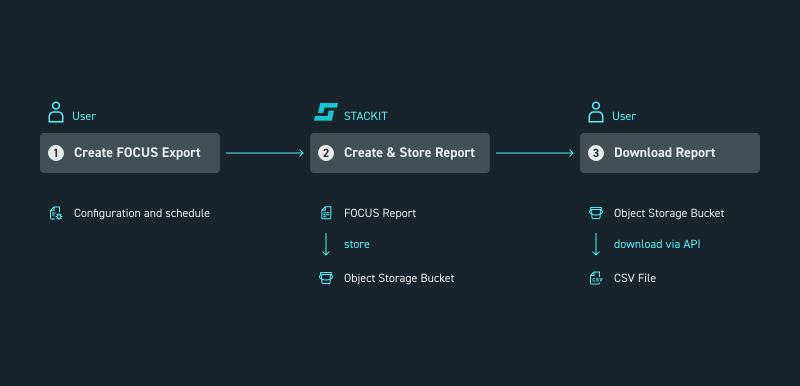
Abbildung 1: Prozess zur Aktivierung des FOCUS-Reports
- Erstellen Sie den Zeitplan für den FOCUS-Export.
- STACKIT erstellt den FOCUS-Report gemäß den Einstellungen des Benutzers und speichert ihn im Object Storage des Benutzers.
- Laden Sie den Report aus dem Object Storage herunter, zum Beispiel über die API.
Zeitplan für den FOCUS-Export erstellen
Abschnitt betitelt „Zeitplan für den FOCUS-Export erstellen“Um den FOCUS-Report zu erhalten, erstellen Sie einen Zeitplan für den FOCUS-Export. Dieser definiert die Parameter für die Erstellung und Lieferung des Reports.
Sie benötigen die zuvor genannten Voraussetzungen (Object Storage aktiviert, Bucket erstellt und Zugriff gewährt).
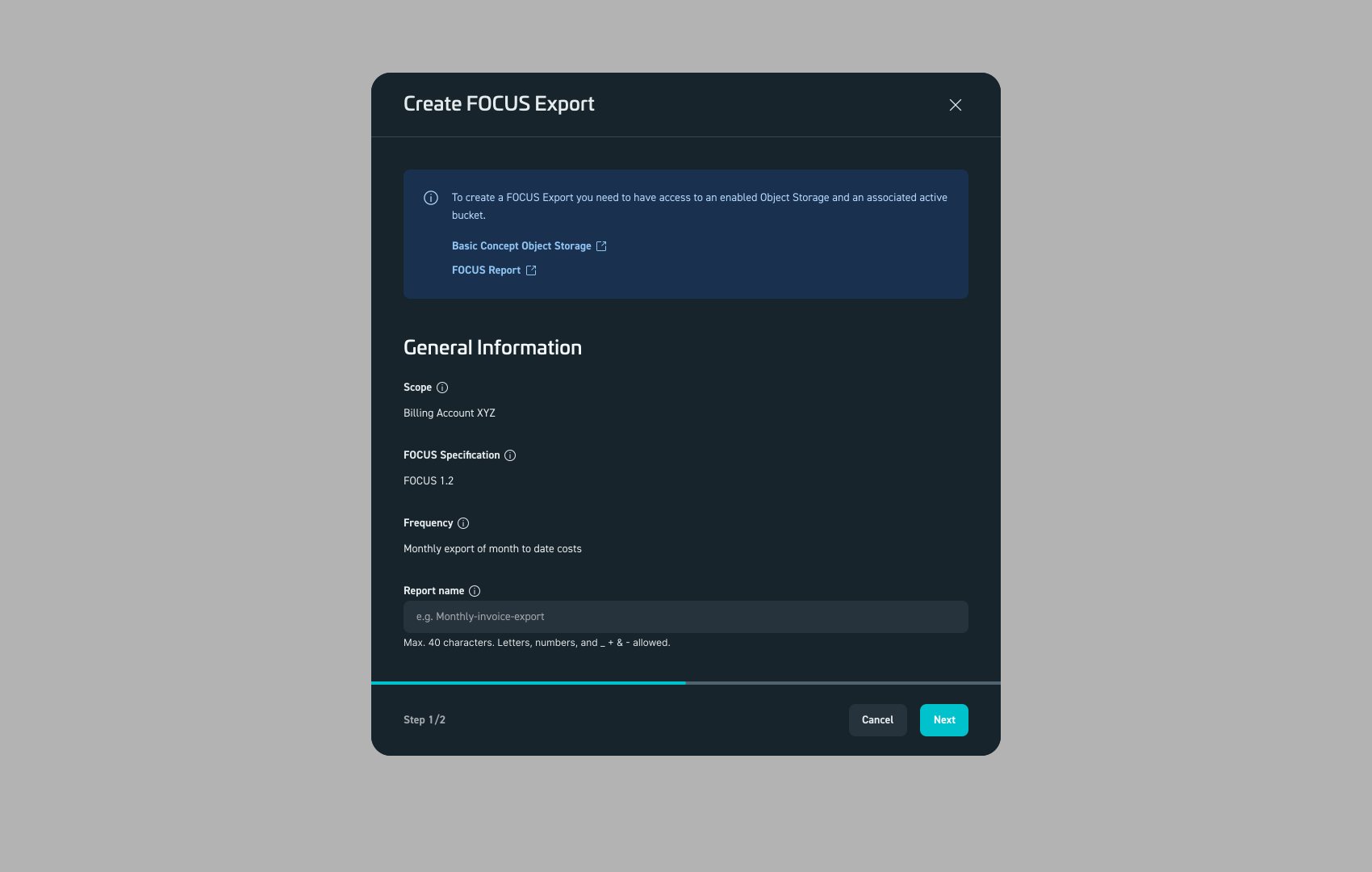
Abbildung 2: Schritt 1 – Erstellen Sie den Zeitplan für Ihr Abrechnungskonto.
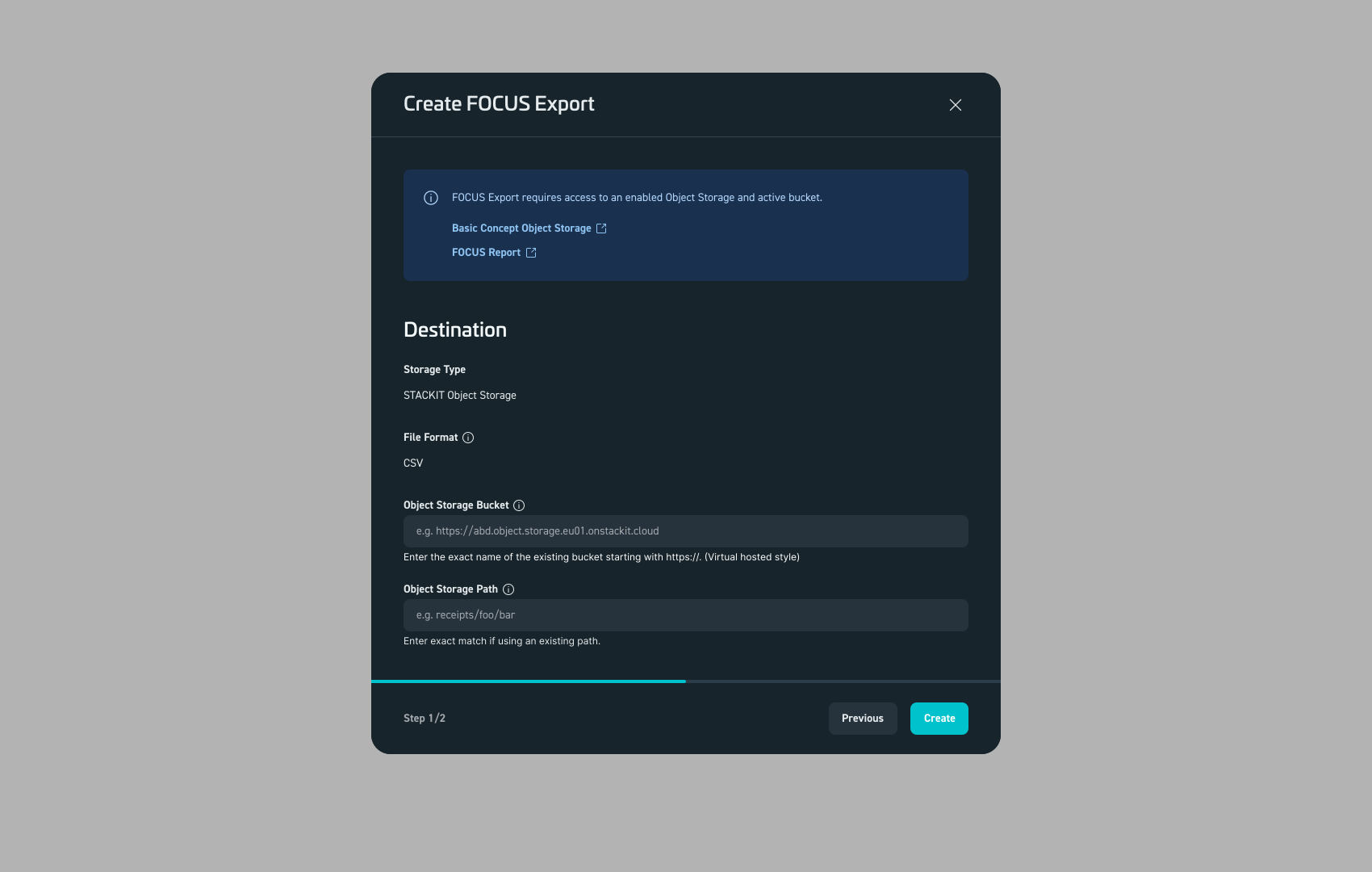
Abbildung 3: Schritt 2 – Geben Sie Details zum Speichern des FOCUS-Reports ein.
Sobald der Zeitplan erstellt ist, wird der FOCUS-Report am nächsten Tag direkt in den von Ihnen angegebenen Object Storage-Bucket geliefert.
Den FOCUS-Report herunterladen
Abschnitt betitelt „Den FOCUS-Report herunterladen“Derzeit ist ein direkter Dateidownload über das STACKIT Cloud Portal für FOCUS-Reports nicht verfügbar.
Um auf Ihren Report zuzugreifen, verbinden Sie sich mit der STACKIT Object Storage-Instanz und rufen Sie die Datei beispielsweise mit einem Standard-Dateitransfer-Client, der Object-Storage-Protokolle unterstützt, oder auf programmatischem Weg ab. Der STACKIT Object Storage ist S3-kompatibel.
Der FOCUS-Report wird gemäß den Einstellungen Ihres FOCUS-Zeitplans gespeichert.
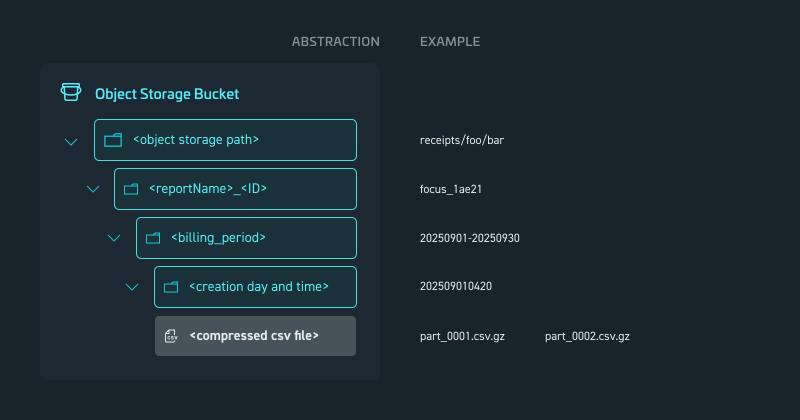
Abbildung 4: Speicherschema für FOCUS-Report
Die folgende Tabelle erklärt die verwendeten Platzhalter:
| Platzhalter | Beschreibung | Beispiel |
|---|---|---|
<object storage path> | Der vom Benutzer definierte Speicherort des Buckets. | receipts/foo/bar |
<reportName> | Ein eindeutiger Ordner, der für den geplanten Report erstellt wird. Der <reportName> wird vom Benutzer angegeben | focus |
<id> | Ist eine vom System generierte 5-stellige alphanumerische ID, um die Eindeutigkeit zu gewährleisten. | 1ae21 |
<billing_period> | Definiert den Zeitraum, den der Report abdeckt, im Format yyyymmdd-bis:yyyymmdd. | 20250901-20250930 |
<creation day and time> | Gibt an, wann der Ordner generiert wurde, im Format yyyymmddhhmm | 202509010420 |
<compressed csv file> | Die eigentliche(n) Reportdatei(en), die eine oder mehrere komprimierte CSV-Dateien sein können. | part_0001.csv.gz |
Beispiel für einen FOCUS-Report
Abschnitt betitelt „Beispiel für einen FOCUS-Report“Um Ihnen zu helfen, sich mit der Struktur und dem Inhalt des Reports vertraut zu machen, wird unten ein Beispiel für einen FOCUS-Report bereitgestellt.
FOCUS-Beispiel herunterladen