Server Agent via STACKIT Portal installieren
Zuletzt aktualisiert am
Um unsere neuesten Funktionen wie STACKIT Run Command STACKIT Server Update Management und viele weitere zukünftige Funktionen nutzen zu können, muss der STACKIT Server Agent als Basis auf Ihrem Server installiert werden. Er dient als Schnittstelle zwischen unserer Infrastruktur und dem Betriebssystem empfängt und verarbeitet remote gesendete Skripte und führt diese lokal auf Ihrem Server aus, sodass Sie Ihren Server nach Bedarf konfigurieren können.
Die folgende Dokumentation beschreibt zwei Wege, um Ihren Server vollständig mit der neuesten verfügbaren Version des STACKIT Server Agent zu konfigurieren. Sie können entweder im STACKIT Portal einen neuen Server einrichten, der den STACKIT Server Agent beim ersten Boot automatisch bereitstellt (deployt), oder, falls Sie bereits einen laufenden Linux– oder Windows Server besitzen, ein Skript manuell ausführen, das den STACKIT Server Agent herunterlädt und installiert.
Wenn Sie es vorziehen, Ihr System zu konfigurieren und die Funktion STACKIT Run Command per API zu verwalten lesen Sie bitte diese Dokumentation: Server Agent über API installieren.
STACKIT Server Agent über das STACKIT Portal während der Deployment des Servers installieren
Abschnitt betitelt „STACKIT Server Agent über das STACKIT Portal während der Deployment des Servers installieren“-
Überprüfen Sie anhand der Tabelle, ob Ihr Betriebssystem eine automatisierte Installation des STACKIT Server Agent über das STACKIT Portal beim ersten Boot unterstützt.
Image Installation über API Installation über STACKIT Portal Windows Server 2016 ✅ ✅ Windows Server 2019 ✅ ✅ Windows Server 2022 ✅ ✅ Windows Server 2025 ✅ ✅ RHEL ✅ ✅ CentOS ✅ ✅ Ubuntu ✅ ✅ Fedora ✅ ✅ Rocky Linux ✅ ✅ AlmaLinux ✅ ✅ Debian ✅ ✅ (Noch nicht in Debian 11 unterstützt) Falls nicht, verwenden Sie die API: Server Agent über API installieren Alternativ können Sie den Agent manuell installieren, sobald der Server eingerichtet ist und läuft (siehe unten).
-
Gehen Sie während der Erstellung des Servers zur Registerkarte Server erstellen und wählen Sie
STACKIT Server Agent bereitstellenaus.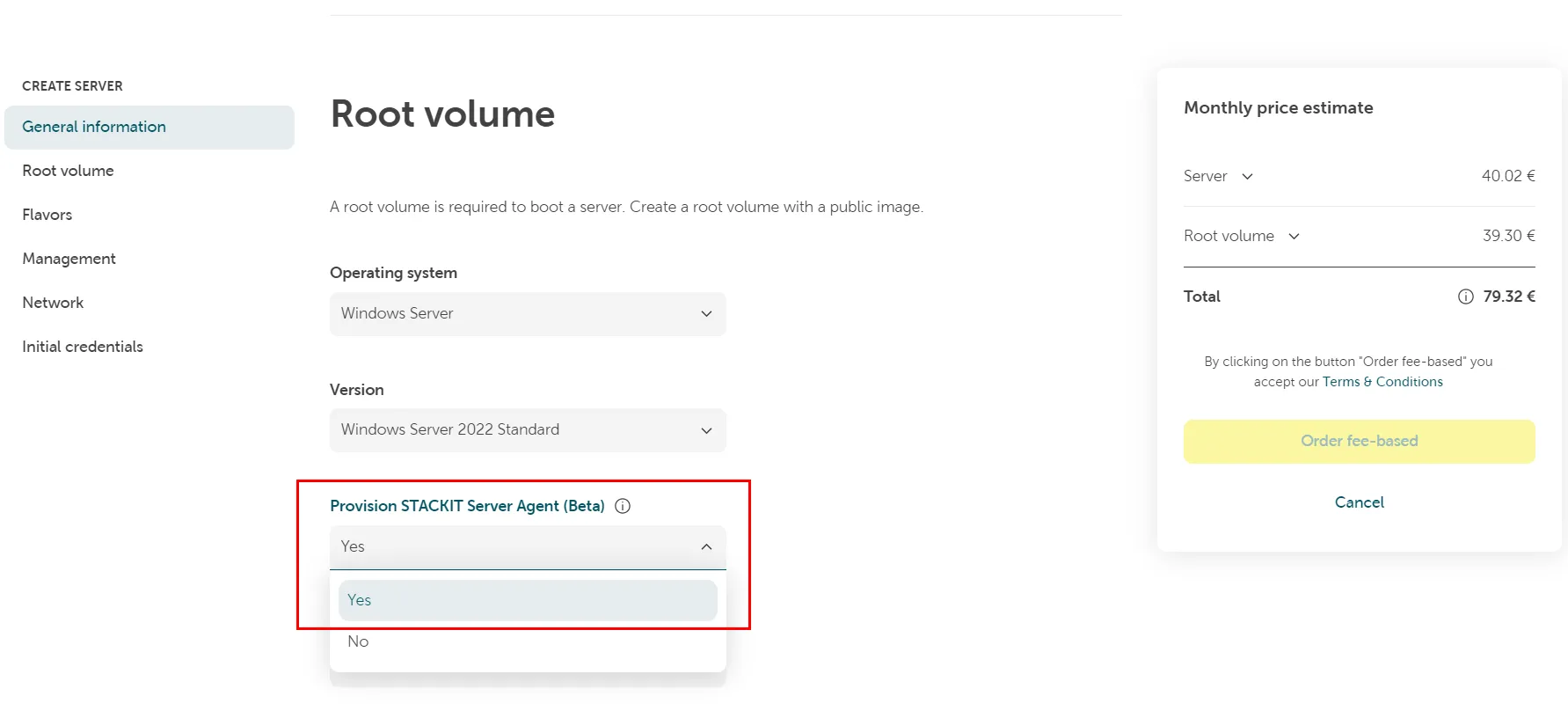
-
Schließen Sie den Server-Bestellvorgang ab.
Der STACKIT Server Agent wird dann während der anfänglichen Konfiguration beim ersten Boot installiert. Sobald der Server seine Deployment-Konfigurationsroutinen abgeschlossen hat, ist er bereit zur Nutzung und kann zur Ausführung von Befehlen verwendet werden.
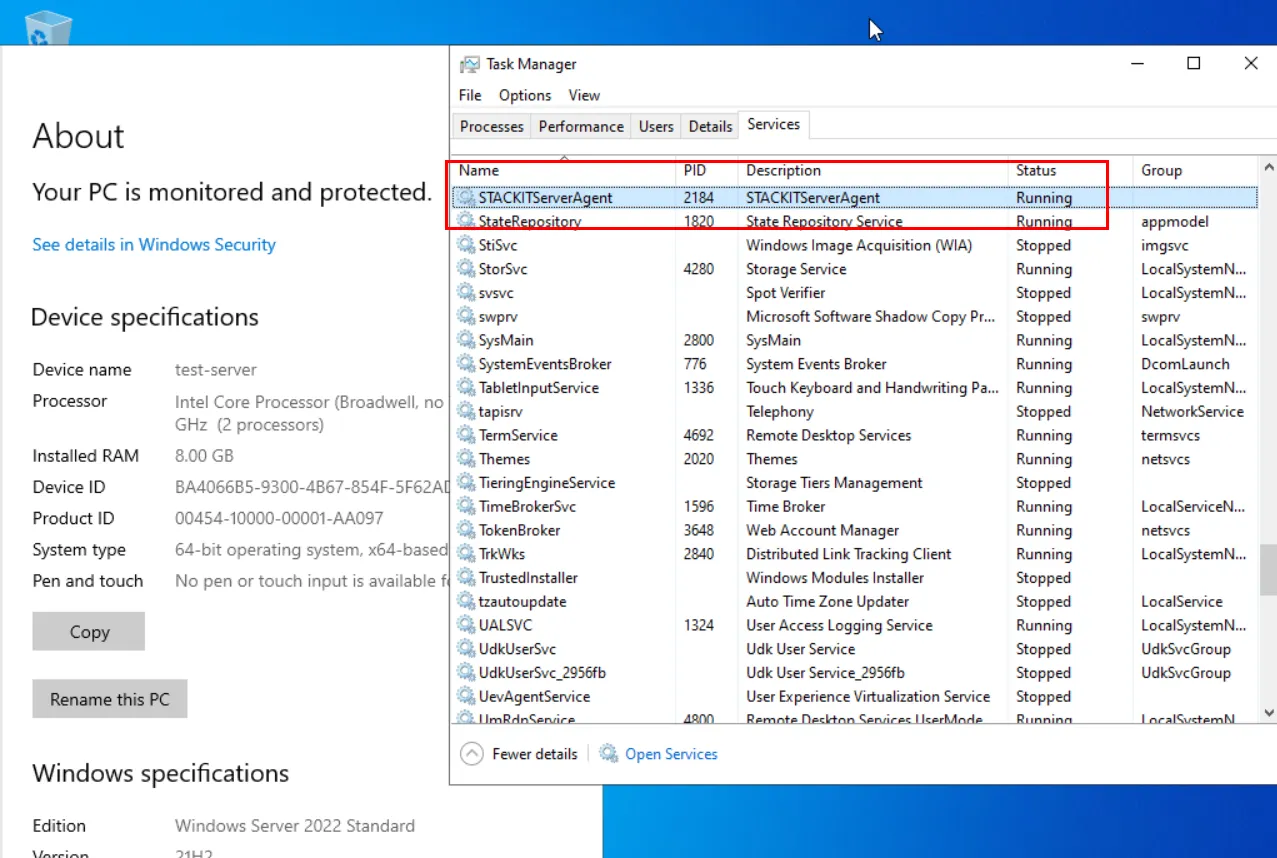
Beispiel des STACKIT Server Agent auf einem Windows Server 2022:
STACKIT Server Agent auf einem vorhandenen Server (Linux) installieren
Abschnitt betitelt „STACKIT Server Agent auf einem vorhandenen Server (Linux) installieren“-
Melden Sie sich remote auf Ihrem Server an. Verwenden Sie eine Methode die eine Zwischenablage-Funktionalität beinhaltet, z. B. Remote Desktop Connection.
-
Öffnen Sie eine Shell.
-
Optional: Signatur verifizieren Sie können die GPG-Signatur des STACKIT Server Agent-Pakets mit den folgenden Skripten verifizieren:
- Linux, RPM-basiert (Fedora, RedHat) Source file: RPM (Fedora/RedHat based)
#!/bin/bash#Download GPG public keycurl [https://stackit-server-agent.object.storage.eu01.onstackit.cloud/stackit-server-agent.gpg](https://stackit-server-agent.object.storage.eu01.onstackit.cloud/stackit-server-agent.gpg) -o /tmp/stackit-server-agent.gpg### Install dependenciesyum install gnupg -y### Import GPG Public keygpg --import /tmp/stackit-server-agent.gpg### Download STACKIT Server Agentcurl [http://169.254.169.254/stackit/v1/server-agent/amd64/rpm](http://169.254.169.254/stackit/v1/server-agent/amd64/rpm) -o /tmp/stackit-server-agent.rpm### Download the package signature filecurl [https://stackit-server-agent.object.storage.eu01.onstackit.cloud/stackit-server-agent.rpm.sig](https://stackit-server-agent.object.storage.eu01.onstackit.cloud/stackit-server-agent.rpm.sig) -o /tmp/stackit-server-agent.rpm.sigif gpg --verify /tmp/stackit-server-agent.rpm.sig /tmp/stackit-server-agent.rpmthenecho "The STACKIT Server Agent is verified successfully"elseecho "The STACKIT Server Agent is not verified successfully"rm -rf /tmp/stackit-server-agent.gpg /tmp/stackit-server-agent.rpm.sig /tmp/stackit-server-agent.rpmexit 1firm -rf /tmp/stackit-server-agent.gpg /tmp/stackit-server-agent.rpm.sig- Linux, DEB-based (Debian, Ubuntu)
Source file: DEB (Debian based)
#!/bin/bash#Download GPG public keycurl https://stackit-server-agent.object.storage.eu01.onstackit.cloud/stackit-server-agent.gpg -o /tmp/stackit-server-agent.gpg### Install dependenciesapt-get update && apt-get install gnupg -y### Import GPG Public keygpg --import /tmp/stackit-server-agent.gpg### Download STACKIT Server Agentcurl http://169.254.169.254/stackit/v1/server-agent/amd64/deb -o /tmp/stackit-server-agent.deb### Download the package signature filecurl https://stackit-server-agent.object.storage.eu01.onstackit.cloud/stackit-server-agent.deb.sig -o /tmp/stackit-server-agent.deb.sigif gpg --verify /tmp/stackit-server-agent.deb.sig /tmp/stackit-server-agent.debthenecho "The STACKIT Server Agent is verified successfully"elseecho "The STACKIT Server Agent is not verified successfully"rm -rf /tmp/stackit-server-agent.deb /tmp/stackit-server-agent.deb.sig /tmp/stackit-server-agent.gpgexit 1firm -rf /tmp/stackit-server-agent.gpg /tmp/stackit-server-agent.deb.sigSobald das Paket erfolgreich verifiziert wurde, können Sie es installieren, indem Sie ausführen:
Source file: RPM (Fedora/RedHat based)
Terminal-Fenster yum localinstall /tmp/stackit-server-agent.rpm -yoder
Source file: DEB (Debian based)Terminal-Fenster dpkg -i /tmp/stackit-server-agent.deb -
STACKIT Server Agent herunterladen und installieren (ohne GPG-Verifizierung) Kopieren Sie das Skript in die Shell und führen Sie es aus:
- Linux, RPM-based (Fedora, RedHat)
Source file: RPM (Fedora/RedHat based)
#!/bin/bash### Download STACKIT Server Agentcurl http://169.254.169.254/stackit/v1/server-agent/amd64/rpm -o /tmp/stackit-server-agent.rpm### Install the Agentyum localinstall /tmp/stackit-server-agent.rpm -y### Cleaning uprm -rf /tmp/stackit-server-agent.rpm- Linux, DEB-based (Debian, Ubuntu)
Source file: DEB (Debian based)
#!/bin/bash### Download STACKIT Server Agentcurl http://169.254.169.254/stackit/v1/server-agent/amd64/deb -o /tmp/stackit-server-agent.deb### Install the Agentdpkg -i /tmp/stackit-server-agent.deb### Cleaning uprm -rf /tmp/stackit-server-agent.deb - Linux, RPM-based (Fedora, RedHat)
-
Wenn die Installation erfolgreich war, überprüfen Sie, ob der Dienst läuft:
Terminal-Fenster systemctl status stackit-server-agent.service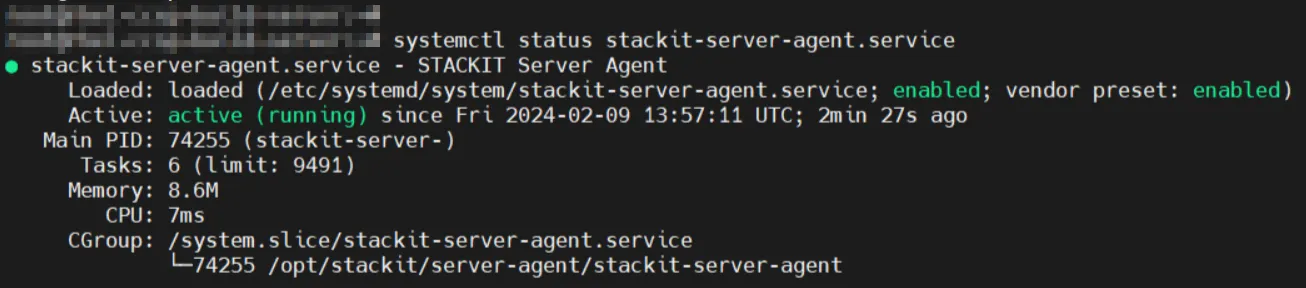
Der STACKIT Server Agent ist nun vollständig konfiguriert und kann Befehle remote akzeptieren und lokal auf Ihrem System ausführen.
STACKIT Server Agent auf einem vorhandenen Server (Windows) installieren
Abschnitt betitelt „STACKIT Server Agent auf einem vorhandenen Server (Windows) installieren“-
Melden Sie sich remote auf Ihrem Server an. Verwenden Sie eine Methode, die eine Zwischenablage-Funktionalität beinhaltet, z. B. Remote Desktop Connection.
-
Starten Sie PowerShell ISE mit erhöhten Berechtigungen.
-
Kopieren Sie das Skript in die Shell und führen Sie es aus. Source file: MSI
Terminal-Fenster ## Download STACKIT Server AgentNew-Item -ItemType Directory -Path "C:\ProgramData\STACKIT\ServerAgent" -ForceInvoke-WebRequest -Uri "http://169.254.169.254/stackit/v1/server-agent/amd64/msi" -OutFile "C:\ProgramData\STACKIT\ServerAgent\STACKITServerAgent.msi"### Install the AgentStart-Process -FilePath "C:\Windows\System32\msiexec.exe" -ArgumentList "/i C:\ProgramData\STACKIT\ServerAgent\STACKITServerAgent.msi /quiet /l*v C:\Windows\Temp\STACKITServerAgent_install.log" -NoNewWindow -Wait -
Überprüfen Sie nach erfolgreicher Installation, ob der Dienst läuft. Öffnen Sie die PowerShell und führen Sie den folgenden Befehl aus:
Terminal-Fenster Get-Service STACKITServerAgentAlternativ überprüfen Sie den Status in der Registerkarte Dienst des Task-Managers:

Der STACKIT Server Agent ist nun vollständig konfiguriert und kann zur Ausführung von Befehlen verwendet werden.