Actions in STACKIT Git aktivieren
Zuletzt aktualisiert am
Actions mit zentral verwalteten Runnern von STACKIT aktivieren
Abschnitt betitelt „Actions mit zentral verwalteten Runnern von STACKIT aktivieren“STACKIT bietet jetzt zentral verwaltete Runner für Ihre STACKIT Git Actions an. Um diese zu nutzen, erstellen Sie bitte eine neue Service-Anfrage über das STACKIT Help Center, in der Sie klar angeben, für welche Instanz die Runner aktiviert werden sollen. [Voraussichtliche Antwortzeit: 2 Tage]
Sobald der STACKIT Runner eingerichtet ist, werden Sie über ein Support-Ticket benachrichtigt.
Der Runner ist mit zwei Tags konfiguriert: stackit-ubuntu-20 und stackit-docker.
stackit-ubuntu-20basiert auf Ubuntu 20.04 und enthält Node.js, was für die meisten GitHub Actions geeignet ist.stackit-dockerenthält ein Docker-Tooling-Set mit vollen Docker-Funktionen zum Erstellen und Pushen von Images. Beachten Sie, dass dieses Image einen größeren Speicherbedarf hat.
Um einen bestimmten Runner-Tag zu verwenden, stellen Sie sicher, dass Sie das Feld runs-on in Ihrer Workflow-YAML-Datei entsprechend definieren.
Actions mit Ihren eigenen selbst-gehosteten Runnern aktivieren
Abschnitt betitelt „Actions mit Ihren eigenen selbst-gehosteten Runnern aktivieren“STACKIT Git Actions bietet Continuous Integration mit einer Web-Oberfläche zur Anzeige der Ergebnisse.
Die Syntax und Semantik der Workflow-Dateien werden Nutzern von GitHub Actions vertraut sein, aber sie sind nicht und werden nie identisch sein.
Die folgende Anleitung erklärt die wichtigsten Konzepte, um zu verstehen, wie Workflows interpretiert werden, zusammen mit einer Reihe von Beispielen, die kopiert und angepasst werden können, um bestimmten Anwendungsfällen gerecht zu werden.
Schnellstart
Abschnitt betitelt „Schnellstart“- Verifizieren Sie, dass
Enable Repository Actionsaktiviert ist. - Fügen Sie Folgendes zur Datei
.forgejo/workflows/demo.yamlin Ihrem Repository hinzu.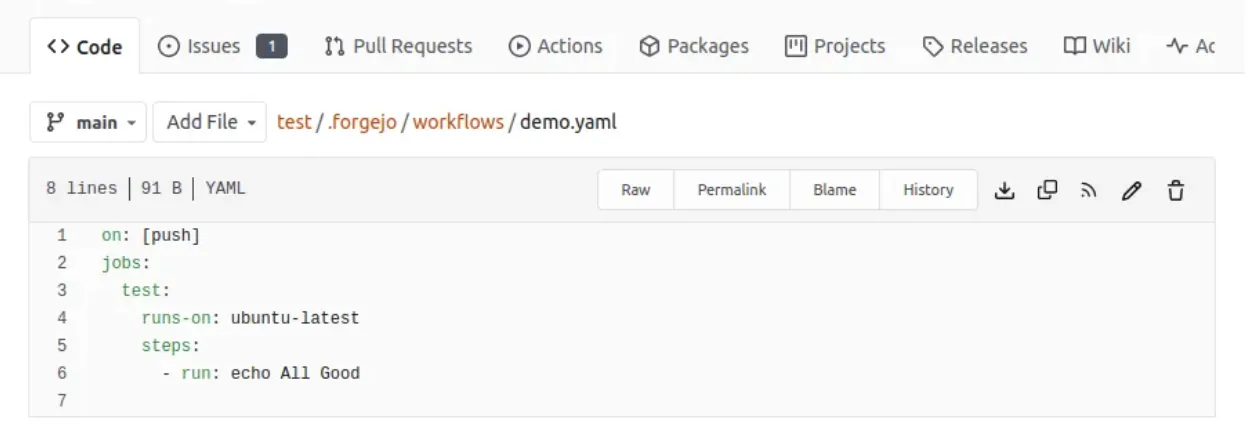
- Gehen Sie zum Tab
Actionsauf der Seite/{owner}/{repository}/actionsdes Repositorys, um das Ergebnis des Laufs zu sehen.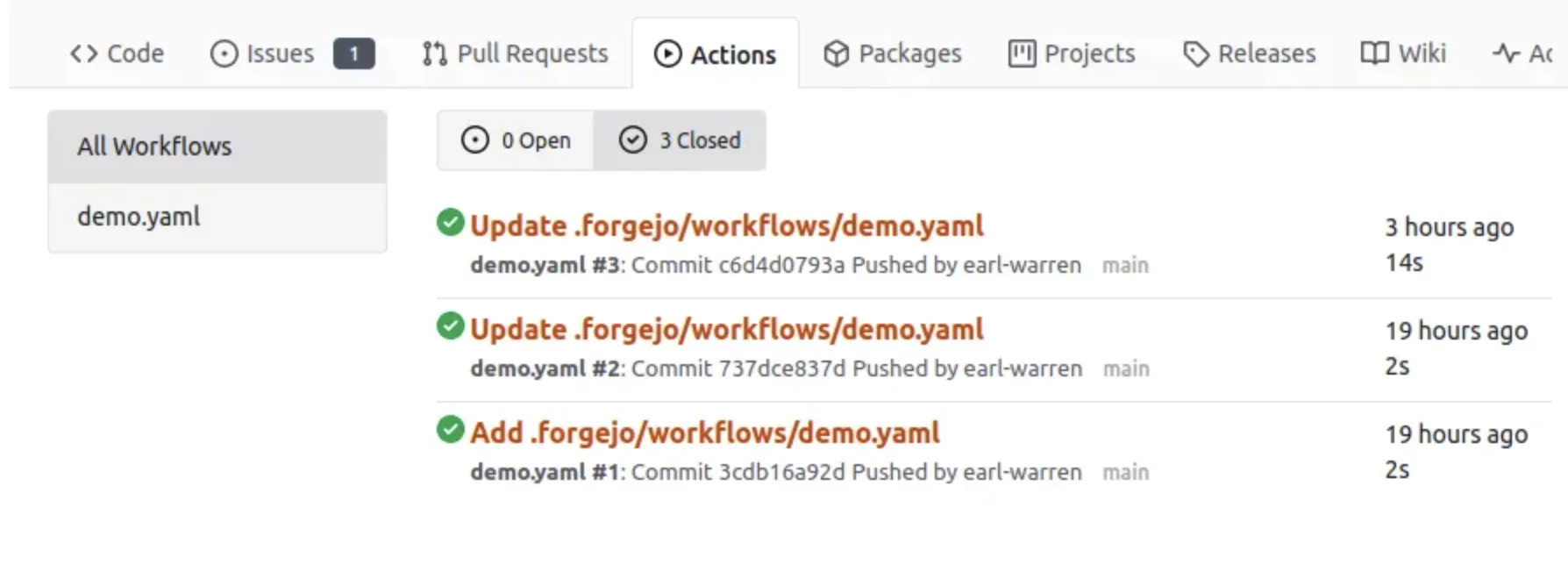
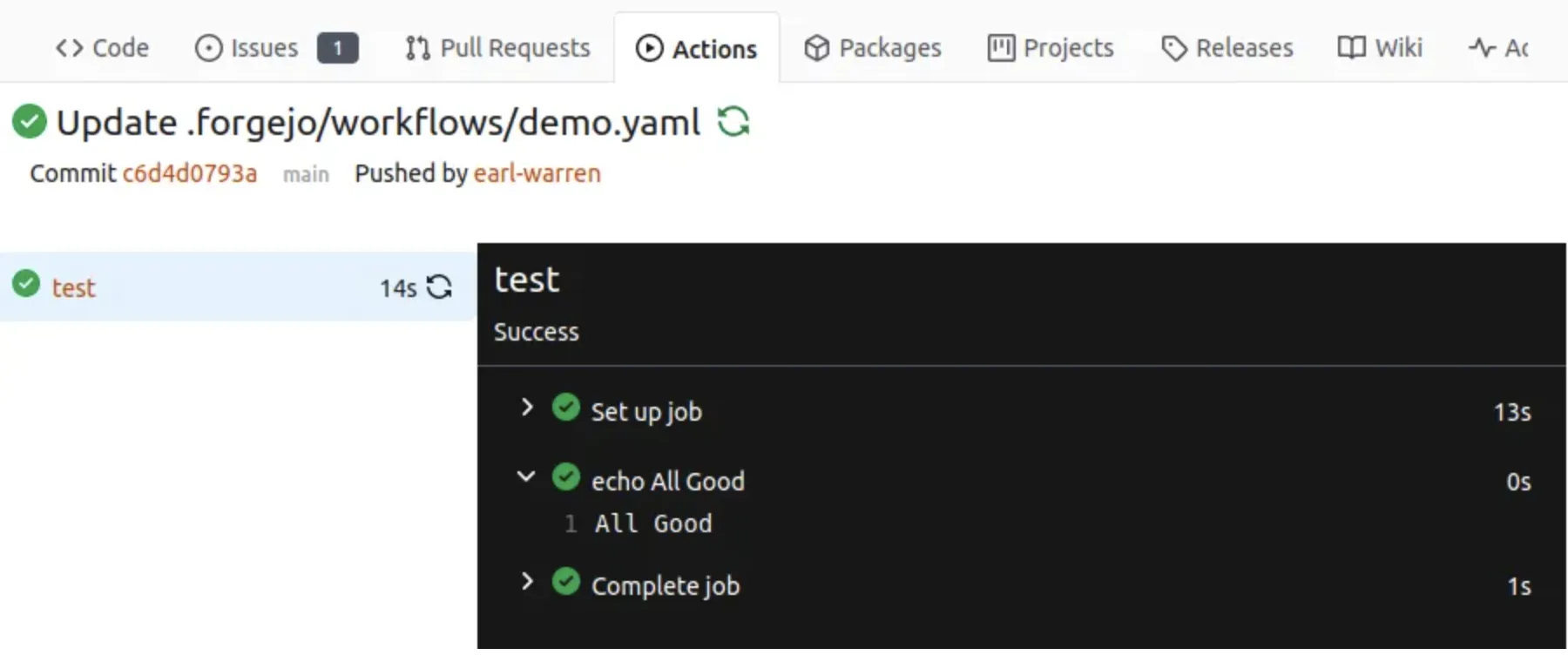
- Klicken Sie auf den Workflow-Link, um die Details und die Job-Ausführungsprotokolle einzusehen.
Hierarchie
Abschnitt betitelt „Hierarchie“In der STACKIT Git-Terminologie ist ein Workflow eine .yml-Datei im Verzeichnis .forgejo/workflows des Repositorys.
Ein Workflow hat Jobs mit Steps, die von einem Action Runner ausgeführt werden.
Actions
Abschnitt betitelt „Actions“Eine Action ist ein Repository, welches das Äquivalent einer Funktion in jeder Programmiersprache enthält.
Sie gibt es in zwei Varianten, abhängig von der Datei, die sich im Stammverzeichnis des Repositorys befindet:
- action.yml: beschreibt die Inputs und Outputs der Action und die Implementierung.
Dockerfile: Wenn keine Dateiaction.ymlgefunden wird, wird diese verwendet, um ein Image mitdocker buildzu erstellen und einen Container daraus zu starten, um die Action auszuführen.
Eine der am häufigsten verwendeten Actions ist checkout, die das Repository klont, das einen Workflow ausgelöst hat.
Eine weitere ist setup-go, die Go installiert.
Wie jedes andere Programm oder jede andere Funktion hat eine Action Voraussetzungen für eine erfolgreiche Installation und Ausführung.
Dies ist zu beachten, wenn eine bestehende Action wiederverwendet werden soll.
Ausdrücke (Expressions)
Abschnitt betitelt „Ausdrücke (Expressions)“In einer Workflow-Datei werden Zeichenketten, die wie ${{... }} aussehen, vom Instanz-Runner evaluiert und als Ausdrücke (Expressions) bezeichnet.
Als Abkürzung gilt if: ${{... }} als äquivalent zu if:..., d.h. die den Ausdruck umgebenden ${{ }} sind implizit und können weggelassen werden.
Literale
Abschnitt betitelt „Literale“- Boolean: true oder false
- Null: null
- Zahl: jedes von JSON unterstützte Zahlenformat
- String: in einfachen Anführungszeichen eingeschlossen
Logische Operatoren
Abschnitt betitelt „Logische Operatoren“| Operator | Beschreibung | | -------- | ----------------------------- | --- | ---- | | ( ) | Logische Gruppierung | | [ ] | Index | | . | Eigenschafts-Dereferenzierung | | ! | Negation | | < | Kleiner als | | <= | Kleiner oder gleich | | > | Größer als | | >= | Größer oder gleich | | == | Gleich | | != | Ungleich | | && | Und | | | | | Oder |
HINWEIS: String-Vergleiche sind nicht case-sensitiv.
Bedingungen (Conditionals)
Abschnitt betitelt „Bedingungen (Conditionals)“Können in if:-Bedingungen für Jobs und Steps verwendet werden.
success(). Gibt true zurück, wenn keiner der vorherigen Jobs/Steps fehlgeschlagen oder abgebrochen wurde.always(). Bewirkt, dass der Job/Step immer ausgeführt wird, und gibt true zurück, auch wenn er abgebrochen wurde. Wenn Sie einen Job/Step unabhängig von seinem Erfolg oder Misserfolg ausführen möchten, verwenden Sie die empfohlene Alternative:'!cancelled()'(der Ausdruck muss in Anführungszeichen eingeschlossen werden, damit er nicht als YAML-Tag interpretiert wird).failure(). Gibt true zurück, wenn ein vorheriger Step/Job fehlgeschlagen ist.
Funktionen
Abschnitt betitelt „Funktionen“contains( search, item ). Gibttruezurück, wennsearchdasitementhält. Wennsearchein Array ist, gibt diese Funktiontruezurück, wenn dasitemein Element im Array ist. Wennsearchein String ist, gibt diese Funktiontruezurück, wenn dasitemein Substring vonsearchist. Diese Funktion ist nicht case-sensitiv. Sie wandelt Werte in einen String um.startsWith( searchString, searchValue ). Gibttruezurück, wennsearchStringmitsearchValuebeginnt. Diese Funktion ist nicht case-sensitiv. Sie wandelt Werte in einen String um.endsWith( searchString, searchValue ). Gibttruezurück, wennsearchStringmitsearchValueendet. Diese Funktion ist nicht case-sensitiv. Sie wandelt Werte in einen String um.format( string, replaceValue0, replaceValue1,..., replaceValueN). Ersetzt Werte imstringdurch die VariablereplaceValueN. Variablen imstringwerden mit der{N}-Syntax angegeben, wobeiNeine Ganzzahl ist. Sie müssen mindestens einenreplaceValueundstringangeben. Maskieren Sie geschweifte Klammern mit doppelten geschweiften Klammern.join( array, optionalSeparator ). Der Wert fürarraykann ein Array oder ein String sein. Alle Werte inarraywerden zu einem String zusammengefügt. Wenn SieoptionalSeparatorangeben, wird es zwischen die zusammengefügten Werte eingefügt. Andernfalls wird der Standardtrennzeichen,verwendet. Sie wandelt Werte in einen String um.toJSON(value). Gibt eine schön formatierte JSON-Darstellung vonvaluezurück.fromJSON(value). Gibt ein JSON-Objekt oder einen JSON-Datentyp fürvaluezurück. Sie können diese Funktion verwenden, um ein JSON-Objekt als einen ausgewerteten Ausdruck bereitzustellen oder um Umgebungsvariablen aus einem String zu konvertieren. STACKIT Git Pipelines basieren auf Forgejo. Weitere Informationen dazu, wie Sie den größtmöglichen Nutzen aus Ihren Pipelines ziehen können, finden Sie in der Forgejo-Dokumentation.