Den Issue Tracker in STACKIT Git verwenden
Zuletzt aktualisiert am
Issues sind ein wichtiges Kommunikationsmittel in STACKIT Git. Neben ihrem grundlegenden Zweck – der Meldung von Bugs an den Projekt-Maintainer – können sie auch dazu verwendet werden, Verbesserungen vorzuschlagen, neue Funktionen anzufordern, die Ausrichtung eines Projekts zu diskutieren, Fragen an Ihr Team zu stellen und vieles mehr.
Issues anzeigen
Abschnitt betitelt „Issues anzeigen“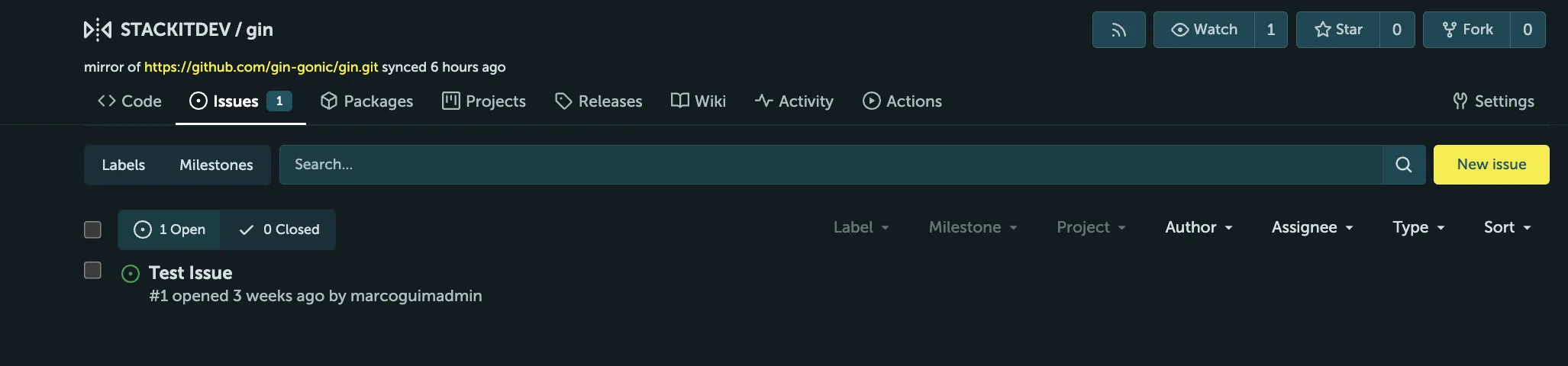
- Klicken Sie auf den Tab Issues, um auf den Issue Tracker zuzugreifen.
- Sie sehen die Liste aller Issues.
- Wechseln Sie zwischen Issues, die noch offen sind, und solchen, die bereits gelöst wurden.
- Filtern Sie die Issues nach Label, Meilenstein, Projekt, Autor, Zuständigem (Assignee) und Typ und sortieren Sie die Liste nach Bedarf.
- Projekte können Meilensteine definieren, denen Issues zugewiesen werden können.
- Sie sind ein nützliches Werkzeug zur Visualisierung des Fortschritts der Projektentwicklung.
Issues erstellen
Abschnitt betitelt „Issues erstellen“- Klicken Sie auf New issue (oben rechts in der Issues-Liste).
- Ein Issue kann einen Zuständigen (Assignee) haben, d. h. jemanden, der für die Lösung oder Moderation des Issues verantwortlich ist.
- Sein Profilbild mit einem Link zu seinem Profil ist in der Issues-Liste sichtbar.
- Beachten Sie, dass Issues im Issue Tracker öffentlich sind und jeder sie lesen und beantworten kann.