API-Nutzung mit der Observability CLI
Zuletzt aktualisiert am
Voraussetzungen:
Abschnitt betitelt „Voraussetzungen:“- Sie haben ein STACKIT-Projekt erstellt.
- Sie haben einen Service Account und ein Zugriffstoken erstellt.
- Sie haben bereits einen STACKIT Observability Service erstellt und Ihr Service zeigt den Status Ready an.
(Siehe: Erstellen eines STACKIT Observability Services)
So installieren Sie die Observability CLI
Abschnitt betitelt „So installieren Sie die Observability CLI“Es gibt zwei Methoden, um die Observability CLI zu installieren:
- Wenn Sie Go auf Ihrem Rechner installiert haben, können Sie diese direkt installieren, indem Sie folgenden Befehl ausführen:
Go install
go install github.com/stackitcloud/stackit-observability-cli/cmd/stackit-observability-cli@latestAbhängig von Ihrer Go-Konfiguration ist die Binärdatei stackit-observability-cli unter $GOPATH/bin oder $HOME/go/bin zu finden, falls $GOPATH nicht gesetzt ist. Stellen Sie sicher, dass Sie das entsprechende Verzeichnis zu Ihrem $PATH hinzufügen. Weitere Informationen finden Sie in der Go-Dokumentation. Führen Sie go env aus, um Ihre aktuelle Konfiguration anzuzeigen.
2. Über die veröffentlichten Binärdateien, indem Sie die gewünschte Version für Ihr Betriebssystem und Ihre Prozessorarchitektur von der STACKIT Observability CLI herunterladen. Machen Sie die Datei ausführbar und verschieben Sie diese in ein Verzeichnis, das in Ihrem $PATH verfügbar ist.
So konfigurieren Sie die Observability CLI
Abschnitt betitelt „So konfigurieren Sie die Observability CLI“Sie können die Observability CLI konfigurieren, indem Sie folgenden Befehl ausführen:
Konfigurieren
stackit-observability-cli configure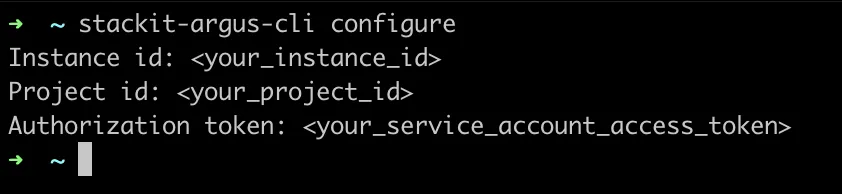
Danach wird die Konfigurationsdatei (.stackit-observability-cli.yaml) in Ihrem $HOME-Verzeichnis erstellt. Sie können die Konfigurationen direkt in der Datei oder durch erneutes Ausführen des Befehls configure ändern. Die Datei enthält auch eine Basis-URL eines API-Aufrufs, die auf den Standardwert gesetzt ist. Um diese zu ändern, sollten Sie diese direkt in der Konfigurationsdatei anpassen.
So verwenden Sie die Observability CLI
Abschnitt betitelt „So verwenden Sie die Observability CLI“Alle API-Anwendungen werden von der CLI unterstützt. Sie können alle verfügbaren Befehle und Flags auflisten, indem Sie folgenden Befehl ausführen:
Verwendung
stackit-observability-cliEs gibt vier Hauptbefehle:
Scrape-Konfigurationen abrufen
Abschnitt betitelt „Scrape-Konfigurationen abrufen“Der Befehl get unterstützt mehrere Ausgabeformate, die mit dem Flag -o ausgewählt werden können.
Verfügbare Ausgabestile
Abschnitt betitelt „Verfügbare Ausgabestile“Standard (Einfache tabellarische Ausgabe)
Abschnitt betitelt „Standard (Einfache tabellarische Ausgabe)“Dies ist das Standard-Ausgabeformat, wenn kein -o-Flag angegeben wird.

Tabellenausgabe (-o table)
Abschnitt betitelt „Tabellenausgabe (-o table)“Zeigt das Ergebnis in einem strukturierten Tabellenformat an.
stackit-observability-cli get scrape-configs -o table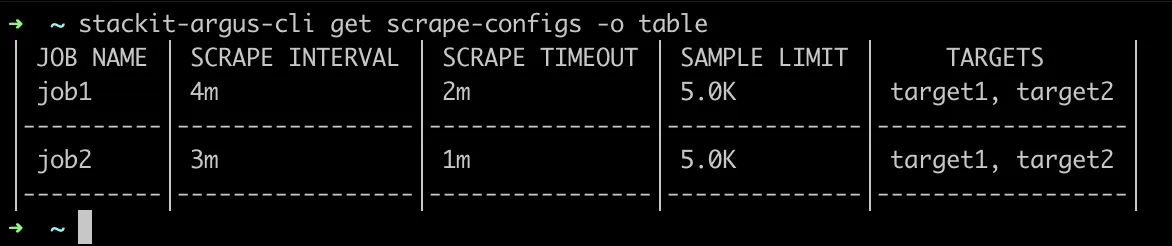
Erweiterte Ausgabe (-o wide / -o wide-table)
Abschnitt betitelt „Erweiterte Ausgabe (-o wide / -o wide-table)“Zeigt zusätzliche Felder und detailliertere Informationen für jede Ressource an.
stackit-observability-cli get scrape-configs -o wideoder
stackit-observability-cli get scrape-configs -o wide-tableStrukturierte Ausgabe (-o json | -o yaml)
Abschnitt betitelt „Strukturierte Ausgabe (-o json | -o yaml)“Nützlich für Automatisierung, Scripting oder Debugging.
stackit-observability-cli get scrape-configs -o jsonstackit-observability-cli get scrape-configs -o yamlEine Scrape-Konfiguration erstellen
Abschnitt betitelt „Eine Scrape-Konfiguration erstellen“Verwenden Sie den Befehl create, um eine neue Scrape-Konfiguration aus einer Datei zu erstellen.
stackit-observability-cli create scrape-config -f test.jsonEine Scrape-Konfiguration aktualisieren
Abschnitt betitelt „Eine Scrape-Konfiguration aktualisieren“Verwenden Sie den Befehl update, um eine bestehende Scrape-Konfiguration zu ändern.
stackit-observability-cli update scrape-configs job2 -f test.yamlEine Scrape-Konfiguration löschen
Abschnitt betitelt „Eine Scrape-Konfiguration löschen“Verwenden Sie den Befehl delete, um eine bestehende Scrape-Konfiguration zu entfernen.
stackit-observability-cli delete scrape-config job2Zusammenfassung
Abschnitt betitelt „Zusammenfassung“| Befehl | Beschreibung |
|---|---|
| get | Scrape-Konfigurationen abrufen |
| create | Eine neue Scrape-Konfiguration erstellen |
| update | Eine bestehende Scrape-Konfiguration aktualisieren |
| delete | Eine Scrape-Konfiguration löschen |
In den meisten Fällen erfordern die Befehle update und create eine Datei, die den Body der Anfrage enthält. Sowohl JSON- als auch YAML-Dateien können als Request-Body-Datei verwendet werden. Die CLI konvertiert diese mit der entsprechenden Benennung in das JSON-Format.