Zugriff auf zusätzliche Frontends
Zuletzt aktualisiert am
Im Observability Service Dashboard stellen wir im Tab API mehrere zusätzliche Frontend-URLs bereit.
Da diese URLs gegen unautorisierten Zugriff geschützt sind, erhalten Sie beim direkten Aufruf der Benutzeroberfläche den Statuscode 403 Forbidden.
Um auf ein zusätzliches Frontend zuzugreifen, müssen Sie beim Aufrufen der URL den HTTP-Request-Header mit Ihren API-Zugangsdaten anpassen.
Hierfür können Sie beispielsweise die Browser-Erweiterung ModHeader verwenden.
Voraussetzungen
Abschnitt betitelt „Voraussetzungen“- Observability-Instanz ist verfügbar und läuft
- API-Benutzer erstellt
- ModHeader-Erweiterung installiert
API-Zugangsdaten kodieren
Abschnitt betitelt „API-Zugangsdaten kodieren“Nachdem Sie die API-Zugangsdaten erstellt haben, müssen Sie diese Base64-kodieren.
Unter macOS und Linux können Sie dazu den folgenden Terminal-Befehl verwenden (ersetzen Sie die Platzhalter [username] und [password] durch Ihre API-Zugangsdaten):
echo -n '[username]:[password]' | base64
Alternativ stehen auch Encoder-Webseiten zur Verfügung. Achten Sie jedoch darauf, dass diese Webseiten vertrauenswürdig sind und die Sicherheit Ihrer Daten gewährleisten.
Authorization-Header setzen
Abschnitt betitelt „Authorization-Header setzen“Nach der Installation der ModHeader-Erweiterung nehmen Sie die folgende Konfiguration vor:
- Klicken Sie im Browser auf das ModHeader-Erweiterungssymbol.
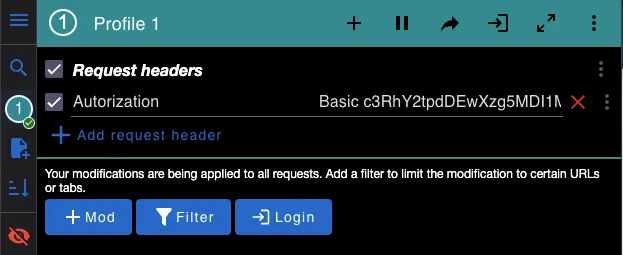
- Falls noch kein Feld Request headers zum Eintragen eines Name-Wert-Paars vorhanden ist, klicken Sie auf die Schaltfläche +Mod und fügen Sie einen Request Header hinzu.
- Tragen Sie im Feld Name ‘Authorization’ ein.
- Tragen Sie im Feld Value ‘Basic’ + Ihren Base64-kodierten Benutzernamen und Ihr Passwort ein. (Referenz)
- Rufen Sie die gewünschte Benutzeroberfläche auf.
- Pausieren Sie die ModHeader-Erweiterung nach der Nutzung wieder.
Andernfalls kann es beim Aufruf anderer Webseiten zu Problemen kommen.
Probleme aufgetreten?
Abschnitt betitelt „Probleme aufgetreten?“Wenn Sie Schwierigkeiten beim Anmelden haben, können Sie Folgendes prüfen:
- Browser-Cache leeren.
- Auf Tippfehler achten.
- Prüfen, ob der richtige Header-Typ verwendet wird (Request-Header, nicht Response-Header).
- Prüfen, ob die Zugangsdaten korrekt kodiert sind.
- Andere Zugangsdaten ausprobieren.