Using extensions
Zuletzt aktualisiert am
About extensions
Section titled “About extensions”Extensions are a way to expand the Talos root filesystem. This allows you to add features like custom container runtimes or extra firmware. These extensions are only applied when you first install or upgrade Talos Linux, but even with them, the root filesystem remains immutable and is read-only. Overlays are similar to extensions, but are used to modify the installation process rather than the root filesystem. You may choose one or more additional extensions for your image. These extensions will be built into the target image and will persist through upgrades as well.
Using extensions
Section titled “Using extensions”In this example we chose the hello-world-service, which acts as an example for extension developers.
Prerequisites:
- Successfully authenticated in the UI of a STEC instance.
Steps:
-
Follow the generic image creation steps, as described in the getting started guide.
-
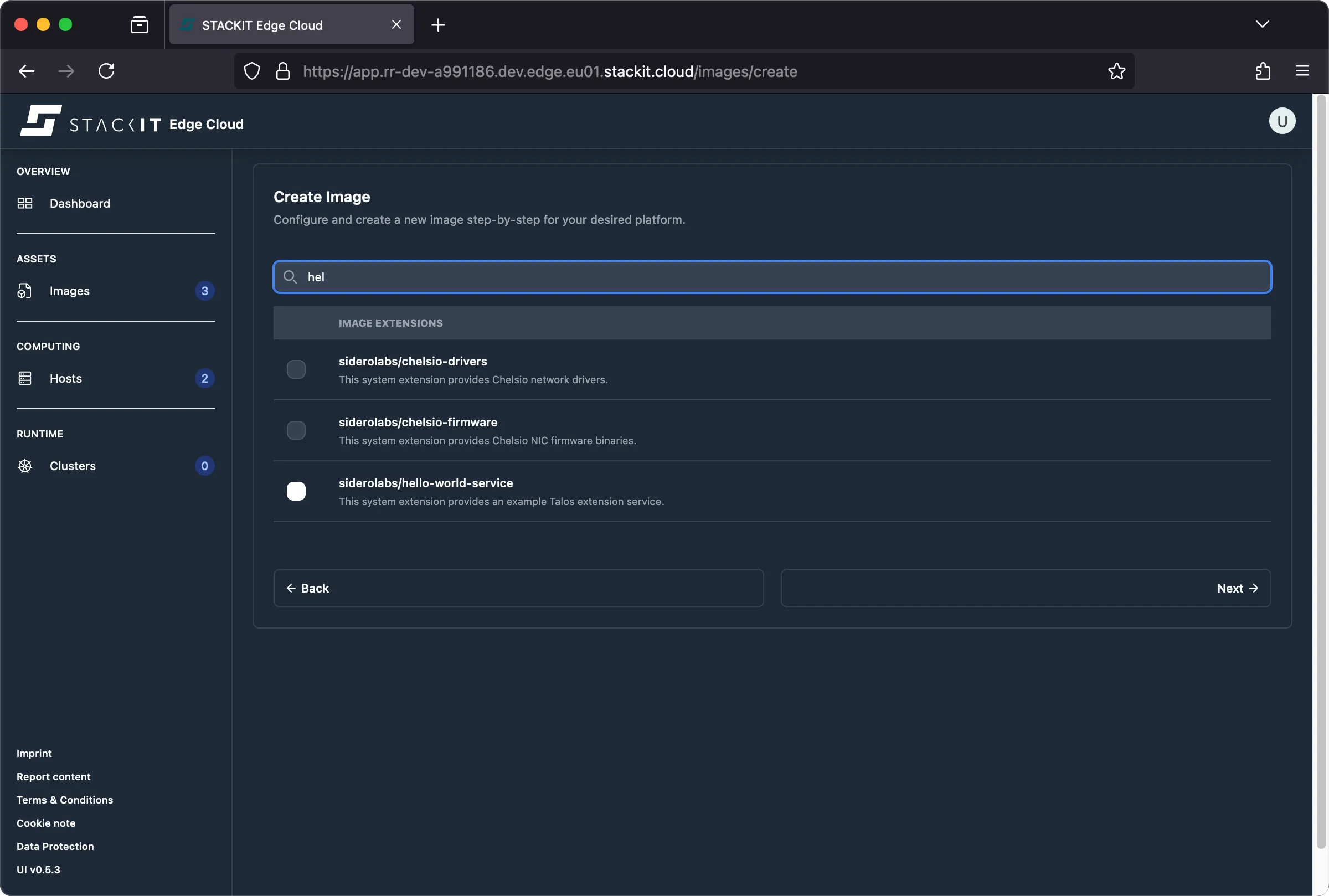
In the step where you can select an extension, type “hello” into the search box and select the hello-world-service.
-
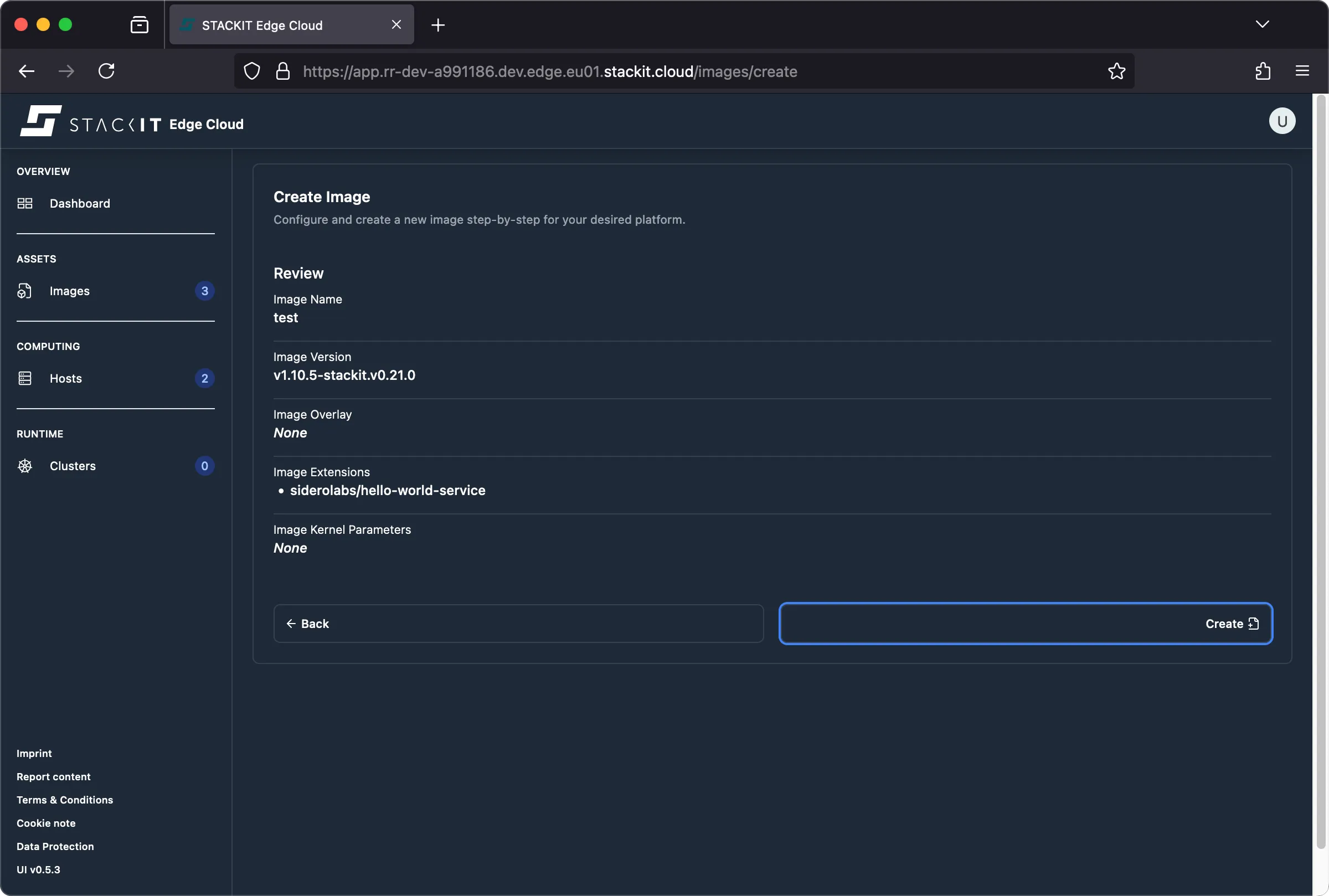
Follow the remaining image creation steps. The resulting preview should indicate that your extension(s) are included in the image. They’ll be part of any installation medium generated from this image. Click the “create” button to create the image.
-
The rest of the process is identical to the regular image creation procedure.
Prerequisites:
- Successfully authenticated with a STEC instance.
- Kubeconfig for the STEC instance is exported in your terminal session.
- Tools: a generic Linux bash terminal,
kubectl.
Steps:
-
Follow the generic image creation steps, as described in the getting started guide.
-
At the step where you have to create an EdgeImage manifest file, make sure to add the extension called siderolabs/hello-world-service.
Terminal window > cat <<EOF | kubectl apply -f -apiVersion: edge.stackit.cloud/v1alpha1kind: EdgeImagemetadata:name: extfoonamespace: defaultspec:schematic: |customization:extraKernelArgs: []systemExtensions:officialExtensions:- siderolabs/hello-world-serviceoverlay: {}talosVersion: v1.10.5-stackit.v0.21.0EOFedgeimage.edge.stackit.cloud/extfoo created> kubectl get EdgeImage/extfooNAME AGEextfoo 105s -
The rest of the process is identical to the regular image creation procedure.
Currently, the only way to get a list of all available image versions, overlays, or extensions, is to query the STEC image factory. The following example shows how to use the API to get a list of Talos extensions.
# get available extensions> INSTANCE_REGION="eu01"> curl https://image-factory.edge.$INSTANCE_REGION.stackit.cloud/versions[ "v1.10.5-stackit.v0.20.0", "v1.10.5-stackit.v0.21.0", "..."]
> IMAGE_VERSION="v1.10.5-stackit.v0.20.0"> curl https://image-factory.edge.$INSTANCE_REGION.stackit.cloud/version/$IMAGE_VERSION/extensions/official[ { "name": "siderolabs/nvidia-open-gpu-kernel-modules-lts", "ref": "stecreg.azurecr.io/siderolabs/nvidia-open-gpu-kernel-modules-lts:535.247.01-v1.10.5", "digest": "sha256:ba78a60ddecca672ea7856125567b405f01511fa0b9a8b8fc9daa7da8351e0ee", "author": "Sidero Labs", "description": "This system extension provides nvidia open source driver kernel modules built against a specific Talos version.\n" }, { "name": "avcheck", "ref": "stecreg.azurecr.io/avcheck:v1.10.5-stackit.v0.20.0", "digest": "sha256:62a720e5fc9987cab170957a646518e1d18e469ae6e39254c3efa8db7578d97d", "author": "STACKIT", "description": "The agent part of the STACKIT Edge Cloud solution\n" }, "..."]