Connect
Last updated on
Prerequisites
Section titled “Prerequisites”- You have a running instance of STACKIT PostgreSQL Flex. If not, you can start with Create and manage instances for PostgreSQL Flex.
- You have a user with proper permissions for the PostgreSQL Flex database in your instance. If not, you can create one with Create and manage users and credentials for PostgreSQL Flex.
Connect to your PostgreSQL Flex instance
Section titled “Connect to your PostgreSQL Flex instance”After installing, open a shell of your choice and connect to your database. psql supports the connection string format. Copy the connection string you saved in the user creation step and use it in conjunction with the pgcli-command. As an alternative, you can also compose the connection string by yourself: postgresql://<USERNAME>:<PASSWORD>@<HOSTNAME>:5432/<DATABASE NAME>. Now connect to the database:
psql postgresql://<USERNAME>:<PASSWORD>@<HOSTNAME>:5432/<DATABASE NAME>When your console shows the name of your database followed by =>, you are connected successfully:
crm=>Press Control + D, to close the connection and return to your command prompt.
pgcli is a CLI tool to access the database. Follow the instructions on pgcli’s install page or install it from the sources of your operating system.
After installing, open a shell of your choice and connect to your database. pgcli supports the connection string format. Copy the connection string you saved in the user creation step and use it in conjunction with the pgcli-command. As an alternative, you can also compose the connection string by yourself: postgresql://<USERNAME>:<PASSWORD>@<HOSTNAME>:5432/<DATABASE NAME>. Now actually connect to the database:
pgcli <Connection String>The CLI will answer with something like this:
Using local time zone Europe/Berlin (server uses Etc/UTC)Use `set time zone <TZ>` to override, or set `use_local_timezone = False` in the configServer: PostgreSQL 17.6 (Ubuntu 17.6-1.pgdg22.04+1)Version: 4.3.0Home: http://pgcli.comcrm>Press Control + D, to close the connection and return to your command prompt.
PGAdmin 4 is a CLI tool to access the database. You can either download it on the official PGAdmin website or install it with the sources of your operating system.
-
Open pgAdmin 4 and on Quick Links, click on Add New Server.
-
A new overlay opens in the General tab. In the Name field, enter a name of your choice.
-
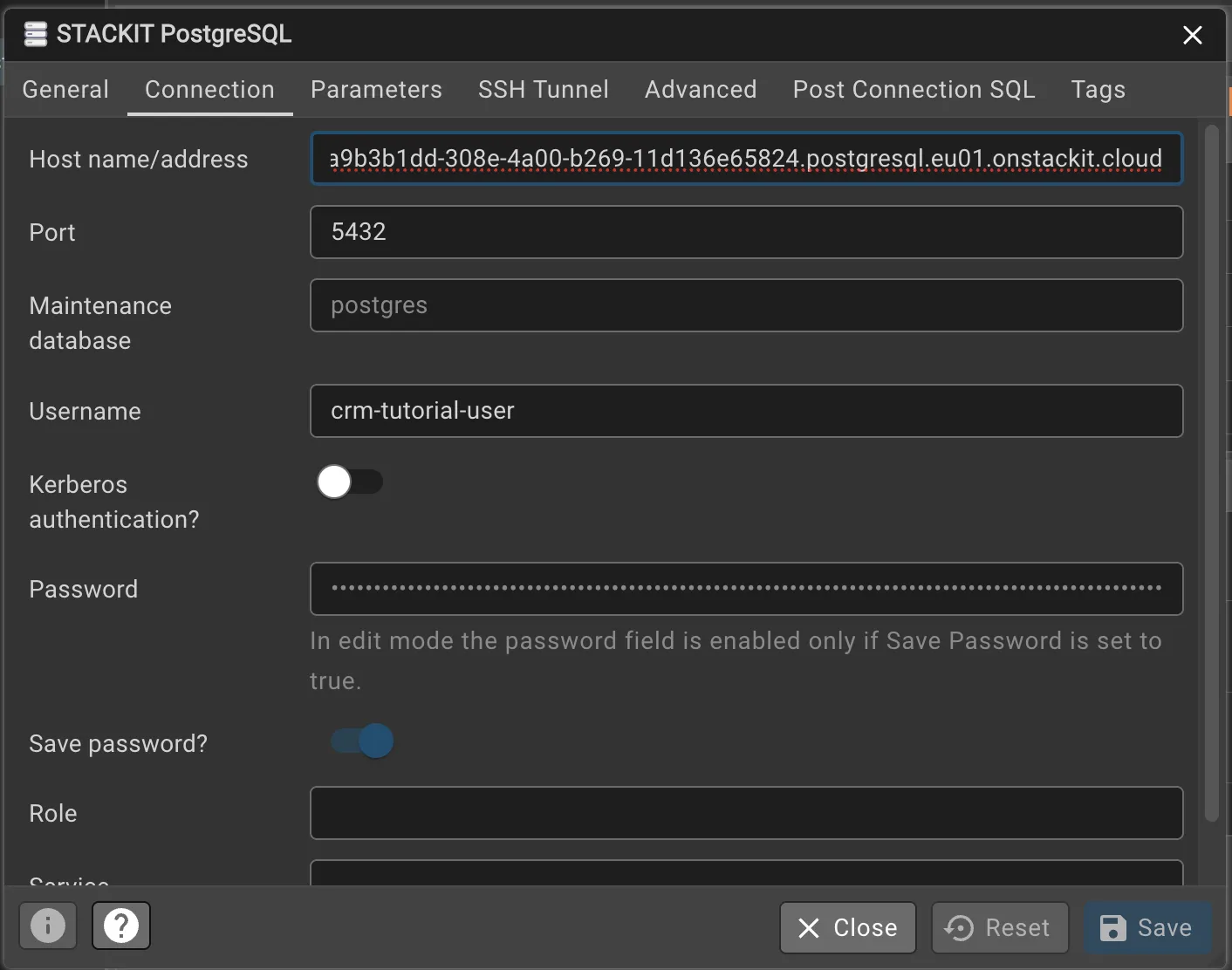
Change to the Connection tab and enter the hostname and credentials: On Host name/address paste the hostname that you copied in Create a user and copy the credentials.
Do the same with the Port, Username and Password field. Leave everything else untouched.
Click on Save.
-
Once you connected succesfully to your instance, a dashboard will open.
-
After your client has established a connection, open the Query Tool Workspace on the left and configure the connection: On Existing Server, select the server you created.
On Database, paste the Database Name that you set in Create a database.
You may need to reenter the password. Click on Connect & Open Query Tool. A query window opens.