Deploy guestbook-app on Kubernetes
Last updated on
This document describe step-by-step how to deploy a guestbook-app on STACKIT Kubernetes Engine.
Prerequisites
Section titled “Prerequisites”Create the Redis database
Section titled “Create the Redis database”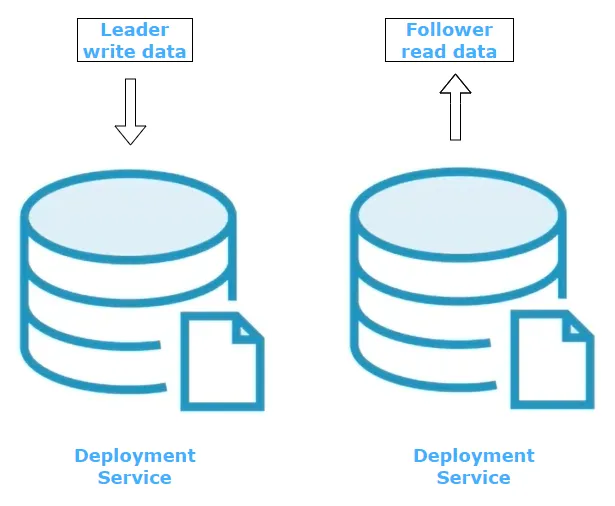
In this Tutorial, we will use Redis to write and retrieve guestbook entries. To make the Service highly available, we will create a single pod deployment to write the data to the database and create a multiple pod deployment to retrieve the data.
Redis leader deployment
Section titled “Redis leader deployment”Create the deployment manifest redis-leader-deployment.yaml:
apiVersion: apps/v1kind: Deploymentmetadata: name: redis-leader labels: app: redis role: leader tier: backendspec: replicas: 1 selector: matchLabels: app: redis template: metadata: labels: app: redis role: leader tier: backend spec: containers: - name: leader image: "docker.io/redis:6.0.5" resources: requests: cpu: 100m memory: 100Mi ports: - containerPort: 6379Apply the deployment file against your cluster.
kubectl apply -f redis-leader-deployment.yamlCheck your Pods to be sure that the Redis Pod is running.
kubectl get podsThe result should look similar like this:
redis-leader-fb76b4755-fmfq2 1/1 Running 0 79sRedis Leader Service
Section titled “Redis Leader Service”The guestbook frontend will have to communicate to the Redis leader through a Service resource. A Service in Kubernetes is an abstract way to expose an application running on a set of Pods as a network service.
Create the Redis Leader Service manifest, redis-leader-service.yaml:
apiVersion: v1kind: Servicemetadata: name: redis-leader labels: app: redis role: leader tier: backendspec: ports: - port: 6379 targetPort: 6379 selector: app: redis role: leader tier: backendApply the service file against your cluster.
kubectl apply -f redis-leader-service.yamlCheck the Service to be sure that the Redis Service is running.
kubectl get serviceThe result should look similar to this:
redis-leader ClusterIP 100.66.106.69 <none> 6379/TCP 5sRedis follower deployment
Section titled “Redis follower deployment”To retrieve the data from the Redis Database, we will add Pods to carry the demand.
Create the redis-follower-deployment.yaml.
apiVersion: apps/v1kind: Deploymentmetadata: name: redis-follower labels: app: redis role: follower tier: backendspec: replicas: 2 selector: matchLabels: app: redis template: metadata: labels: app: redis role: follower tier: backend spec: containers: - name: follower image: registry.ske.eu01.stackit.cloud/test/guestbook-redis-follower:v1 resources: requests: cpu: 100m memory: 100Mi ports: - containerPort: 6379Apply the Deployment file against your cluster.
kubectl apply -f redis-follower-deployment.yamlCheck your Pods to be sure that the Redis Pod is running.
kubectl get podsThe result should look similar like this:
redis-follower-dddfbdcc9-2sc2h 1/1 Running 0 9sredis-follower-dddfbdcc9-wkrbg 1/1 Running 0 9sredis-leader-fb76b4755-fmfq2 1/1 Running 0 79sRedis Follower - Service
Section titled “Redis Follower - Service”The frontend application needs to get data from the Redis Follower. To access the Pods, we will create another Service.
Create the Redis Follower Service manifest, redis-follower-service.yaml:
apiVersion: v1kind: Servicemetadata: name: redis-follower labels: app: redis role: follower tier: backendspec: ports: - port: 6379 selector: app: redis role: follower tier: backendApply the service file against your cluster.
kubectl apply -f redis-follower-service.yamlCheck the Service to be sure that the Redis Service is running.
kubectl get serviceThe result should look similar to this:
redis-follower ClusterIP 100.69.108.108 <none> 6379/TCP 32sredis-leader ClusterIP 100.66.106.69 <none> 6379/TCP 5sCreate the guestbook frontend
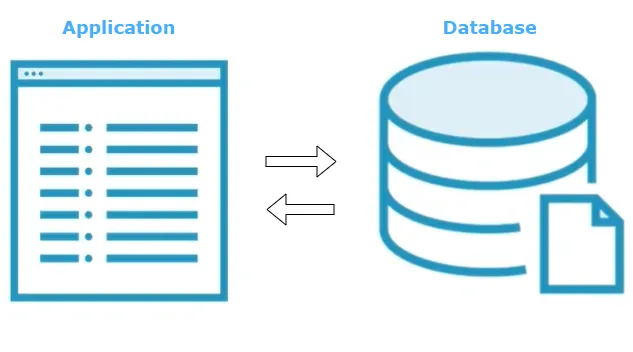
Section titled “Create the guestbook frontend”The frontend application will receive guestbook entries and store it into the Redis database. It is configured to talk to either the Redis leader or follower, depending on if the application receives a new guestbook entry or if it should serve existing ones.
Frontend application deployment
Section titled “Frontend application deployment”Create the frontend-deployment.yaml:
apiVersion: apps/v1kind: Deploymentmetadata: name: frontendspec: replicas: 3 selector: matchLabels: app: guestbook tier: frontend template: metadata: labels: app: guestbook tier: frontend spec: containers: - name: php-redis image: registry.ske.eu01.stackit.cloud/test/guestbook-frontend:v1 env: - name: GET_HOSTS_FROM value: "dns" resources: requests: cpu: 100m memory: 100Mi ports: - containerPort: 80Apply the deployment file against your cluster.
kubectl apply -f frontend-deployment.yamlCheck the Pods to be sure that the Frontend Deployment works.
kubectl get podsThe result should look similar to this:
frontend-85595f5bf9-5p4xd 0/1 ContainerCreating 0 25sfrontend-85595f5bf9-n2ftd 0/1 ContainerCreating 0 25sfrontend-85595f5bf9-vnd7d 0/1 ContainerCreating 0 25sFrontend application service
Section titled “Frontend application service”To access the application from outside the Cluster, we need a service to configure the application externally visible.
Create the frontend-service.yaml:
apiVersion: v1kind: Servicemetadata: name: frontend labels: app: guestbook tier: frontendspec: type: LoadBalancer ports: - port: 80 selector: app: guestbook tier: frontendApply the Service file against your cluster.
kubectl apply -f frontend-service.yamlCheck the Service to be sure it works.
kubectl get serviceThe result should look similar to this:
NAME TYPE CLUSTER-IP EXTERNAL-IP PORT(S) AGEfrontend LoadBalancer 100.70.46.37 <pending> 80:31620/TCP 11skubernetes ClusterIP 100.64.0.1 <none> 443/TCP 87dredis-follower ClusterIP 100.69.108.108 <none> 6379/TCP 18hredis-leader ClusterIP 100.66.106.69 <none> 6379/TCP 18hNotice that the frontend External-IP is in the state pending. Wait a couple of seconds and check your service again. Now you should get something similar like this:
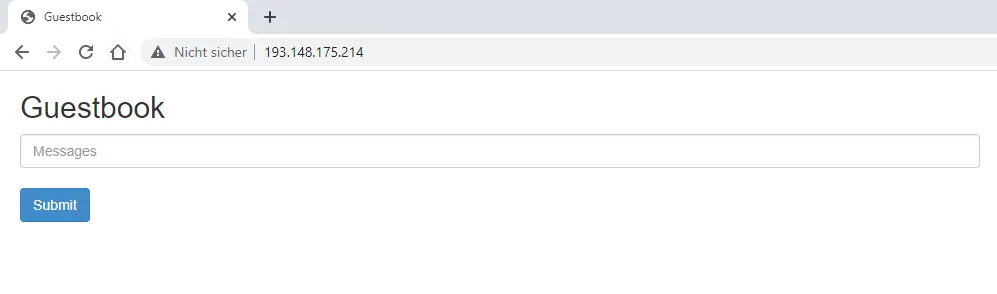
NAME TYPE CLUSTER-IP EXTERNAL-IP PORT(S) AGEfrontend LoadBalancer 100.70.46.37 193.148.175.214 80:31620/TCP 66sUse the External-IP and paste it into the web browser of your choice. You should see something similar to this: