Installieren Sie den Server Agent über die API
Zuletzt aktualisiert am
Um von unseren neuesten Funktionen wie „Run Command“, dem „STACKIT Server Update Management“-Dienst und vielen weiteren zukünftigen Diensten zu profitieren, muss der STACKIT Server Agent als Basis auf Ihrem Server installiert sein. Der STACKIT Server Agent dient als Schnittstelle zwischen unserer Infrastruktur und dem Betriebssystem. Er empfängt und verarbeitet remote gesendete Skripte und führt diese lokal auf Ihrem Server aus, sodass Sie Ihre Server-Einstellungen nach Bedarf anpassen können.
Die folgende Dokumentation beschreibt, wie Sie Ihren Server vollständig konfiguriert mit der neuesten verfügbaren Version des STACKIT Server Agent unter Verwendung der API bereitstellen.
Wenn Sie es vorziehen, Ihr System zu konfigurieren und die Run Command-Funktion über das STACKIT Portal zu verwalten, lesen Sie bitte diese Dokumentation: Installieren Sie den Server Agent über das Portal.
Voraussetzungen
Abschnitt betitelt „Voraussetzungen“-
Sie haben einen Service Account erstellt.
(Siehe: Service Accounts erstellen, verwalten und löschen) -
Sie haben diesem Service Account die erforderlichen Projektberechtigungen zugewiesen.
(Siehe: Rollen einem Benutzer oder Service Account zuweisen) -
Sie haben ein Zugriffstoken für diesen Service Account erstellt.
(Siehe: Kurzlebige Zugriffstoken erwerben) -
Grundkenntnisse in der Verwendung von APIs: So erstellen Sie eine VM über die API
-
So erstellen Sie einen Windows Server über APIs und CLIs: Einen Windows Server über die STACKIT API erstellen
Installation des STACKIT Server Agent auf einem neuen Server über die API
Abschnitt betitelt „Installation des STACKIT Server Agent auf einem neuen Server über die API“Der STACKIT Server Agent wird über vendordata installiert, wenn das entsprechende Flag in der API-Anfrage enthalten ist. Wenn Sie einen Server über die API bereitstellen, stellen Sie sicher, dass dieses Flag gesetzt ist, wenn der Agent installiert werden soll. Sie können dieses Flag als Eigenschaft agent in der STACKIT IAAS-API setzen (weitere Informationen finden Sie auch in den API-Docs).
Diese Methode zur Bereitstellung des STACKIT Server Agent wird für alle aktuellen x86/amd64-Versionen der öffentlichen Linux-Images von STACKIT unterstützt (ARM wird in Zukunft unterstützt).
Beachten Sie auch, dass Sie die userdata verwenden können, um den STACKIT Server Agent durch Einfügen eines Installationsskripts zu installieren, falls vendordata vom Betriebssystem nicht unterstützt wird (z. B. Windows Server, Debian 11). Bitte beziehen Sie sich hierfür auf die Installationsskripte für den STACKIT Server Agent für Linux und Windows in der folgenden Dokumentation: Installieren Sie den Server Agent über das Portal.
Überprüfung der Installation des STACKIT Server Agent
Abschnitt betitelt „Überprüfung der Installation des STACKIT Server Agent“Nachdem Sie das Deployment des Servers eingeleitet haben, überprüfen Sie bitte den Status Ihres Servers. Sobald der Server verfügbar ist und Sie sich anmelden können, verifizieren Sie, dass der STACKIT Server Agent ordnungsgemäß installiert ist, indem Sie den Status des Dienstes STACKITServerAgent prüfen.
Verwenden Sie in Windows den folgenden PowerShell-Befehl:
Get-Service STACKITServerAgentÜberprüfen Sie alternativ den Status im Reiter Dienste des Task-Managers:

Verwenden Sie in Linux den folgenden Befehl:
systemctl status stackit-server-agent.service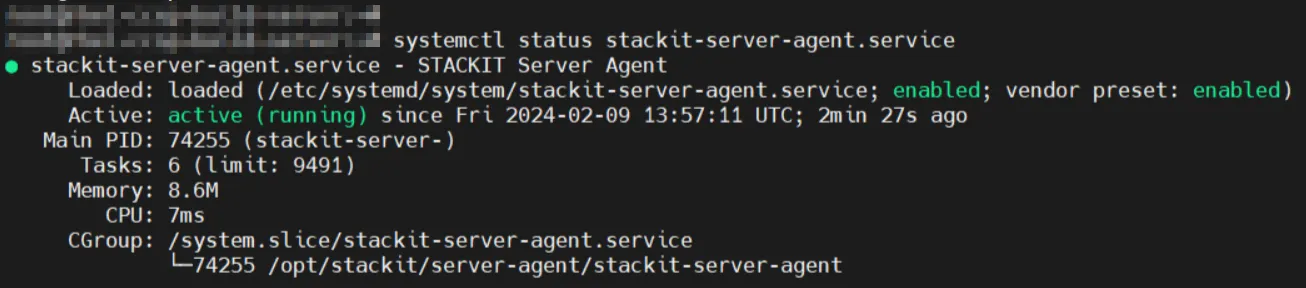
Der STACKIT Server Agent ist nun vollständig konfiguriert und kann zum Ausführen von Befehlen verwendet werden.
Installation des STACKIT Server Agent auf einem bestehenden Server
Abschnitt betitelt „Installation des STACKIT Server Agent auf einem bestehenden Server“Wenn Sie bereits einen laufenden Linux- oder Windows-Server haben, können Sie den STACKIT Server Agent nachträglich manuell installieren, indem Sie die folgende Dokumentation verwenden: Installieren Sie den Server Agent über das Portal.