Architektur
Zuletzt aktualisiert am
STACKIT Intake ist ein vollständig verwalteter Service, der für das Ingestieren von Datenströmen in Apache Iceberg-Tabellen in STACKIT Dremio entwickelt wurde. Die Architektur konzentriert sich auf drei hierarchische Kernkonzepte: das Intake, den Intake Runner und den Intake-Benutzer.
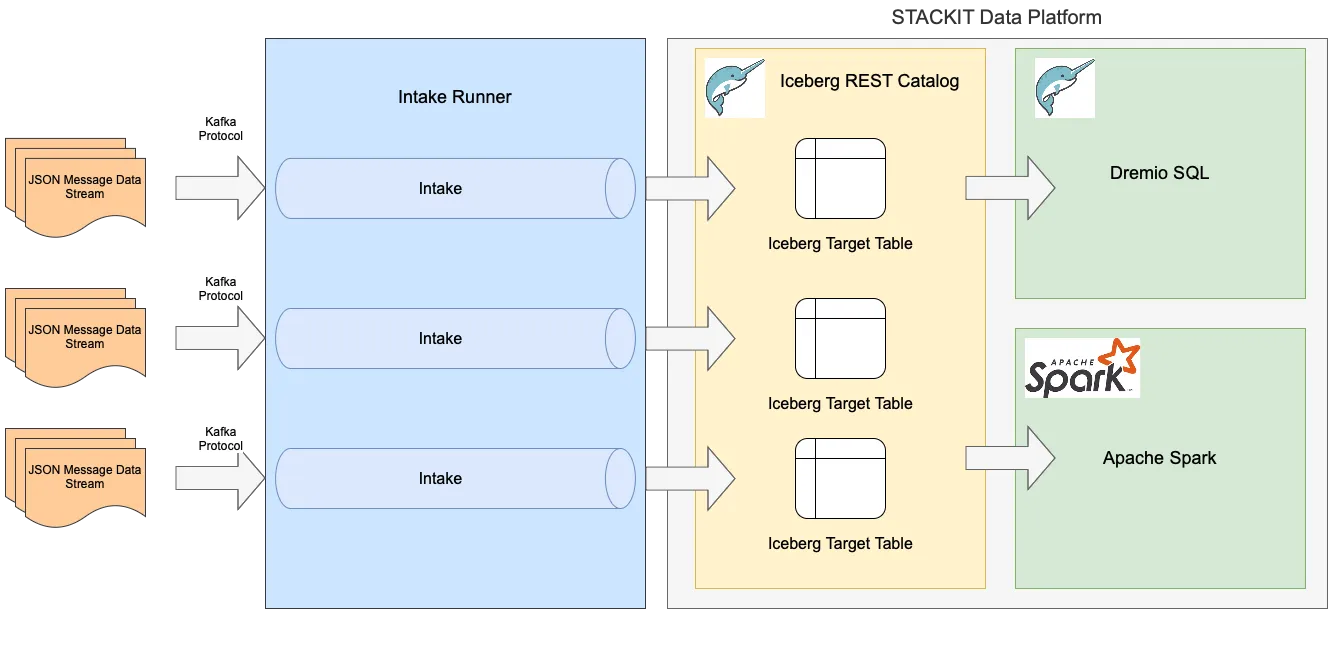
Ein Intake repräsentiert eine vollständige Daten-Ingestion-Pipeline in eine einzelne Apache Iceberg-Tabelle. Es ingestiert Daten im JSON-Format und schreibt diese regelmäßig in die entsprechende Dremio-Tabelle, wobei sichergestellt wird, dass jede Nachricht genau einmal eingefügt wird. Das Schreiben (Flushing) führt zu einer Verzögerung von etwa 5 Minuten, bevor Nachrichten in der Tabelle erscheinen.
Ein Intake kann entweder in eine bestehende Tabelle schreiben oder dynamisch eine erstellen, wobei das Schema aus der ersten empfangenen Nachricht abgeleitet wird. Um potenzielle nachgelagerte Ausfälle abzufangen, wie zum Beispiel Wartungsarbeiten an Dremio, puffern Intakes Nachrichten für bis zu 24 Stunden.
Ein Intake wird definiert durch:
- Dremio-Instanzparameter & Zugangsdaten: URLs für den Iceberg REST Catalog und den Authentifizierungs-Endpunkt sowie ein Dremio Personal Access Token (PAT) für die Benutzerauthentifizierung.
- Iceberg-Tabellendefinition: Der Namespace und der Name der Zieltabelle. Falls nicht angegeben, werden ein Standard-Namespace und ein automatisch generierter Name verwendet.
- Partitionierungsinformationen: Die Option, die Iceberg-Tabelle basierend auf einem Feld in der JSON-Nachricht oder automatisch nach Ingestions-Datum unter Verwendung der automatisch hinzugefügten Spalte
__intake_tszu partitionieren. Wenn keine Partitionierungsoption angegeben ist, erstellt ein Intake keine Partitionen in der Ergebnistabelle.
Jedes Intake stellt zwei Kafka-Protokoll-Topics für die Kommunikation bereit:
- Intake-Topic: Das primäre Topic zum Senden von Nachrichten, die ingestiert werden sollen.
- Dead Letter Queue (DLQ) Topic: Ein Topic, in dem nicht zustellbare Nachrichten (z. B. Nicht-JSON-Nachrichten) vorübergehend für Debugging-Zwecke gespeichert werden.
Intake Runner
Abschnitt betitelt „Intake Runner“Ein Intake Runner ist eine dedizierte, isolierte Laufzeitumgebung für die Verwaltung eines oder mehrerer Intakes. Er stellt einen verwalteten, öffentlichen Kafka-Protokoll-API-Endpunkt für das Übermitteln von Nachrichten bereit. Die Kapazität des Runners wird vom Benutzer definiert und basiert auf einem gewünschten stündlichen Durchsatz:
- Maximale Anzahl an Nachrichten pro Stunde
- Maximale Nachrichtengröße in KiB Der Intake Runner stellt sicher, dass seine Intakes Nachrichten bis zur zugewiesenen Kapazität empfangen können, und verwaltet den Speicher für die Nachrichtenpufferung. Die Kapazität des Intake Runners kann aktualisiert werden, solange das Produkt aus beiden Maximalwerten größer wird.
Intake-Benutzer
Abschnitt betitelt „Intake-Benutzer“Ein Intake-Benutzer stellt sichere technische Zugangsdaten für Anwendungen bereit, um sich mit einem Intake über den Kafka-Protokoll-Endpunkt des Intake Runners mittels SASL-Authentifizierung zu verbinden. Es gibt zwei Arten von Benutzern, um den Zugriff zu steuern:
- intake: Wird von Anwendungen verwendet, um Nachrichten an das Haupt-Intake-Topic zu senden.
- dead-letter: Ein schreibgeschützter Benutzertyp speziell für den Zugriff auf die Dead Letter Queue zu Debugging-Zwecken. Beim Erstellen eines Intake-Benutzers ist ein starkes Passwort erforderlich, das sicher gespeichert wird und nicht wieder abgerufen werden kann. Sie können die Passwörter von Intake-Benutzern jederzeit aktualisieren.
Datenhaltung und Durchsatzregelung
Abschnitt betitelt „Datenhaltung und Durchsatzregelung“Intake Runner weisen Speicher zu, um Nachrichten für bis zu 24 Stunden zu puffern. Diese Funktion ist entscheidend für den Umgang mit zeitweiligen Zustellungsproblemen oder geplanten Ausfallzeiten, wie zum Beispiel Dremio-Wartungsfenstern.
Nachrichten, die erfolgreich in eine Iceberg-Tabelle ingestiert wurden, werden aus dem Puffer entfernt. Ein Intake Runner blockiert die Nachrichtenweiterleitung, wenn das Volumen der nicht zugestellten Nachrichten eine Grenze überschreitet, die aus dem 24-Stunden-Pufferzeitraum sowie dem definierten maximalen stündlichen Durchsatz und der Nachrichtengröße berechnet wird.
Sobald Nachrichten zugestellt wurden und wieder Pufferspeicher frei ist, nimmt der Intake Runner die Annahme von Nachrichten für die Ingestion wieder auf, bis die Grenze erneut erreicht wird.
Monitoring
Abschnitt betitelt „Monitoring“Alle Ressourcen innerhalb von STACKIT Intake – Intake Runner, Intakes und Intake-Benutzer – enthalten ein Statusfeld, um ihren aktuellen Deployment-Zustand widerzuspiegeln. Dieses Feld kann einen der folgenden Werte annehmen:
- active: Die Ressource wurde erfolgreich erstellt und ist betriebsbereit.
- reconciling: Die Ressource wird gerade erstellt oder aktualisiert.
- deleting: Die Ressource wird gerade gelöscht.
- failed: Die Erstellung oder der Betrieb der Ressource ist fehlgeschlagen.
Zusätzlich bietet ein Intake spezifische Felder, die Ihnen helfen, Ingestions-Probleme zu erkennen und zu diagnostizieren:
- Anzahl nicht zugestellter Nachrichten: Diese Metrik zeigt die Anzahl der Nachrichten an, die in die Dead Letter Queue (DLQ) des Intakes umgeleitet wurden, weil sie nicht verarbeitet werden konnten, beispielsweise aufgrund einer fehlerhaften JSON-Nachricht.
- Fehlermeldung: Dieses Feld enthält die letzte Fehlermeldung, die während der Nachrichtenverarbeitung aufgetreten ist, und bietet eine schnelle Erklärung des Problems (z. B. ein JSON-Parsing-Fehler).
- Dead Letter Queue (DLQ) Topic: Für ein detaillierteres Debugging können Sie einen Intake-Benutzer vom Typ “dead-letter” verwenden, um die problematischen Nachrichten direkt aus dem DLQ-Topic zu lesen. Dies ermöglicht es Ihnen, den genauen Inhalt der Nachrichten zu untersuchen, deren Ingestion fehlgeschlagen ist.
Verwaltung
Abschnitt betitelt „Verwaltung“Sie haben verschiedene Möglichkeiten, Ihre STACKIT Intake-Ressourcen zu verwalten, was Flexibilität für unterschiedliche Workflows und Benutzerpräferenzen bietet:
- STACKIT Portal: Eine benutzerfreundliche grafische Oberfläche für eine einfache Verwaltung.
- STACKIT CLI: Das Kommandozeilen-Interface für Skripting und Automatisierung.
- STACKIT SDK: Ein Software Development Kit für die Integration von Verwaltungsaufgaben in Ihre eigenen Anwendungen.
- STACKIT API: Direkter REST-API-Zugriff für die volle programmgesteuerte Kontrolle.
- Terraform Provider: Ein Infrastructure-as-Code-Tool für eine deklarative und versionsgesteuerte Verwaltung. Alle diese Methoden unterstützen das vollständige Lifecycle-Management Ihrer Ressourcen, einschließlich:
- Erstellen neuer Intake Runner, Intakes und Intake-Benutzer.
- Aktualisieren bestehender Intake Runner, Intakes und Intake-Benutzer.
- Löschen von Ressourcen, wenn diese nicht mehr benötigt werden.
- Auflisten verfügbarer Ressourcen und Überprüfen ihres Status für Monitoring-Zwecke.