STACKIT OpenSearch API verwenden
Zuletzt aktualisiert am
In diesem Tutorial erfahren Sie, wie Sie Service-Instanzen und Service-Zugangsdaten in Ihrem STACKIT-Projekt mithilfe der STACKIT OpenSearch API verwalten.
Voraussetzungen
Abschnitt betitelt „Voraussetzungen“Um die auf dieser Seite beschriebenen Schritte auszuführen, müssen die folgenden Voraussetzungen erfüllt sein:
-
Ihre Organisation verfügt über ein Kundenkonto.
(Siehe: Kundenkonto erstellen) -
Sie haben ein Benutzerkonto mit den erforderlichen Berechtigungen.
(Siehe: Benutzerkonto erstellen) -
Sie haben ein Projekt in Ihrem Kundenkonto.
(Siehe: Projekt erstellen) -
Sie haben ein Servicekonto erstellt.
(Siehe: Servicekonto erstellen) -
Sie haben diesem Servicekonto die erforderlichen Projektberechtigungen zugewiesen.
(Siehe: Berechtigungen einem Servicekonto zuweisen) -
Sie haben ein Zugriffstoken für dieses Servicekonto erstellt.
(Siehe: Authentifizierungstoken einem Servicekonto zuweisen) -
Sie können cURL verwenden, ein Kommandozeilenwerkzeug und eine Bibliothek zur Datenübertragung mit URL-Syntax.
(Siehe: cURL-Website) -
Sie können jq verwenden, einen Kommandozeilen-JSON-Prozessor.
(Siehe: jq-Website)
API-Nutzung mit curl
Abschnitt betitelt „API-Nutzung mit curl“Service-Angebote abrufen
Abschnitt betitelt „Service-Angebote abrufen“API-Aufruf
curl --location --request GET 'https://opensearch.api.eu01.stackit.cloud/v1/projects/[projectId]/offerings' \| Variable | Beschreibung |
|---|---|
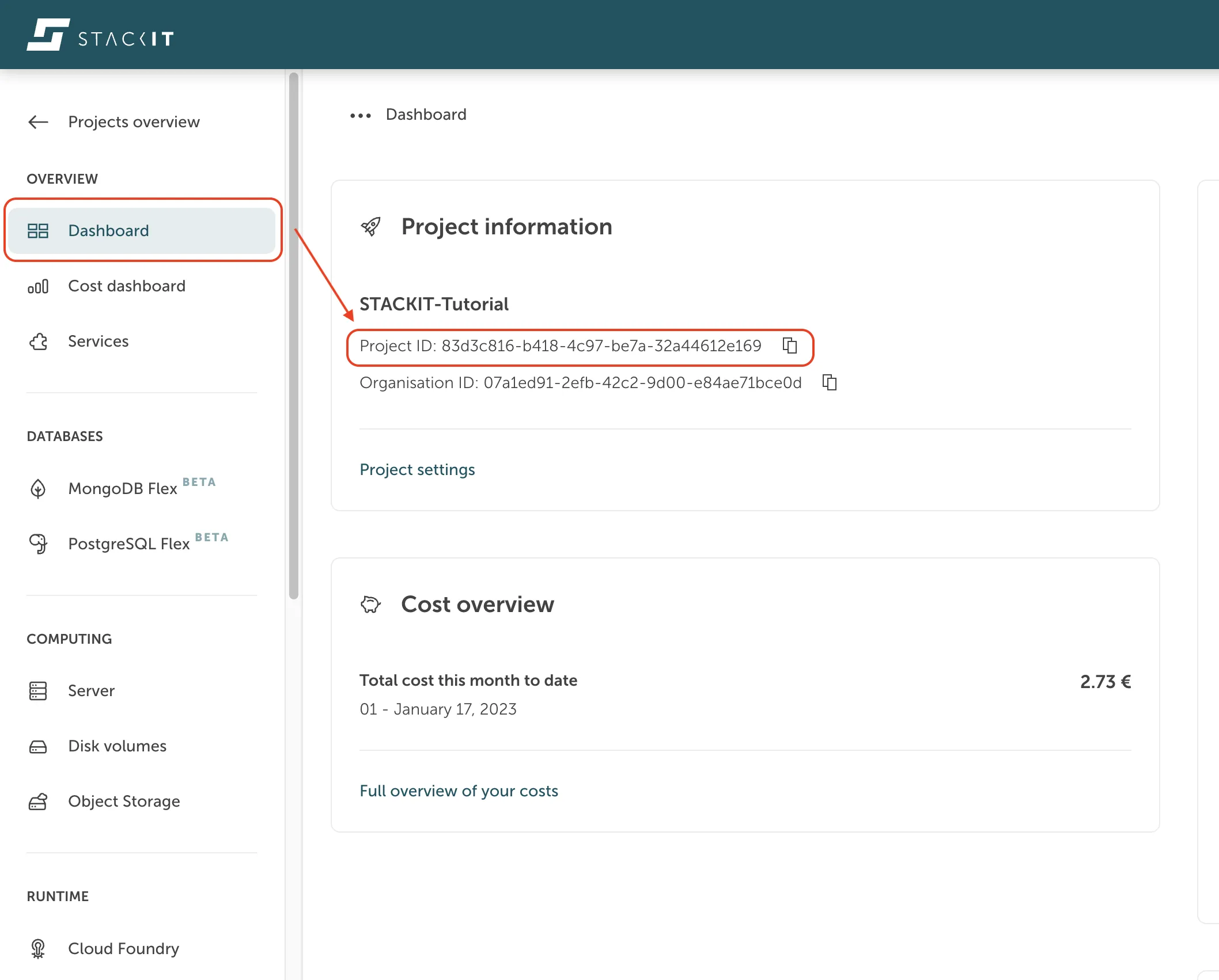
[projectId] | Die ProjectId kann im STACKIT Portal abgerufen werden, indem Sie in der Seitenleiste im Bereich Overview zum Projekt-Dashboard navigieren. |
[token] | Das Zugriffstoken Ihres Servicekontos. |
Auszug aus der API-Antwort
{ "offerings": [ { "description": "OpenSearch is a fully managed search and analytics engine.", "imageUrl": "data:image/png;base64,iVBORw0...YII=", "documentationUrl": "", "quotaCount": 2, "latest": true, "name": "OpenSearch 2", "plans": [ { "description": "3 Nodes, 1 vCPU, 2 GB RAM, 10 GB Disk", "id": "9e4eac4b-b03d-4d7b-b01b-6d1224aa2d68", "name": "stackit-opensearch-1.2.10-replica", "free": false }, { "description": "3 Nodes, 1 vCPU, 4 GB RAM, 10 GB Disk", "id": "e5fbee3b-8237-415e-a783-3ab25a40eeda", "name": "stackit-opensearch-1.4.10-replica", "free": false }, { "description": "3 Nodes, 1 vCPU, 4 GB RAM, 50 GB Disk", "id": "28029780-2e42-41e7-9cc5-9ee15acd95f6", "name": "stackit-opensearch-1.4.50-replica", "free": false }, { "description": "3 Nodes, 2 vCPUs, 4 GB RAM, 10 GB Disk", "id": "8fa3d311-a5ff-464f-97cf-29a6fc159dbc", "name": "stackit-opensearch-2.4.10-replica", "free": false },... { "description": "1 Node, 4 vCPUs, 8 GB RAM, 50 GB Disk", "id": "913780f9-f5e6-4c9b-9e9a-864754fe8005", "name": "stackit-opensearch-4.8.50-single", "free": false } ],.. ]}Service-Instanz erstellen
Abschnitt betitelt „Service-Instanz erstellen“API-Aufruf
curl --location --request POST 'https://opensearch.api.eu01.stackit.cloud/v1/projects/[projectId]/instances' \--header 'Content-Type: application/json' \--header 'Accept: application/json' \--header 'Authorization: Bearer [token]' \--data-raw '{ "planId": "[planId]", "instanceName": "[service_instance_name]", "parameters": {"sgw_acl": "[ip_list]"}}'[planId] | Service-planId des Serviceangebots, das Sie bestellen möchten. Siehe den vorherigen API-Aufruf „Get service offerings“. Beispiel: Die planId für „stackit-opensearch-1.2.10-replica“ lautet „9e4eac4b-b03d-4d7b-b01b-6d1224aa2d68“. |
|---|---|
[service_instance_name] | Wählen Sie einen aussagekräftigen Namen für Ihre Instanz. |
[ip_list] | Durch Kommas getrennte Liste von IP-Netzwerken in CIDR-Notation, die auf diese Instanz zugreifen dürfen, z. B. 193.148.160.0/19,45.129.40.0/21 |
API-Antwort
InstanceId of the created service instance, required for further API calls.
e.g.{"instanceId":"a8196380-da17-4789-aae6-b452442bef56"}
Service-Instanz nach instanceId abrufen
Abschnitt betitelt „Service-Instanz nach instanceId abrufen“API-Aufruf
curl --location --request GET 'https://opensearch.api.eu01.stackit.cloud/v1/projects/[projectId]/instances/[instanceId]' \--header 'Accept: application/json' \--header 'Authorization: Bearer [token]' | jq.Service-Instanz löschen
Abschnitt betitelt „Service-Instanz löschen“API-Aufruf
curl --location --request DELETE 'https://opensearch.api.eu01.stackit.cloud/v1/projects/[projectId]/instances/[instanceId]' \--header 'Accept: application/json' \--header 'Authorization: Bearer [token]'Service-Zugangsdaten erstellen
Abschnitt betitelt „Service-Zugangsdaten erstellen“API-Aufruf
curl --location --request POST 'https://opensearch.api.eu01.stackit.cloud/v1/projects/[projectId]/instances/[instanceId]/credentials' \--header 'Accept: application/json' \--header 'Authorization: Bearer [token]' | jq.Beispiel einer API-Antwort
{ "id": "acb13963-2e83-4553-aba9-bd62aaf2be5a", "uri": "https://sed21b412-0.data.eu01.onstackit.cloud:49366", "raw": { "credentials": { "username": "*****", "password": "*****", "port": 49366, "host": "https://sed21b412-0.data.eu01.onstackit.cloud:49366", "hosts": ["sed21b412-os-0-1.data.eu01.onstackit.cloud"], "uri": "https://sed21b412-0.data.eu01.onstackit.cloud:49366", "cacrt": "-----BEGIN CERTIFICATE-----\nMIIFujC.....4ZfJ\n-----END CERTIFICATE-----", "scheme": "https" }, "routeServiceUrl": "", "syslogDrainUrl": "" }}Einfachere Handhabung von API-Aufrufen
Abschnitt betitelt „Einfachere Handhabung von API-Aufrufen“Sie können eines von mehreren API-Test- und Entwicklungstools verwenden, um die Arbeit mit der API komfortabler zu gestalten.
Beispiele hierfür sind:
oder andere Tools. Die meisten Tools unterstützen den Import der OpenAPI-Spezifikation.