Verbindung zu einer Redis-Instanz herstellen
Zuletzt aktualisiert am
Voraussetzungen
Abschnitt betitelt „Voraussetzungen“- Sie haben eine laufende Instanz von STACKIT Redis. Falls nicht, können Sie mit Erstellen und Verwalten von Instanzen beginnen.
- Sie haben einen Benutzer (Anmeldeinformationen) mit den entsprechenden Berechtigungen für die Redis-Datenbank in Ihrer Instanz. Falls nicht, können Sie einen unter Erstellen und Verwalten von Anmeldeinformationen erstellen.
Verbindung zu Ihrer Redis-Instanz herstellen
Abschnitt betitelt „Verbindung zu Ihrer Redis-Instanz herstellen“Öffnen Sie nach der Installation eine Shell Ihrer Wahl und verbinden Sie sich mit Ihrer Datenbank. Der Befehl redis-cli unterstützt das Format des Connection-Strings. Sie benötigen den Connection-String und den Endpunkt Ihrer Instanz, um die erforderlichen Flags anzugeben. Sie können all diese Parameter im Tab Zugangsdaten Ihrer Instanz nachschlagen. Sie müssen den Endpunkt aus dem Connection-String extrahieren.
redis-cli -u <connection-string> --tls --sni <Endpunkt>Wenn Sie das Passwort nicht direkt in der Befehlszeile eingeben möchten, verwenden Sie dieses Verbindungsformat:
redis-cli -h <Endpunkt> -p <Port> --user <Benutzername> --sni <Endpunkt> --askpass --tlsDie Konsole wird etwa Folgendes anzeigen:
red601d47-master-1.data.eu01.onstackit.cloud:53137>Geben Sie nun ping ein, um zu prüfen, ob die Verbindung erfolgreich hergestellt wurde:
red601d47-master-1.data.eu01.onstackit.cloud:53137> pingWenn Sie ordnungsgemäß verbunden sind, antwortet die Datenbank mit:
PONGNun können Sie mit der Nutzung der Datenbank beginnen. Drücken Sie STRG + D, um die Verbindung zu schließen.
Drücken Sie Strg + D, um die Verbindung zu schließen und zu Ihrer Eingabeaufforderung zurückzukehren.
Redis Insight ist ein GUI-Tool für den Zugriff auf und die Verwaltung der Datenbank. Folgen Sie den Anweisungen auf der Redis Insight Installationsseite oder installieren Sie es falls verfügbar über die Quellen Ihres Betriebssystems.
Öffnen Sie nach der Installation Redis Insight. Kopieren Sie den Connection-String, den Sie im Schritt zum Erstellen von Anmeldeinformationen gespeichert haben.
-
Klicken Sie nach dem Öffnen von Redis Insight auf + Add Redis database.
-
Fügen Sie im neuen Bereich den Connection-String, den Sie im Artikel Erstellen und Verwalten von Anmeldeinformationen erhalten haben, in das Feld Connection URL ein.
-
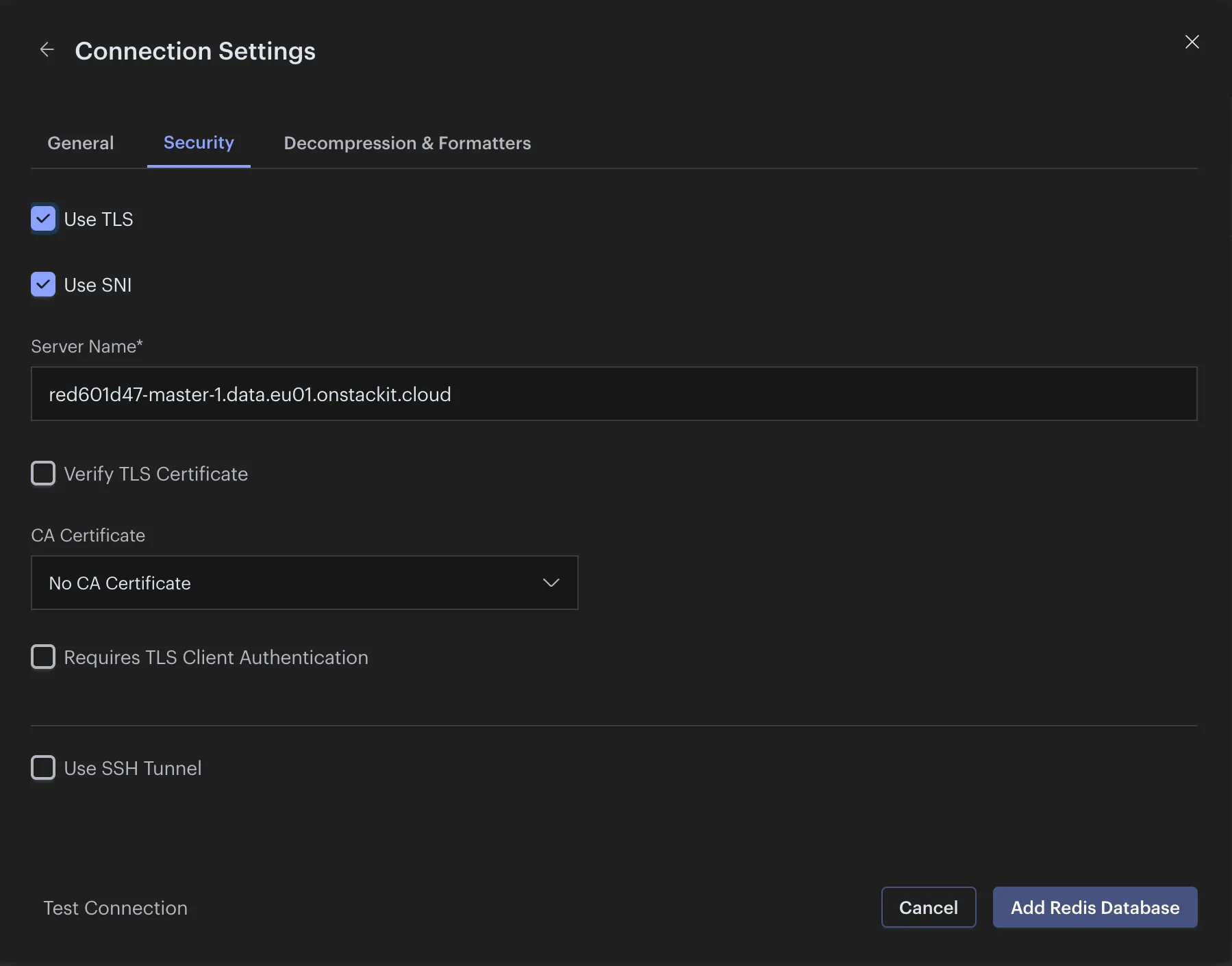
Klicken Sie dann auf Connection Settings und wechseln Sie zum Tab Security.
-
Klicken Sie auf Use SNI und lassen Sie das vorausgefüllte Feld unverändert.
-
Klicken Sie auf Add Redis Database