Grant and revoke members to SQL server agent roles in SQLServer Flex
Zuletzt aktualisiert am
With one of the following required roles, the permission required for the SQLServer Agent (Manager / User) can be set automatically via the Portal:
- ##STACKIT_ServerManager##
→ This role contains ##STACKIT_SQLAgentManager## role by default. - ##STACKIT_SQLAgentManager##
→ The role acts as SQL Server agent manager and corresponds to the existing role in an SQLServer -SQLAgentOperatorRole. - ##STACKIT_SQLAgentUser##
→ The role acts as SQL Server agent user and corresponds to the existing role in an SQLServer -SQLAgentUserRole.
Brief comparison between ##STACKIT_SQLAgentManager## and ##STACKIT_SQLAgentUser## agent roles
| Task | ##STACKIT_SQLAgentManager## | ##STACKIT_SQLAgentUser## |
|---|---|---|
| Create jobs | ✓ | ✓ |
| View/run their own jobs | ✓ | ✓ |
| View/run any jobs | ✓ | ☓ |
| Modify/delete their own jobs | ✓ | ✓ |
| Modify/delete jobs owned by others | ☓ | ☓ |
| View their own job history | ✓ | ✓ |
| View other jobs history | ✓ | ☓ |
| View job schedules | ✓ | ✓ |
| Modify job schedules | ✓ | ☓ |
| Create alerts/operators | ☓ | ☓ |
| View alerts/operators | ✓ | ☓ |
| Modify existing alerts/operators | ✓ | ☓ |
Grant Users to SQLServer Agent Roles
Section titled “Grant Users to SQLServer Agent Roles”The corresponding roles can be granted to the user via the Portal in the respective project of the SQLServer instance:
- ##STACKIT_ServerManager##
- ##STACKIT_SQLAgentManager##
- ##STACKIT_SQLAgentUser##
Example:
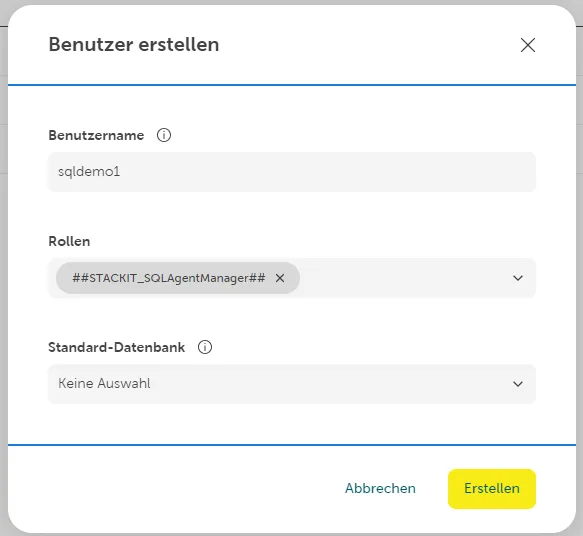
Currently, roles can be granted via the Portal only during user creation process.
Granting SQL agent roles to existing users
It is possible to grant the roles ##STACKIT_SQLAgentManager## or ##STACKIT_SQLAgentUser## to
an existing user afterwards,
e.g. via the SQL Management Studio (with the Stored Procedures see Tab “via SQL Management Studio”).
The following Stored Procedures can be used to grant access to the SQL agent roles:
| Grant access to SQLServer Agent Manager role | Grant access to SQLServer Agent User role |
|---|---|
| EXEC [msdb].[stackit].[add_sql_agent_user] N’USER’ | EXEC [msdb].[stackit].[add_sql_agent_manager] N’USER’ |
Users granted the following roles only can run ([stackit].[add_sql_agent_manager] and [stackit].[add_sql_agent_user]) stored procedures:
- ##STACKIT_ProcessManager##
- ##STACKIT_ServerManager##
Revoke Users from SQLServer Agent Roles
Section titled “Revoke Users from SQLServer Agent Roles”The roles cannot currently be revoked via the portal.
Revoking SQL agent roles from existing users
It is possible to revoke roles ##STACKIT_SQLAgentManager## and ##STACKIT_SQLAgentUser## from an existing users retrospectively. e.g. via the SQL Management Studio (with the Stored Procedure see Tab “via SQL Management Studio”).
The following Stored Procedures can be used to revoke the access from the roles:
| revoke access from SQLServer Agent Manager role | revoke access from SQLServer Agent User role |
|---|---|
| EXEC [msdb].[stackit].[revoke_sql_agent_manager] N’USER’ | EXEC [msdb].[stackit].[revoke_sql_agent_user] N’USER’ |
Users granted the following roles only can run ([stackit].[revoke_sql_agent_manager] and [stackit].[revoke_sql_agent_user]) stored procedures:
- ##STACKIT_ProcessManager##
- ##STACKIT_ServerManager##