How to implement transactional replication into STACKIT
Zuletzt aktualisiert am
Introduction
Section titled “Introduction”Transactional replication is a powerful feature of Microsoft SQL Server that provides a robust solution for distributing data across multiple databases. Designed to synchronize data in near real-time, it ensures consistency and accuracy, making it an essential tool for maintaining high availability, disaster recovery, distributing workloads, and supporting complex business scenarios.
This document is focused on the Implementation of a Transactional Replication concept based on an OnPrem Database into a STACKIT SQL Server Flex environment.
In this document, we will explore the intricacies of transactional replication, from its fundamental concepts to advanced implementation techniques. We will begin by defining what transactional replication is and discussing its core components and operational mechanics. Next, we will delve into the benefits of using transactional replication, including improved performance, scalability, and disaster recovery capabilities.
This guide is intended for database administrators (DBAs) and IT professionals who seek to harness the full potential of transactional replication in SQL Server. Whether you are new to replication or looking to enhance your existing knowledge, this document will provide you with the necessary insights and practical steps to effectively plan, configure, and manage transactional replication in your SQL Server environment.
Overview of Transactional Replication
Section titled “Overview of Transactional Replication”Transactional replication is a feature of Microsoft SQL Server that is designed to distribute and synchronize data across multiple databases. This replication method ensures that changes made at the source (the publisher) are immediately propagated to the target (the subscriber) in a transactional consistent manner. This ensures that subscribers have an up-to-date copy of the data, reflecting changes in near real-time.
Purpose and Benefits of Transactional Replication
Section titled “Purpose and Benefits of Transactional Replication”The benefits of transactional replication are manifold. It enhances performance by offloading read-heavy operations to subscriber databases, thereby reducing the load on the primary database. This feature also improves scalability, allowing organizations to handle larger datasets and increased user demands without compromising performance. Furthermore, transactional replication plays a pivotal role in high availability and disaster recovery strategies, providing an additional layer of redundancy and ensuring business continuity in case of system failures. By distributing data across multiple servers, transactional replication supports data distribution and localized processing, which is essential for global enterprises operating in diverse geographical regions.
How Transactional Replication Works
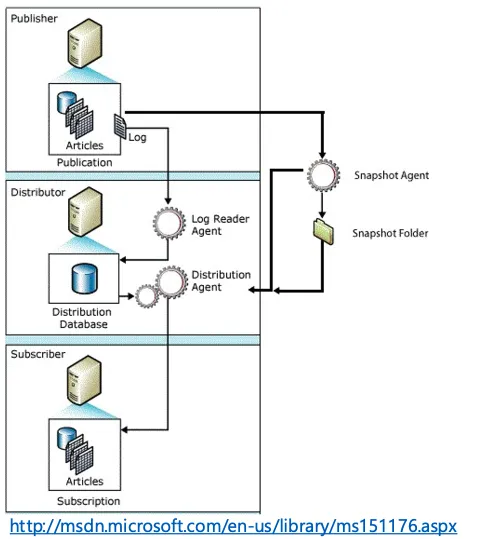
Section titled “How Transactional Replication Works”Transactional replication captures changes to the data at the publisher using the transaction log. These changes are then stored in the distribution database by the distributor. The distributor continuously reads the transaction log and sends the changes to the subscribers.
What is Transactional Replication in Microsoft SQL Server
Section titled “What is Transactional Replication in Microsoft SQL Server”Definition and Key Concepts
Section titled “Definition and Key Concepts”Publisher: The database or server where the original data resides. The publisher is responsible for identifying changes and distributing them to the subscribers.
Subscriber: The database or server that receives the changes from the publisher. Subscribers can be used for reporting, load balancing, or disaster recovery purposes.
Distributor: An intermediary between the publisher and the subscriber. The distributor manages the distribution database and ensures that changes are delivered efficiently and reliably.
Publication: A collection of articles (tables, stored procedures, views, etc.) that are designated for replication. Publications define the scope of the data to be replicated.
Article: An individual database object, such as a table or a view, included in a publication.
Subscription: A request by a subscriber to receive a publication. Subscriptions can be push (initiated by the publisher) or pull (initiated by the subscriber).
Components Involved in Transactional Replication
Section titled “Components Involved in Transactional Replication”Transactional replication in Microsoft SQL Server involves several key components that work together to ensure data is accurately and efficiently replicated across databases.
Publisher
Section titled “Publisher”The database that contains the original data. It is responsible for identifying and marking changes that need to be replicated. The publisher sends these changes to the distributor.
Subscriber
Section titled “Subscriber”The database that receives the replicated data from the publisher. Subscribers maintain an up-to-date copy of the data and can be used for reporting, load balancing, or as a backup for disaster recovery purposes.
Distributor
Section titled “Distributor”The intermediary between the publisher and the subscriber. The distributor manages the distribution database, which stores metadata and history data for replication. It ensures that changes are efficiently and reliably delivered to the subscribers.
Log Reader Agent
Section titled “Log Reader Agent”A background process that scans the transaction log of the publisher’s database to identify changes (inserts, updates, deletes). It transfers these changes to the distribution database.
Distribution Agent
Section titled “Distribution Agent”A background process that moves changes from the distribution database to the subscriber databases. It ensures that the replicated data is applied consistently and efficiently at the subscribers.
Snapshot Agent
Section titled “Snapshot Agent”A background process that generates snapshot files containing the schema and data of the published articles. These snapshot files are used to initialize the subscriber databases.
Planning and Prerequisites
Section titled “Planning and Prerequisites”Implementing Transactional Replication in Microsoft SQL Server involves several prerequisites and system requirements. Ensuring that your environment meets these requirements is a guarantee for the successful configuration and operation of replication.
System Requirements
Section titled “System Requirements”Transactional replication is supported in SQL Server Standard, Enterprise, Developer, and Web editions. It’s essential to verify that all participating SQL Server instances (Publisher, Distributor, and Subscribers) are running supported versions and editions.
Cross-version replication is possible, but the Publisher must always be at an equal or higher version compared to the Subscriber.
Preparing the Publisher
Section titled “Preparing the Publisher”- The Publisher database can use either the Full, Bulk-Logged, or Simple recovery model for transactional replication.
- Tables to be replicated must have primary keys defined. Transactional replication relies on primary keys for identifying.
- SQL Server Agent must be activated and started on the distributor.. The SQL Server Agent is responsible for running replication jobs, such as the Snapshot Agent, Log Reader Agent, and Distribution Agent.
Note
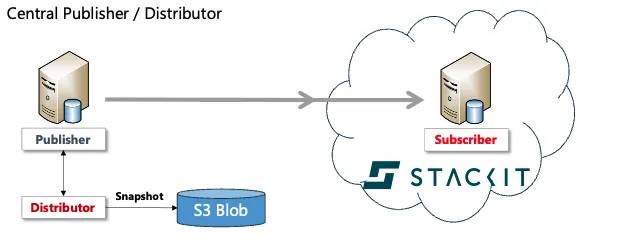
The following configuration settings/steps are based on the installation of a replication from an on-premises system to a Microsoft SQL Server instance in the STACKIT cloud. The name of the instance has been shortened for better readability!
Setup for Transactional Replication
Section titled “Setup for Transactional Replication”The following documentation describes the step-by-step instructions for implementing transactional replication between a local instance of Microsoft SQL Server and an instance in the STACKIT Cloud.
Prerequisites
Section titled “Prerequisites”Before transactional replication can be set up in the STACKIT Cloud, some prerequisites are required, which are described below.
- Create the target database which contains the replicated objects
- Creating a SQL login to connect the distributor to the subscriber to transfer the transactions
- Add the SQL Login as user to the target database
- Grant
db_datareaderanddb_datawriterpermissions to the user account - Create a mount point to an S3-storage if you want to create the subscriber database from a
snapshot
It is not recommended to use a snapshot but create the subscriber from an actual backup of the publisher database!
Prerequisites
/* creation of a new database - if required */CREATE DATABASE [repl_source];GO
/* creation of a new login to SQL Server Instance */CREATE LOGIN [repl_service]WITH      PASSWORD = 'repl$2025',      CHECK_POLICY = OFF,      CHECK_EXPIRATION = OFF;GO
/* user and permissions within the database for the replication account */USE [repl_source];GO
CREATE USER [repl_service] FOR LOGIN [repl_service];ALTER ROLE [db_datareader] ADD MEMBER [repl_service];ALTER ROLE [db_datawriter] ADD MEMBER [repl_service];GO
Setting Up the Distributor
Section titled “Setting Up the Distributor”The distributor is the “transshipment point” for data. The distributor controls which DDL/DML commands must be transmitted from the publisher to a subscriber.
Configuring the Distributor
Section titled “Configuring the Distributor”The distributor service is configured on the local Microsoft SQL Server on which the database to be replicated is located.
It is conceivable to use a separate Microsoft SQL Server for the distributor, which is either installed locally or is available as a separate instance in the STACKIT cloud.
SQLCMD-Variables
Section titled “SQLCMD-Variables”It is recommended to carry out the entire installation using T-SQL. To avoid using variable values arbitrarily in the code, it is advisable to declare all required parameters as SQLCMD variables in the script header.
SQLCMD Variables
:SETVAR sql_server_distributor JUMPHOST:SETVAR sql_server_distributor_pwd pa$w0rd$2025:SETVAR sql_server_stackit_cloud "server.sqlserver.eu01.onstackit.cloud":SETVAR db_distributor distribution:SETVAR db_distributor_data_folder "%path%\MSSQL\Data":SETVAR db_distributor_data_file distribution.MDF:SETVAR db_distributor_log_folder "%path%\MSSQL\Data":SETVAR db_distributor_log_file distribution.LDF:SETVAR db_snapshot_folder "%path%\MSSQL\ReplData"Adding the local server as Distributor
Section titled “Adding the local server as Distributor”RAISERROR ('Adding server $(sql_server_distributor) as distributor', 0, 1) WITH NOWAIT;EXEC sp_adddistributor @distributor = N'$(sql_server_distributor)', @password = N'$(sql_server_distributor_pwd)';GOAdding the agent profiles
Section titled “Adding the agent profiles”RAISERROR ('Adding agent profiles', 0, 1) WITH NOWAIT;EXEC sp_MSupdate_agenttype_default @profile_id = 1;EXEC sp_MSupdate_agenttype_default @profile_id = 2;EXEC sp_MSupdate_agenttype_default @profile_id = 4;EXEC sp_MSupdate_agenttype_default @profile_id = 6;EXEC sp_MSupdate_agenttype_default @profile_id = 11;GOAdding the Distribution Database
Section titled “Adding the Distribution Database”RAISERROR ('Adding the distribution databases $(db_distributor)', 0, 1) WITH NOWAIT;exec sp_adddistributiondb @database = N'$(db_distributor)', @data_folder = N'$(db_distributor_data_folder)', @data_file = N'$(db_distributor_data_file)', @data_file_size = 1024, @log_folder = N'$(db_distributor_log_folder)', @log_file = N'$(db_distributor_log_file)', @log_file_size = 256, @min_distretention = 0, @max_distretention = 72, @history_retention = 48, @deletebatchsize_xact = 5000, @deletebatchsize_cmd = 2000, @security_mode = 1GOSetting up the Publisher
Section titled “Setting up the Publisher”Setting up the publisher is the initial step in configuring transactional replication in SQL Server. The publisher is responsible for identifying changes to the data and ensuring that these changes are distributed to the subscribers in a consistent and timely manner.
SQLCMD-Variables
Section titled “SQLCMD-Variables”It is recommended to carry out the entire installation using T-SQL. To avoid using variable values arbitrarily in the code, it is advisable to declare all required parameters as SQLCMD variables in the script header.
:SETVAR sql_server_distributor JumpHost:SETVAR db_distributor Distribution:SETVAR db_snapshot_folder "%path%\MSSQL\ReplData":SETVAR db_publisher repl_testAdding the publisher
Section titled “Adding the publisher”RAISERROR ('Adding the server $(db_distributor) as publisher', 0, 1) WITH NOWAIT;EXEC sp_adddistpublisher @publisher = N'$(sql_server_distributor)', @distribution_db = N'$(db_distributor)', @security_mode = 1, @working_directory = N'$(db_snapshot_folder)', @trusted = N'false', @thirdparty_flag = 0, @publisher_type = N'MSSQLSERVER';GOSetting up the Publication
Section titled “Setting up the Publication”After the publisher has been created, publications can be created. A publication is a container for articles that are to be published to subscribers. If a publication should not create a snapshot to initialize the subscriber, creating a job to generate the snapshot can be skipped.
SQLCMD Variables
Section titled “SQLCMD Variables”It is recommended to carry out the entire installation using T-SQL. To avoid using variable values arbitrarily in the code, it is advisable to declare all required parameters as SQLCMD variables in the script header.
:SETVAR publication_name repl_test:SETVAR db_publisher repl_testAdding the Publication
Section titled “Adding the Publication”-- Enabling the replication databaseUSE masterEXEC sp_replicationdboption @dbname = N'$(db_publisher)', @optname = N'publish', @value = N'true';GO
-- Adding the job for the log reader agentEXEC [$(db_publisher)].sys.sp_addlogreader_agent @job_login = null, @job_password = null, @publisher_security_mode = 1;GO
-- Adding the transactional publicationUSE [$(db_publisher)]GO
EXEC sp_addpublication @publication = N'$(publication_name)', @description = N'Transactional publication of database ''$(db_publisher)'' from Publisher ''sql_server_distributor''.', @sync_method = N'concurrent', @retention = 0, @allow_push = N'true', @allow_pull = N'false', @allow_anonymous = N'false', @enabled_for_internet = N'false', @snapshot_in_defaultfolder = N'true', @compress_snapshot = N'false', @ftp_port = 21, @ftp_login = N'anonymous', @allow_subscription_copy = N'false', @add_to_active_directory = N'false', @repl_freq = N'continuous', @status = N'active', @independent_agent = N'true', @immediate_sync = N'false', @allow_sync_tran = N'false', @autogen_sync_procs = N'false', @allow_queued_tran = N'false', @allow_dts = N'false', @replicate_ddl = 1, @allow_initialize_from_backup = N'true', @enabled_for_p2p = N'false', @enabled_for_het_sub = N'false';GO/* A job for the creation of the snapshot agent should only be used if you plan to create the subscribers from a snapshot of the publication.*/EXEC sp_addpublication_snapshot @publication = N'$(publication_name)', @frequency_type = 1, @frequency_interval = 0, @frequency_relative_interval = 0, @frequency_recurrence_factor = 0, @frequency_subday = 0, @frequency_subday_interval = 0, @active_start_time_of_day = 0, @active_end_time_of_day = 235959, @active_start_date = 0, @active_end_date = 0, @job_login = null, @job_password = null, @publisher_security_mode = 1;GO
-- adding service account for access to the publicationexec sp_grant_publication_access @publication = N'$(publication_name)', @login = N'NT SERVICE\SQLSERVERAGENT'GO
exec sp_grant_publication_access @publication = N'$(publication_name)', @login = N'distributor_admin'GOSelecting Articles for Replication
Section titled “Selecting Articles for Replication”A publication contains articles. Articles can be tables, views, procedures,… Articles are added to a publication as follows:
SQLCMD Variables
Section titled “SQLCMD Variables”It is recommended to carry out the entire installation using T-SQL. To avoid using variable values arbitrarily in the code, it is advisable to declare all required parameters as SQLCMD variables in the script header.
:SETVAR publication_name pub_test:SETVAR db_publisher repl_testAdding an Article
Section titled “Adding an Article”-- Adding the transactional articlesUSE [$(db_publisher)]GO
EXEC sp_addarticle @publication = N'$(publication_name)', @article = N'customers', @source_owner = N'dbo', @source_object = N'customers', @type = N'logbased', @description = N'', @creation_script = N'', @pre_creation_cmd = N'drop', @schema_option = 0x000000000803509F, @identityrangemanagementoption = N'none', @destination_table = N'customers', @destination_owner = N'dbo', @status = 24, @vertical_partition = N'false', @ins_cmd = N'CALL [sp_MSins_dbocustomers]', @del_cmd = N'CALL [sp_MSdel_dbocustomers]', @upd_cmd = N'SCALL [sp_MSupd_dbocustomers]';GOSetting Up the Subscriber
Section titled “Setting Up the Subscriber”In Microsoft SQL Server transactional replication, the subscriber plays an important role in receiving and maintaining an up-to-date copy of the data from the publisher (consumer). The subscriber database is configured to accept replicated data changes—such as inserts, updates, and deletes—from the publisher as they occur.
SQLCMD Variables
Section titled “SQLCMD Variables”It is recommended to carry out the entire installation using T-SQL. To avoid using variable values arbitrarily in the code, it is advisable to declare all required parameters as SQLCMD variables in the script header.
:SETVAR subscriber_server "stackit.sqlserver.eu01.onstackit.cloud":SETVAR publication_name pub_test:SETVAR db_subscriber repl_test:SETVAR subscriber_login repl_service:SETVAR subscriber_pwd repl$2025Adding a subscriber
Section titled “Adding a subscriber”-- Adding the transactional subscriptionsEXEC sp_addsubscription @publication = N'$(publication_name)', @subscriber = N'$(subscriber_server)', @destination_db = N'$(db_subscriber)', @subscription_type = N'Push', @sync_type = N'replication support only', @article = N'all', @update_mode = N'read only', @subscriber_type = 0;GOAdding Subscription Agent
Section titled “Adding Subscription Agent”EXEC sp_addpushsubscription_agent @publication = N'$(publication_name)', @subscriber = N'$(subscriber_server)', @subscriber_db = N'$(db_subscriber)', @job_login = null, @job_password = null, @subscriber_security_mode = 0, @subscriber_login = N'$(subscriber_login)', @subscriber_password = N'$(subscriber_pwd)', @frequency_type = 64, @frequency_interval = 1, @frequency_relative_interval = 1, @frequency_recurrence_factor = 0, @frequency_subday = 4, @frequency_subday_interval = 5, @active_start_time_of_day = 0, @active_end_time_of_day = 235959, @active_start_date = 0, @active_end_date = 0, @dts_package_location = N'Distributor'GOImplementation of Transactional Replication – Step by Step
Section titled “Implementation of Transactional Replication – Step by Step”- Create an empty database in the STACKIT SQL Server Flex as the target database for the Transactional Replication OR Restore a backup of your Source Database into the Target Database
- Create a new login for the connection from the distributor to the STACKIT SQL Server Flex
- Add the new login as user to the new database
- Assign the user to the [db_owner] role
- Create the distributor environment
see “Setting Up the Distributor” - Create the publisher on your Source Server
see “Setting up the Publisher” - Create the publication for the database on your Source Server
see “Setting up the Publication” - Add the articles you want to publish to the Target Server
see “Selecting Articles for Replication” - Add the target server as subscriber
see “Setting Up the Subscriber”
Implementation without BACKUP
Section titled “Implementation without BACKUP”If all replication partners have access to the S3 storage, replication can be set up using the GUI. However, if there is no network share available that both partners can access, replication can only be carried out by manually scripting the objects involved and manually exchanging data.
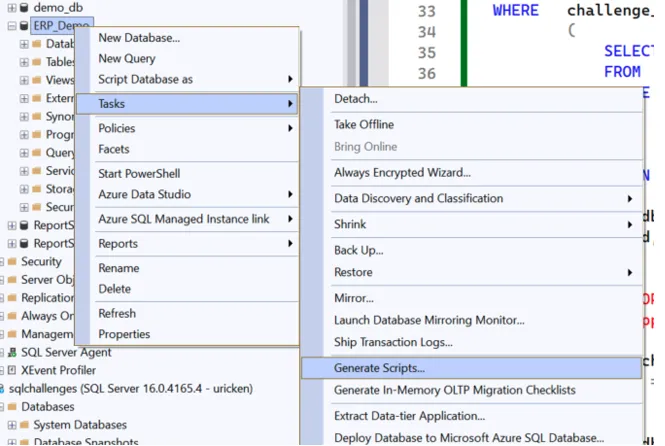
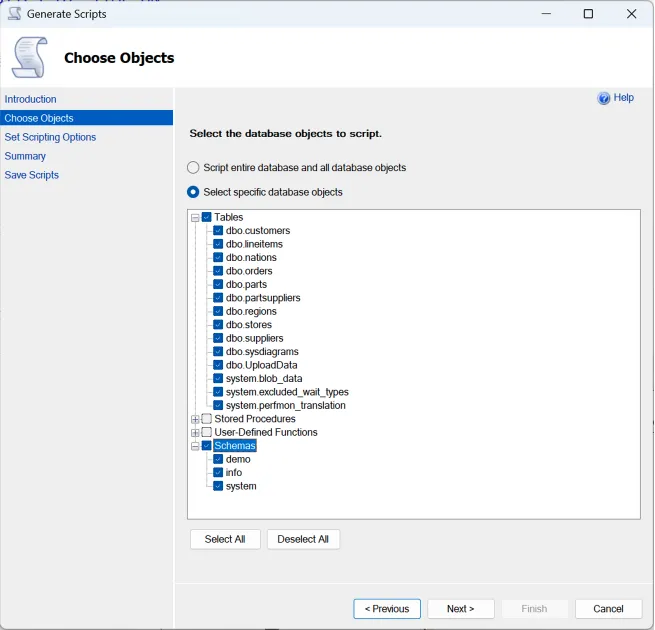
Creation of scripts for objects
Section titled “Creation of scripts for objects”SQL Server Management Studio provides a feature that allows objects in a database to be read and saved as scripts.
- RePlay the scripts in your source database
- Transfer all data from the source tables into the target database
- Add the target server as subscriber
see “Setting Up the Subscriber”
Using Replication with Always On Availability Groups
Section titled “Using Replication with Always On Availability Groups”There are no restrictions for implementing transactional replication in an availability group.
The target database must first be set up via the STACKIT portal. This step is necessary because a new database in a contained availability group cannot be integrated directly via SSMS.
Once the database has been integrated into the contained availability group, it can be addressed via the AG Listener (load balancer) without any further problems.
All steps described so far remain identical without restrictions.
If the availability group fails over, there are little to no delays. Replication resumes after a few seconds.
Additional Resources and References
Section titled “Additional Resources and References”- Concept of Transactional Replication
- SQL Server Management Studio and SQLCMD
sp_adddistributorsp_MSupdate_agenttype_defaultsp_adddistributiondbsp_adddistpublishersp_replicationdboptionsp_addlogreader_agentsp_addpublicationsp_addpublication_snapshotsp_addarticlesp_addsubscriptionsp_addpushsubscription_agent