Config patches
Zuletzt aktualisiert am
Introduction
Section titled “Introduction”In STACKIT Edge Cloud (STEC) we use declarative configuration for everything. This includes the configuration of the registered hosts. Sometimes the machine config that is generated when you create a cluster is not enough to satisfy your needs. To adjust the setup of Talos—and the instance of Kubernetes running within—you may override most settings using patches. This article provides you with advanced examples of how to apply such patches.
Config patches
Section titled “Config patches”A Talos Linux host is fully managed using a set of YAML configuration files. When you modify these configurations we call the change a configPatch. You may have multiple config patches that will be merged before they are applied, which helps to organize the desired configuration in smaller patch files that you can apply together as needed.
Kubernetes runs on a 1+n set of Talos Linux hosts, which are called edge hosts, and it is configured in the same way using config patches. Since the Kubernetes configuration used on the hosts that form a cluster should be pretty identical for every cluster member, STEC provides an additional set of config patches called clusterConfigPatches, which are defined at cluster level and applied to all hosts of the cluster. The merge is performed with the host’s configPatches having precedence over the cluster’s clusterConfigPatches.
When working with Talos for the first time, there are some core concepts that you should be familiar with:
- Since the primary use case of Talos Linux is to run a Kubernetes cluster in that philosophy it doesn’t make sense to configure a Talos Linux without a Kubernetes configuration and as of today this is not supported.
- Although the machine configuration—as implied by it’s name—contains data that defines how the machine should be configured, it also contains a cluster configuration section that will use defaults—for example to configure Kubernetes—if no configuration is explicitly set in the applied machine configuration. Conversely this means, that you can not configure a Talos Linux machine without deploying Kubernetes in some way or another on it.
- Because a cluster is simply a group of machines sharing a common cluster configuration, this common cluster configuration has to be configured on every single machine that should be part of the cluster. Thus, the cluster configuration within every machine config part of a cluster usually will be nearly identical.
Patching YAML files can be done using different formats that enforce different merge behavior. Here’s a partial list of the common patch formats:
- JSON Merge Patch (RFC 7386). Used for simple, direct updates to a resource. A JSON object that mirrors the target document’s structure.
- JSON Patch (RFC 6902). Used for complex or conditional updates. Is array of “operations” with specific JSON Pointers.
- Strategic-Merge Patches / Server-Side-Apply (SSA). Used for complex or conditional updates. A JSON or YAML object that mirrors the target document, but with special directives. Strategic Merge Patches are easier to read and maintain compared to JSON Patch (RFC 6902). Unlike JSON Patch (RFC 6902) or JSON Merge Patch (RFC 7386), which are formal internet standards, the Strategic-Merge Patch is a Kubernetes-specific patching mechanism with it’s own spec. However, strategic-merge patches are not supported for CRDs and therefore can not be used directly for STEC resources. This is where Server-Side-Apply (SSA) steps in, which is the recommended method to edit resources. It makes use of the special directives defined in the CRD itself, identical to strategic-merge patches, which tells Kubernetes how exactly to merge objects. The limitation is, that SSA doesn’t offer operations so—similar to JSON Merge Patches—the required workflow to patch a resource becomes a 3-step get-edit-apply workflow.
Please note that not every patch format is supported by all resources. When trying to use a unsupported patch format you’ll receive an adequate error message.
A downside of using JSON Patch (RFC6902), to patch properties of list elements, is that JSON Patch can only select a list element using it’s list index position. If the position changes, the patch will be applied to an element not intended by the user. This is a limitation of JSON Patch that you should consider before using it.
While the configPatches and clusterConfigPatches are normal Kubernetes fields that can be manipulated using any of the supported patch formats, the content of each element of those lists are simply strings. Semantically, those strings need to be either JSON Patches (RFC 6902) or Strategic-Merge Patches. However, please be aware that Talos allows the use of a multi-document configuration. When used, JSON Patches (RFC 6902) won’t work, since they don’t support the multi-document format.
Talos may or may not require a reboot when changing it’s machine configuration. Whether or not a reboot is required depends on the mode in which the change is applied and what kind of change it is. STEC always applies changes in the default mode (automatic).
Prerequisites:
- Successfully authenticated in the UI of a STEC instance.
Steps:
-
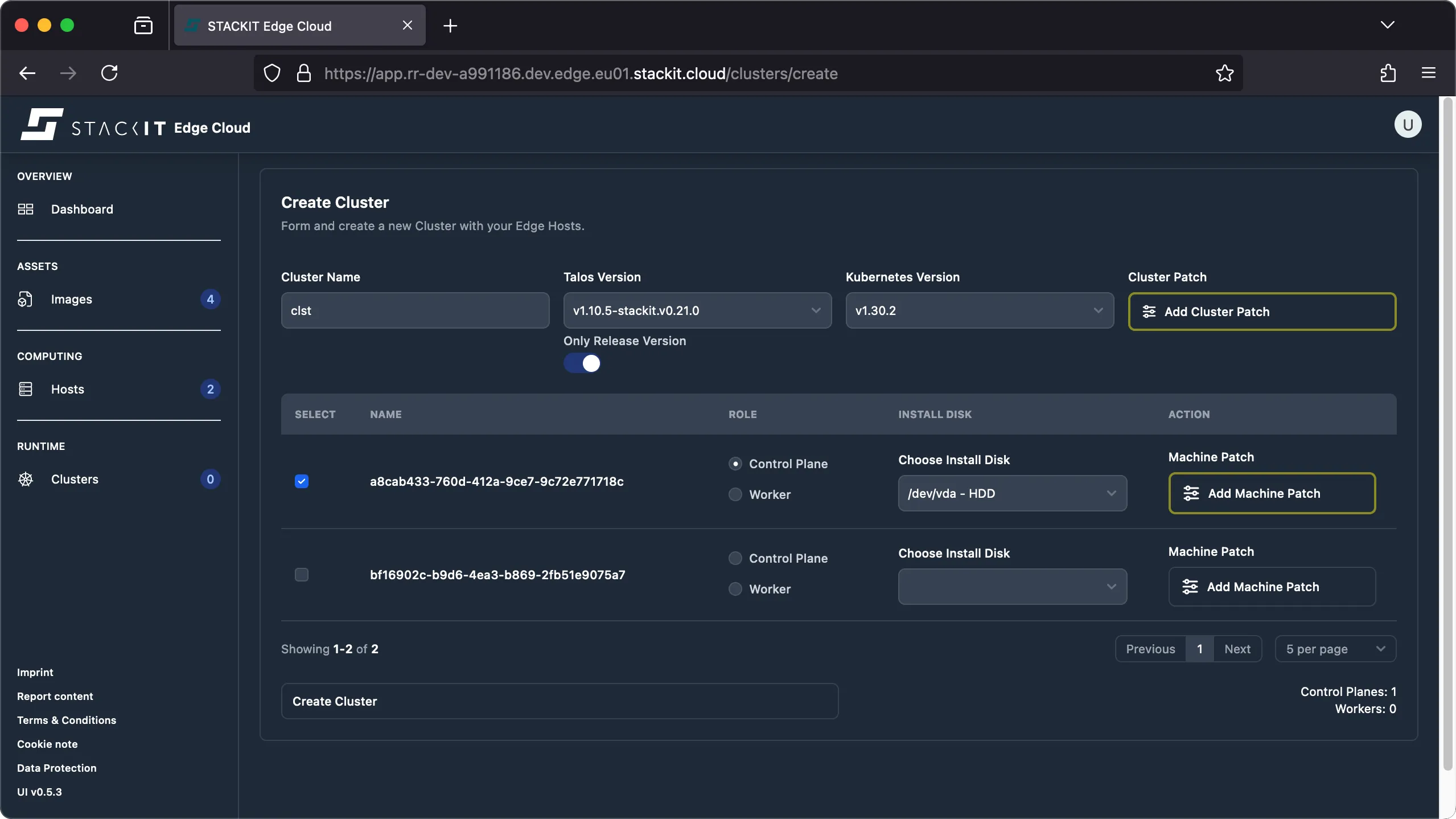
Navigate to the Clusters view and click on the ‘create cluster’ button. In the cluster creation UI you will be presented with multiple places where you can define configuration patches:
-
Settings that should be identical for every host should be defined on the cluster level using a cluster patch.
Click the ‘add cluster patch’ button to open the editor. For example, if you want to change the
cluster.allowSchedulingOnControlPlanesetting you need to add the following patch: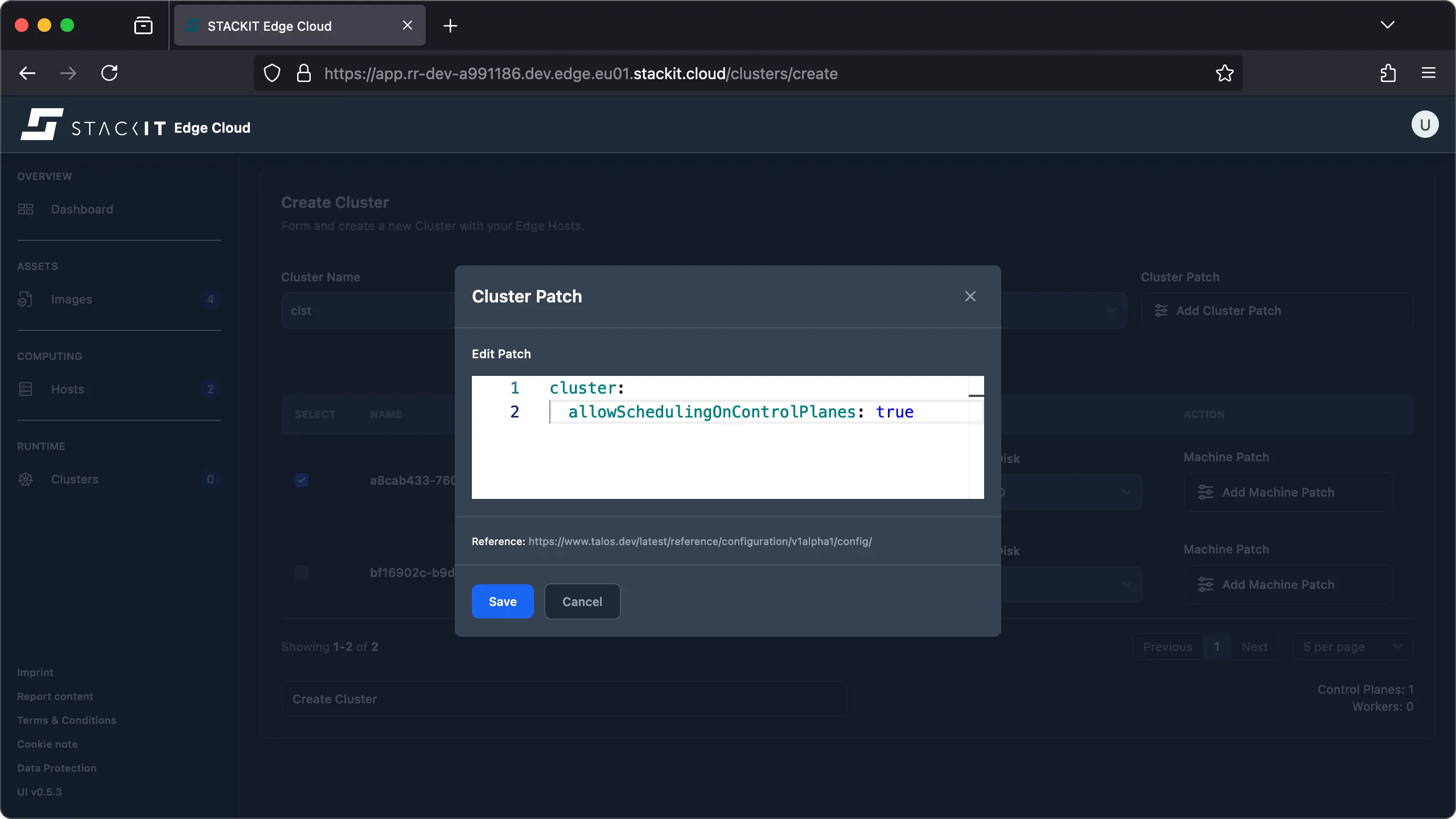
-
Every host may have host specific overrides for it’s machine configuration.
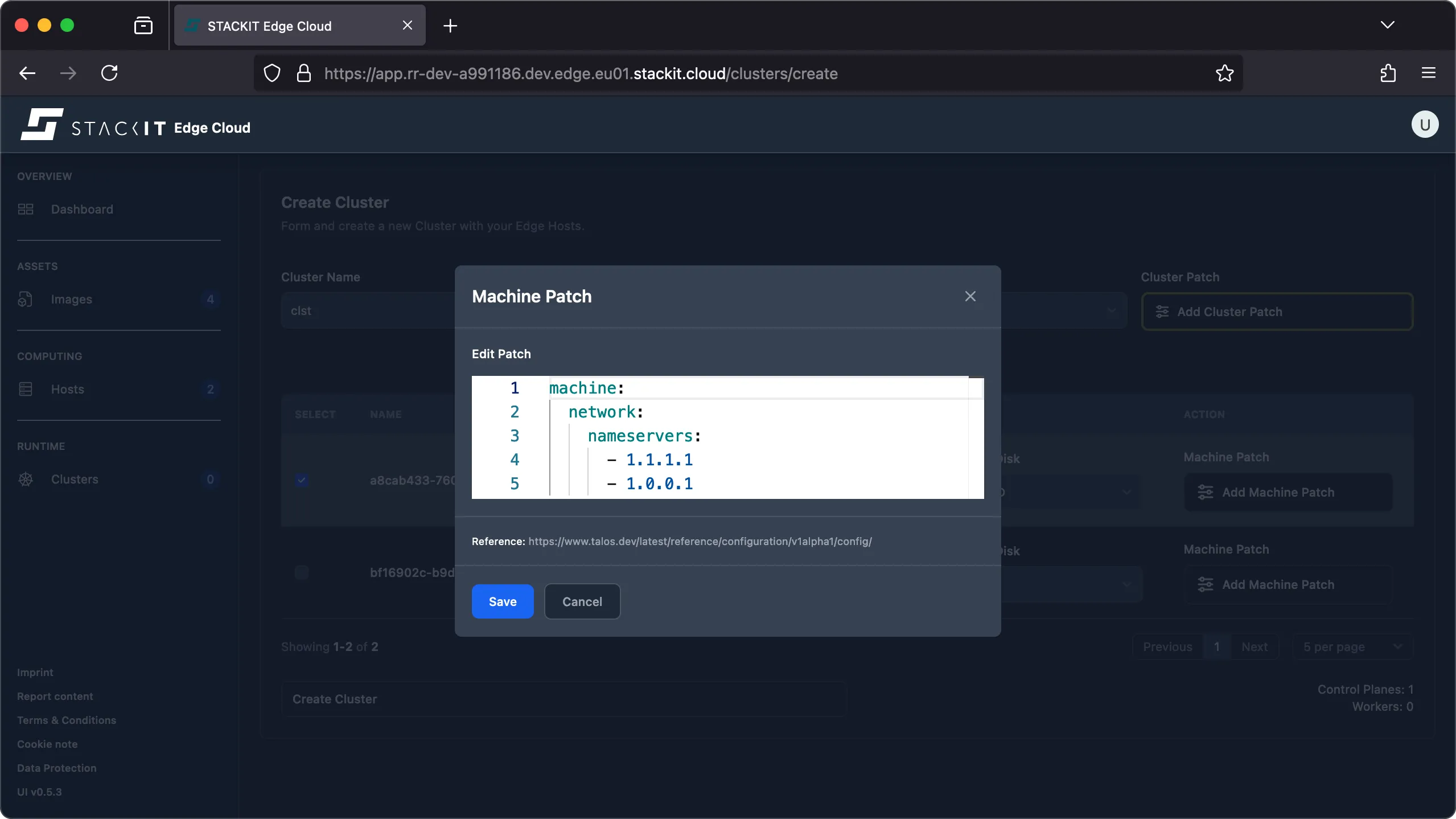
This means host specific patches will take precedence over the defined cluster patch. In this example the edge host was initially deployed using the DNS nameservers
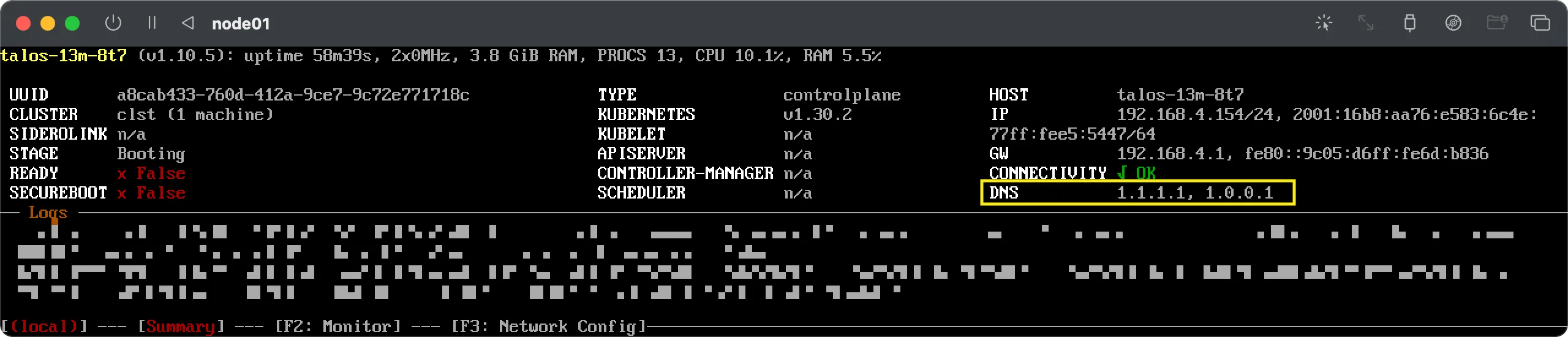
1.1.1.2and1.0.0.2. Those could have been configured via DHCP or using boot customization. It’s not important how exactly and why it was initially configured that way: for the sake of this example when making this host part of a cluster we want to change the nameservers to be1.1.1.1and1.0.0.1. This can be done using themachine.network.nameserverslist.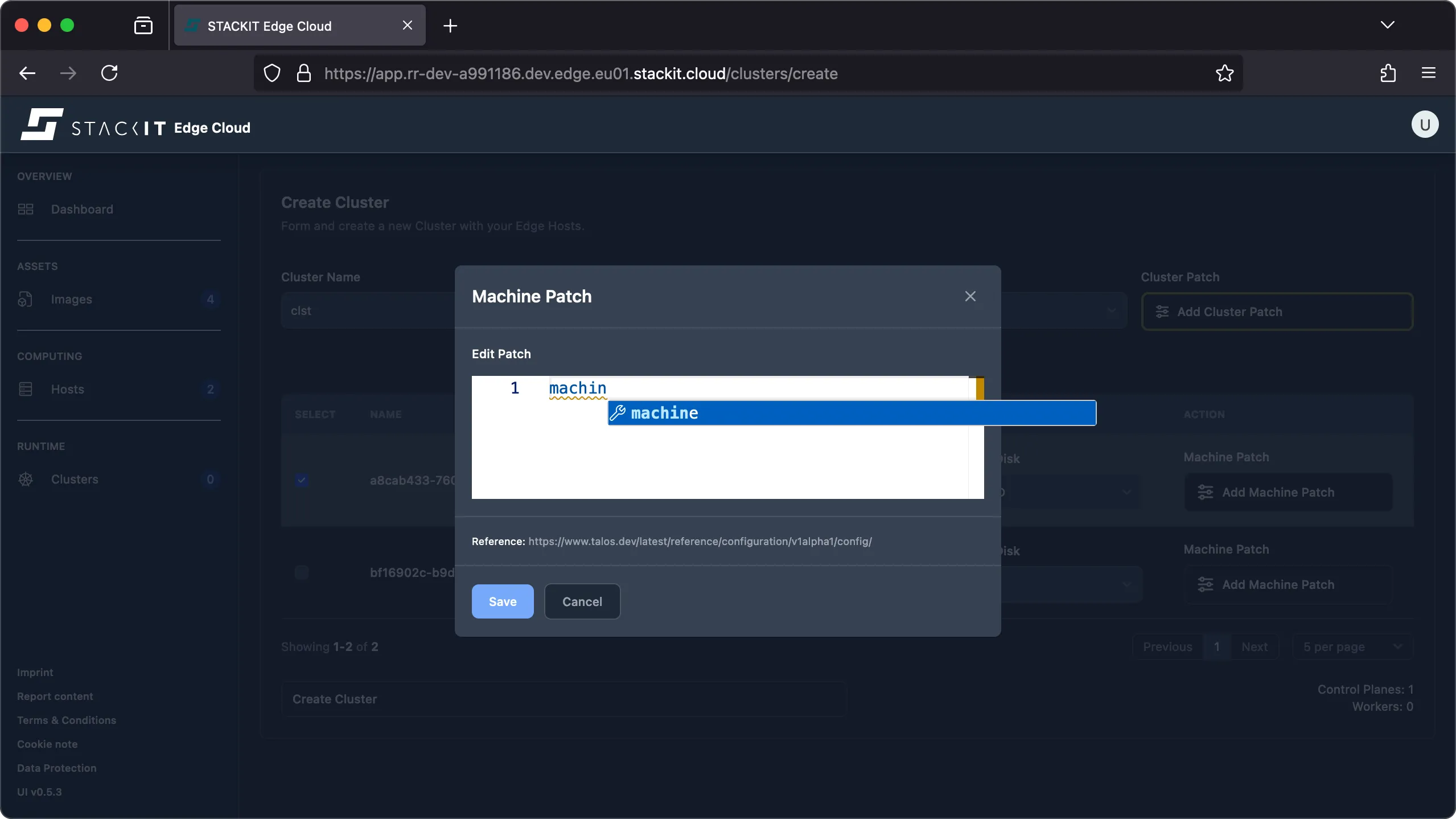
-
When the cluster is created, the resulting machine configuration will be merged and can be reviewed in the
edgehosts.edge.stackit.cloud.spec.machineConfigproperty of every EdgeHost resource. It is subsequently applied to the edge host, resulting in the desired configuration changes to be applied on the system.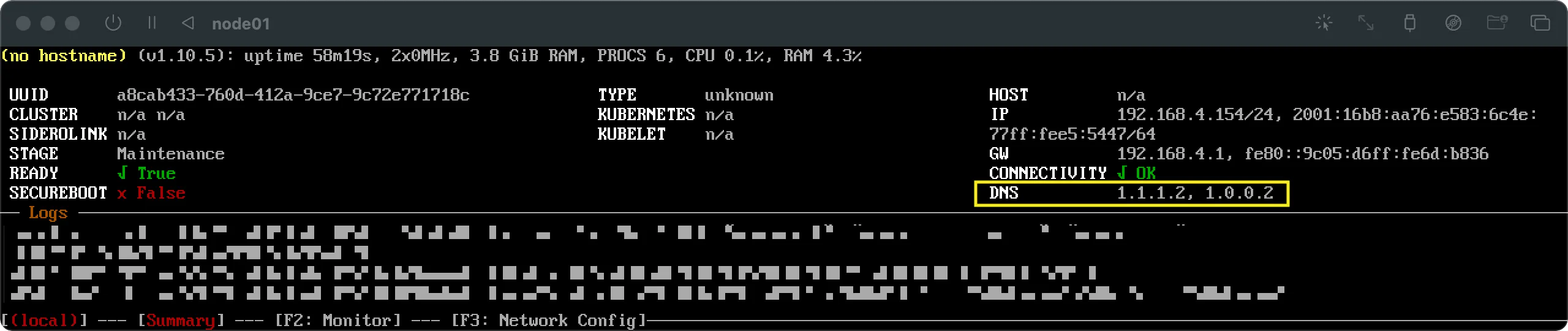
Prerequisites:
- Successfully authenticated with a STEC instance.
- Kubeconfig for the STEC instance is exported in your terminal session.
- Tools: a generic Linux bash terminal,
kubectl.
Steps:
-
Using the API, it’s possible to apply patches to edge hosts and clusters at any time.
In the creating clusters documentation we already demonstrated how to apply machine-specific or cluster-wide patches at cluster creation time. In this example, we’ll demonstrate how to patch an existing setup.
Please be aware that while every config patch provided to the
clusterConfigPatchesandconfigPatcheslists is a string that has to be a valid JSON Patch (RFC 6902) or Strategic-Merge Patch, theclusterConfigPatchesandconfigPatcheslists themselves are simply lists of strings that don’t define a merge-key (x-kubernetes-list-type: atomic). This means that if you patch theclusterConfigPatchesorconfigPatcheslists, all list elements of the respective list will be removed and replaced with your patch’s list. If you want to retain existing patches, you’ll either have to use JSON Patches (RFC 6902), or first get the current configuration and manually merge it with your patch definition to have a complete list of all patches before you patch the EdgeCluster resource, e.g. using SSA. -
Since there is only one cluster resource and one
clusterConfigPatcheslist, we can simply use a JSON Patch (RFC 6902) to add new patches to the end of the list ofclusterConfigPatches. If you want to replace all existing patches from theclusterConfigPatcheslist with a new list of patches, you could use a JSON Merge Patch (RFC 7386) instead.Terminal window > CLUSTERNAME="YOUR-EDGECLUSTER-NAME"> cat << EOF > controlplane_scheduling.yaml- op: addpath: /spec/talos/clusterConfigPatches/-value: |-cluster:allowSchedulingOnControlPlanes: trueEOF> kubectl patch edgeclusters.edge.stackit.cloud/$CLUSTERNAME --type=json --patch-file controlplane_scheduling.yamledgecluster.edge.stackit.cloud/YOUR-EDGECLUSTER-NAME patched -
Every host may have host specific overrides for it’s machine configuration.
This means host specific patches will take precedence over the defined cluster patch. In this example the edge host was initially deployed using the DNS nameservers 1.1.1.2 and 1.0.0.2. Those could have been configured via DHCP or using boot customization. It’s not important how exactly and why it was initially configured that way: for the sake of this example when making this host part of a cluster we want to change the nameservers to be 1.1.1.1 and 1.0.0.1. This can be done using the machine.network.nameservers list.
Since the spec.nodes list may hold multiple nodes we’ll have to select the correct node to apply the patch to. In this example we’ll use Server-Side-Apply (SSA). The content of the
configPatcheslist will be completely replaced by the content of that list in our provided patch. Adopt the patch file as needed. SSA requires a 3-step get-edit-apply workflow.Terminal window > CLUSTERNAME="YOUR-EDGECLUSTER-NAME"> EDGEHOST_TO_UPDATE="123456789012-abcd-abcd-abcd-123456789012"### Export the variable so it can be consumed by yq> export EDGEHOST_TO_UPDATE### Create the patch file. Make sure to adopt it as needed to include ALL the configuration you wich to have applied.### The current configuration will be fully REPLACED with the content of this patch file.> cat <<'EOF' > patch.yamlmachine:network:nameservers:- 1.1.1.1- 1.0.0.1EOF### Get the current state of the cluster, remove status and relevant metadata and replace the configPatches of the host with the content of the patch.yaml> kubectl get edgecluster/${CLUSTER_NAME} --namespace ${NAMESPACE} -o yaml | yq 'del(.status,.metadata.resourceVersion,.metadata.uid,.metadata.creationTimestamp,.metadata.generation,.metadata.managedFields,.metadata.finalizers) | (.spec.nodes[] | select(.edgeHost == strenv(EDGEHOST_TO_UPDATE))).configPatches = [load_str("patch.yaml") |. style="literal"]' > desired-cluster.yaml### Server-Side-Apply the new desired state of the clusterkubectl apply -f desired-cluster.yaml --server-side --force-conflictsedgecluster.edge.stackit.cloud/xxx serverside-applied -
The changes should be applied immediately and your host should start using the configuration shortly after. You can verify the cluster has the desired state:
Terminal window > kubectl get edgecluster/${CLUSTER_NAME} -o yaml | yq '.spec' -nodes:- configPatches:- |machine:network:nameservers:- 1.1.1.1- 1.0.0.1edgeHost: 123456789012-abcd-abcd-abcd-123456789012installDisk: /dev/vdamachineConfigRef: ""role: controlplanetalos: {}...
While it’s technically possible to apply machine configuration patches directly using the Talos gRPC API, it is not recommended, because it may be overwritten by the STEC EMP operator that manages your edge hosts. Any desired state change should therefore be done by patching the EdgeCluster resource in STEC.
Common settings
Section titled “Common settings”In this section, we’ll demonstrate how to configure common settings in your EdgeCluster and the EdgeHosts associated with it.
When you configure a setting in the machine configuration, it will only take affect when the machine configuration is applied. This means that during boot, or when your host is not yet part of a cluster (maintenance stage), those configurations will not take effect. Instead, you’ll have to configure all settings that you need in this early stage, by using kernel parameters, as described in boot customization. Please be aware that, when you reset a host, those kernel parameters will be in effect again, even if you had different settings in effect when the machine configuration was still applied. If that’s not what you want, you’ll have to edit the machine configuration of a host to overwrite the original kernel parameters using the machine.install.extraKernelArgs.
Please be aware that, while every config patch provided to the clusterConfigPatches and configPatches lists is a string that has to be a valid JSON Patch (RFC 6902) or Strategic-Merge Patch, the clusterConfigPatches and configPatches lists themselves are simply lists of strings that don’t define a merge-key. This means that, if you patch the clusterConfigPatches or configPatches lists, all list elements of the respective list will be removed and replaced with your patch’s list. If you want to retain existing patches, you’ll either have to use JSON Patches (RFC 6902), or first get the current configuration and manually merge it with your patch definition, to have a complete list of all patches before you patch the EdgeCluster resource.
Static network
Section titled “Static network”If no DHCP server is available, or there are other reasons to configure the network interface in a static manner, the following example will demonstrate how to do so. Please keep in mind that this configuration is performed against the machine configuration that persists during upgrades. If you initially used boot customization to configure the network interface, you should consider to also perform these changes in the machine configuration.
Instead of using a static interface name as a selector to define which interface should be configured, you may also use network device selectors, as shown in this example.
Things to keep in mind for this example:
- The node references a EdgeHost and is selected using it’s index position in the
configPatcheslist (0 equals the first element of the list). - The “replace” operation will remove all list elements from any other
configPatcheslist. Since it’s manipulating a list, the value has to be a list. - The “add” operation requires the use of the special
/-tailing sequence in thepath. The value denotes the content to be added as a list element and thus has to be a string. - While the first three patches are Strategic-Merge Patches, the last patch is provided as JSON Patch (RFC 6902) format. This is to demonstrate that both formats are supported and can be used together. However, please be aware that Talos allows the use of a multi-document configuration. When supplying a config patch that is a multi-document YAML, JSON Patch (RFC6902) is not supported, and the patch has to be specified in the Strategic-Merge Patch format.
- There are certainly other options how the JSON patch could be designed based on your needs. This is just an example that tries to cover different aspects of JSON patch.
> CLUSTERNAME="YOUR-EDGECLUSTER-NAME"> cat << EOF > static_network.yaml- op: replace path: /spec/nodes/0/configPatches value: - | machine: network: hostname: "foobar"- op: add path: /spec/nodes/0/configPatches/- value: | machine: network: interfaces: - deviceSelector: driver: virtio_net hardwareAddr: '92:cc:a0:*' dhcp: false addresses: - 192.168.4.144/24 routes: - gateway: 192.168.4.1 network: 0.0.0.0/0- op: add path: /spec/nodes/0/configPatches/- value: | machine: network: nameservers: - 1.0.0.1 - 1.1.1.1- op: add path: /spec/nodes/0/configPatches/- value: | - op: add path: /machine/time value: bootTimeout: 2m0s disabled: false servers: - time.cloudflare.comEOF
> kubectl patch edgeclusters.edge.stackit.cloud/$CLUSTERNAME --type=json --patch-file static_network.yamledgecluster.edge.stackit.cloud/YOUR-EDGECLUSTER-NAME patched
Internet proxy
Section titled “Internet proxy”If your edge host is behind an internet proxy, you may want to configure the internet proxy so it’s able to reach the STACKIT cloud—which is required for the system to be managed—and other internet services, such as container image registries, which is a hard requirement for Talos to be able to configure Kubernetes.
Things to keep in mind for this example:
- The node references a EdgeHost and is selected using it’s index position in the
configPatcheslist (0 equals the first element of the list). - The “add” operation requires the use of the special
/-tailing sequence in thepath. The value denotes the content to be added as a list element and thus has to be a string. - There are certainly other options how the JSON patch could be designed based on your needs. This is just an example that tries to cover different aspects of JSON patch.
You should consider adding certain names and IPs to the no_proxy variable, to make sure Kubernetes specific traffic is not redirected to your configured proxy. Examples, that you should consider to exclude, are:
- Loopback address (localhost and 127.0.0.1)
- RFC 1918 private IP ranges
- Kubernetes cluster IP ranges
- Kubernetes API server IP
- Kubernetes node IPs
- Kubernetes service DNS domains (
.cluster.local,.svc)
If you’re using IPv6, additional excludes should be considered.
> CLUSTERNAME="YOUR-EDGECLUSTER-NAME"> cat << EOF > internet_proxy.yaml- op: add path: /spec/nodes/0/configPatches/- value: | machine: env: http_proxy: http://my-http-proxy.local:8080 https_proxy: http://my-https-proxy.local:8080 no_proxy: localhost,127.0.0.1,10.0.0.0/8,172.16.0.0/12,192.168.0.0/16,.cluster.local.,.cluster.local,.svc.,.svcEOF
> kubectl patch edgeclusters.edge.stackit.cloud/$CLUSTERNAME --type=json --patch-file internet_proxy.yamledgecluster.edge.stackit.cloud/YOUR-EDGECLUSTER-NAME patched
Registry mirrors
Section titled “Registry mirrors”This example will show you how to configure an internal OCI image registry, that can be used as mirror, instead of the public registries, that are configured by default. In this example we assume the used docker.io mirror doesn’t require authentication, while the k8s.io mirror does.
> CLUSTERNAME="YOUR-EDGECLUSTER-NAME"> cat << EOF > registry_mirrors.yaml- op: add path: /spec/nodes/0/configPatches/- value: | machine: registries: config: b-mirror.example.com: auth: username: b-mirror-username password: BASE64-encoded-passphrase mirrors: docker.io: endpoints: - 'https://a-mirror.example.com' registry.k8s.io: endpoints: - 'https://b-mirror.example.com'EOF
> kubectl patch edgeclusters.edge.stackit.cloud/$CLUSTERNAME --type=json --patch-file registry_mirrors.yamledgecluster.edge.stackit.cloud/YOUR-EDGECLUSTER-NAME patched
Custom certificates
Section titled “Custom certificates”You may add custom certificates to be trusted. This might be required if you configure an internal image registry mirror that is signed using a custom CA.
The content of a config patch may be specified in JSON Patch (RFC 6902) or Strategic-Merge Patch format. However, please be aware that Talos allows the use of a multi-document configuration. When used JSON Patches (RFC 6902) won’t work, since they don’t support the multi-document format. In this example we make use of such a multi-document configuration, since the TrustedRootsConfig is specified as a separate YAML document. Thus, the only allowed patch format for this config patch is the Strategic-Merge Patch format. However, other config patches in the configPatches list may still be supplied as JSON Patch (RFC 6902).
> CLUSTERNAME="YOUR-EDGECLUSTER-NAME"> cat << EOF > trusted_roots.yaml- op: add path: /spec/nodes/0/configPatches/- value: | --- apiVersion: v1alpha1 kind: TrustedRootsConfig name: some-trusted-root certificates: |- -----BEGIN CERTIFICATE-----... -----END CERTIFICATE-----EOF
> kubectl patch edgeclusters.edge.stackit.cloud/$CLUSTERNAME --type=json --patch-file trusted_roots.yamledgecluster.edge.stackit.cloud/YOUR-EDGECLUSTER-NAME patched