Topologies
Zuletzt aktualisiert am
The following article describes what topologies are and how they can be used in SKE to improve your application’s resilience.
Topology is a widely-used concept in datacenters, public clouds and Kubernetes itself. It refers to the failure-resistent architecture of compute resources by subdividing their location into regions and zones (also called Availability Zones or AZs). STACKIT works with topologies, too. You can learn more about the STACKIT-specific topology layout here.
As an SKE customer, you can use this topology to your advantage: By distributing your Kubernetes workloads across multiple AZs, you can improve resilience and protect your services against unforeseen failures. In the following, we will have a look at how exactly this works in SKE.
Topologies in STACKIT Kubernetes Engine
Section titled “Topologies in STACKIT Kubernetes Engine”Of course, Kubernetes has some built-in mechanisms to make workloads failure-resistant, think of Deployments that start many instances of the same application and load balancers that route traffic to all of them (that are healthy).
On top of that, you can leverage STACKIT Regions and Availability Zones to further improve the resilience of your applications. You achieve this by spanning your cluster over multiple AZs. For example, in our region “Heilbronn/Germany”, there are the following zones:
- eu01-1
- eu01-2
- eu01-3
- eu01-m
These AZs can be used in SKE when creating node pools for your cluster.
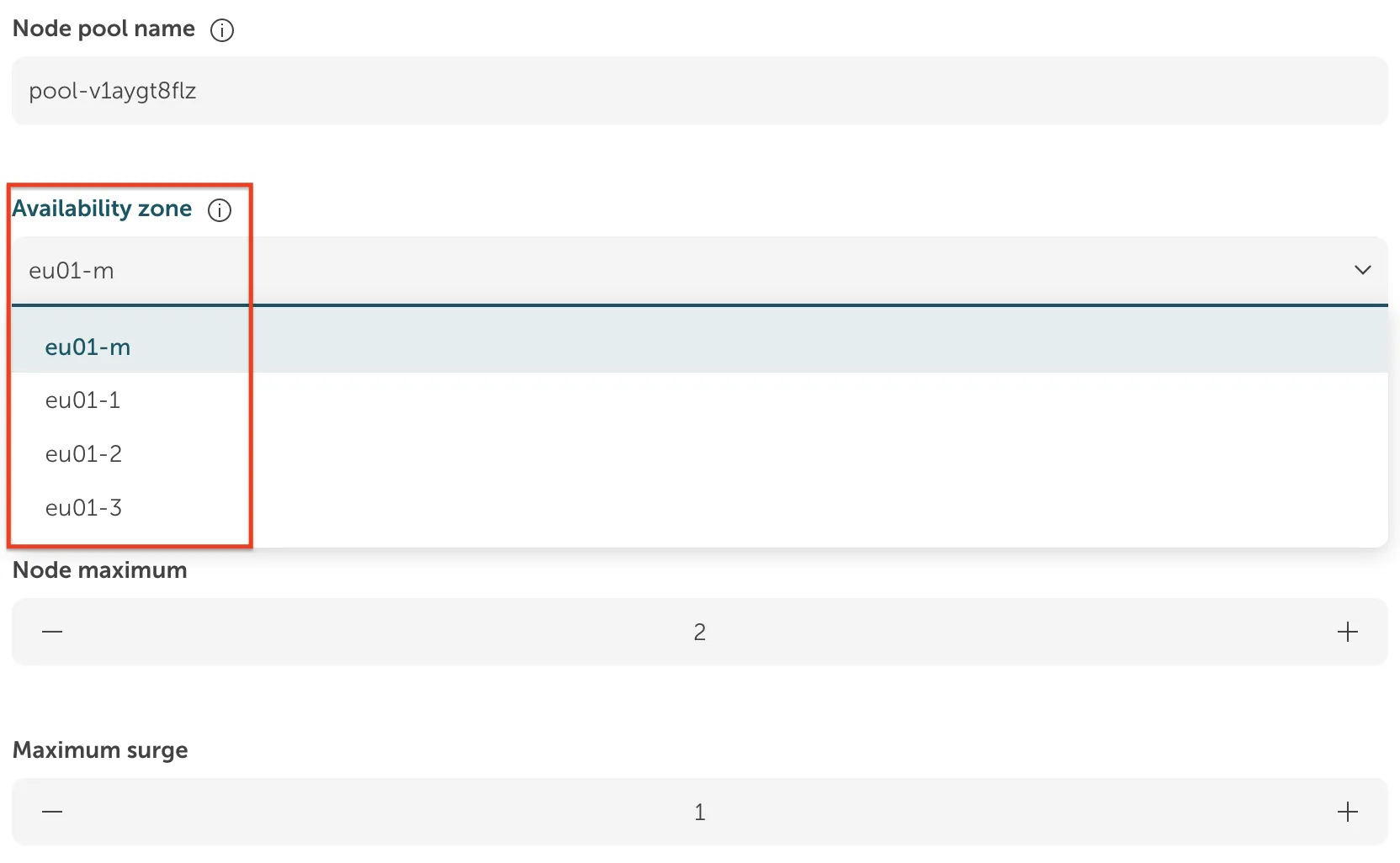
A single node pool can be configured to span multiple AZs, distributing its nodes across them to ensure high availability. Please note that the configured node maximum must be equal to or greater than the number of selected AZs.
When multiple AZs are selected for a node pool, SKE automatically distributes the nodes across the selected zones. For example, if you create a node pool with a size of 4 and select two AZs (eu01-1 and eu01-2), SKE will place 2 nodes in each AZ.
You can configure additional AZs for existing node pools, it is—however—not possible to remove AZs from the configuration. To drop a previously configured AZ, you must create a new node pool and then move your workloads over. This is achieved by draining the old nodes. Pay close attention to the migration of Volumes during this process: How to migrate your storage to another AZ.
Single availability zone and metro availability zone
Section titled “Single availability zone and metro availability zone”The Metro AZ is a special STACKIT offering that is actually a High Availability Zone spanning the other three AZs (eu01-1 to eu01-03, called Single AZs). It is designed for applications that cannot achieve resilience on their own - in case of a failure of one of the Single AZs an application placed in the Metro AZ is started in one of the other Single AZs. You can learn more about this concept here: Block Storage service plans.
As described above, the built-in Kubernetes mechanisms and its ability to span multiple AZs make it very failure-resistant already. You do not have to use the Metro AZ in SKE to achieve High Availability if the node pools are configured correctly to run in multiple AZs.
Working with Multiple AZs in Kubernetes
Section titled “Working with Multiple AZs in Kubernetes”Suppose you have created an SKE cluster and configured two Node Pools, one in AZ eu01-1 and one in AZ eu01-2. Both Node Pools contain one machine each. After connecting to the cluster with the .kubeconfig file, you can see that each node is labelled according to its placement in the respective AZs:
kubectl get nodes --show-labelsNAME STATUS ROLES AGE VERSION LABELSnode-1 Ready <none> 1h v1.30.3 failure-domain.beta.kubernetes.io/region=RegionOne,failure-domain.beta.kubernetes.io/zone=eu01-1,topology.cinder.csi.openstack.org/zone=eu01-1,topology.kubernetes.io/region=RegionOne,topology.kubernetes.io/zone=eu01-1node-2 Ready <none> 1h v1.30.3 failure-domain.beta.kubernetes.io/region=RegionOne,failure-domain.beta.kubernetes.io/zone=eu01-2,topology.cinder.csi.openstack.org/zone=eu01-2,topology.kubernetes.io/region=RegionOne,topology.kubernetes.io/zone=eu01-2
(The node names and the list of labels have been shortened for brevity.)As the Kubernetes documentation states: Kubernetes automatically spreads the Pods for workload resources (such as Deployment or StatefulSet) across different nodes in a cluster. This spreading helps reduce the impact of failures.
As Kubernetes distributes the Pods of a Deployment across different nodes automatically, we already have a working failure-resistant setup across two AZs in this example case. Learn more about how Kubernetes supports multiple AZs: Multiple Zones.
However, if there are several nodes in the same Node Pool, it could be that Pods get scheduled within the same AZ. You can fine-tune the behaviour of Multi-AZ clusters manually. The mechanisms to do that are:
Example for Node Selector Constraints:
Section titled “Example for Node Selector Constraints:”apiVersion: v1kind: Podmetadata: name: nginxspec: containers: - name: nginx image: nginx imagePullPolicy: IfNotPresent nodeSelector: topology.kubernetes.io/zone: eu01-1The example Pod running nginx would be placed on a node in the eu01-1 AZ because of the node selector constraint. The node selector field in the Pod specification is a simple key-value list, where the key must match the node’s label name and the value must match the label’s value. This means you could use any of the labels shown above (kubectl get nodes —show-labels) to constrain node selection to specific AZs.
Example for Pod Topology Spread Constraints:
Section titled “Example for Pod Topology Spread Constraints:”apiVersion: v1kind: Podmetadata: name: nginx labels: app: examplespec: containers: - name: nginx image: nginx imagePullPolicy: IfNotPresent topologySpreadConstraints: - maxSkew: 1 topologyKey: topology.kubernetes.io/zone whenUnsatisfiable: DoNotSchedule labelSelector: matchLabels: app: nginxThis approach will take into account all nodes that have the topology.kubernetes.io/zone label present. The constraint is applied for all Pods that have the label app: example. Kubernetes will make sure that these pods are scheduled across all considered nodes in such a way that the maxSkew value is not violated. (The maximum skew describes how big a difference between the number of pods on each considered node is tolerated.)
Using Persistent Volumes with Availability Zones
Section titled “Using Persistent Volumes with Availability Zones”When your applications require Persistent Volumes by requesting Persistent Volume Claims, you need to pay attention to some details in regard to AZs.
If you create a Persistent Volume Claim that is not yet used by any Pod, it will not create a bound Persistent Volume right away. That means the volume is not placed in a specific AZ of your cluster because Kubernetes does not yet know where the mounting Pod will be placed. Instead, the placement of this Volume occurs when a Pod is created that references the Persistent Volume Claim. The needed Persistent Volume then gets placed in the same AZ as the Pod requesting it. This late-binding mode is called WaitForFirstConsumer.
Example for Dynamic Volume Creation
Section titled “Example for Dynamic Volume Creation”Suppose you have the following PersistentVolumeClaim in a file called pvc.yaml:
apiVersion: v1kind: PersistentVolumeClaimmetadata: name: example-pvcspec: accessModes: - ReadWriteOnce resources: requests: storage: 2Gi storageClassName: "premium-perf1-stackit"You can apply this by running kubectl apply -f pvc.yaml. Check the status of this PVC:
kubectl describe pvc example-pvckubectl describe pvc example-pvc
Name: example-pvcNamespace: defaultStorageClass: premium-perf1-stackitStatus: PendingVolume:Labels: <none>Annotations: <none>Finalizers: [kubernetes.io/pvc-protection]Capacity:Access Modes:VolumeMode: FilesystemUsed By: <none>Events: Type Reason Age From Message ---- ------ ---- ---- ------- Normal WaitForFirstConsumer 7s (x3 over 26s) persistentvolume-controller waiting for first consumer to be created before bindingAs you can see, no Volume is bound to the Claim yet. The PVC is waiting for the first consumer. Now, let’s create a pod using this PVC (using a YAML file called pod.yaml):
apiVersion: v1kind: Podmetadata: name: examplespec: volumes: - name: pv-storage persistentVolumeClaim: claimName: example-pvc containers: - name: exmaple-container image: busybox volumeMounts: - mountPath: "/tmp/data" name: pv-storageNow, the PVC is bound. The name of the bound Persistent Volume can be retrieved as follows:
kubectl get pvc example-pvcNAME STATUS VOLUME CAPACITY ACCESS MODES STORAGECLASS AGEexample-pvc Bound <volume-name> 2Gi RWO premium-perf1-stackit 10It is now possible to verify the location of the Volume in the AZ:
kubectl get pv <volume-name> -o yamlapiVersion: v1kind: PersistentVolumemetadata: ... name: <volume-name>spec: accessModes: - ReadWriteOnce capacity: storage: 2Gi claimRef: apiVersion: v1 kind: PersistentVolumeClaim name: example-pvc namespace: default .... nodeAffinity: required: nodeSelectorTerms: - matchExpressions: - key: topology.cinder.csi.openstack.org/zone operator: In values: - eu01-2 persistentVolumeReclaimPolicy: Delete storageClassName: premium-perf1-stackit volumeMode: Filesystemstatus: phase: BoundThe nodeAffinity field shows that this particular Volume is required to be scheduled
in the eu01-2 zone (this can be different for you). It can therefore not be mounted in another AZ. See below for a migration guide.
For more information on binding modes, see the official Kubernetes documentation.
Migrating Volumes between AZs
Section titled “Migrating Volumes between AZs”In some cases, you might want to migrate Persistent Volumes between AZs. We have put together a tutorial on how to do that here: How to migrate your storage to another AZ.