Connect to SQLServer Flex
Last updated on
Prerequisites
Section titled “Prerequisites”- You have a running instance of STACKIT SQLServer Flex and a user with proper permissions for your SQLServer Flex instance. If not, you can start with Create your first instance of SQLServer Flex and connect to it.
Connect to your SQLServer flex instance
Section titled “Connect to your SQLServer flex instance”You can connect to SQLServer Flex instances using any client tool that supports SQL Server as a source connection. Below are examples of connecting using SQL Server Management Studio and Azure Data Studio as client tools.
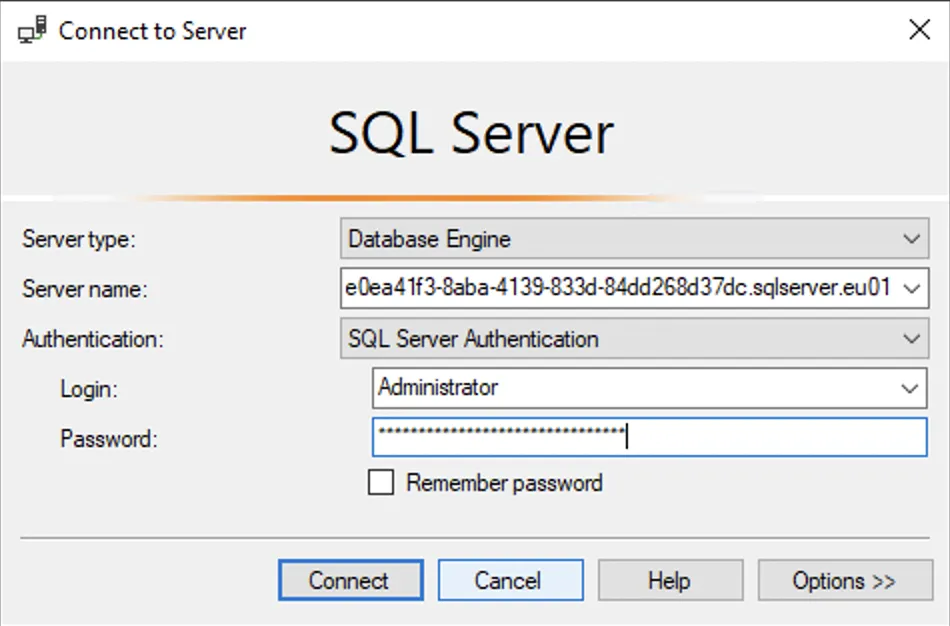
To connect to the SQLServer Flex instance via SQL Server Management Studio (SSMS), the following parameters must be defined:
| Parameter | Suggested values |
|---|---|
| Server type | Database Engine |
| Server name | The fully qualified server name (<instance ID>.sqlserver.eu01.onstackit.cloud) |
| Authentication | SQL Server Authentication |
| User name | SQL Server login name |
| Password | SQL Server login password |
See the screenshot below for an example of the parameters.
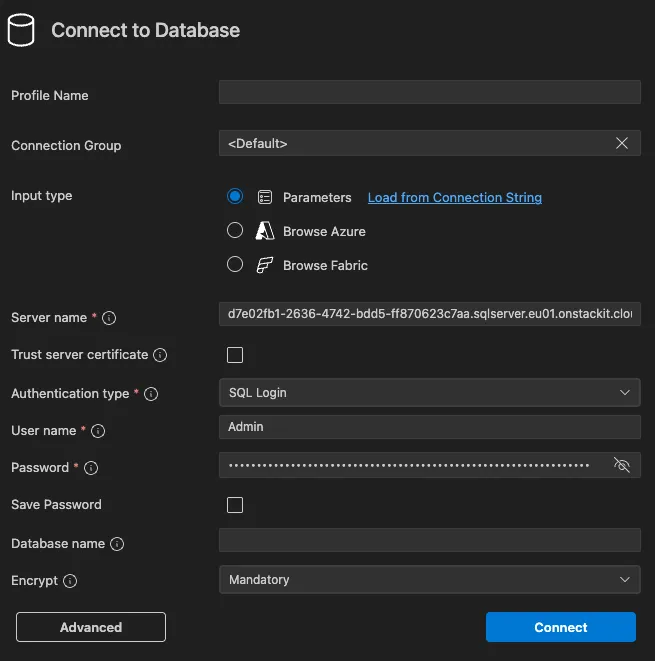
To connect to the SQLServer Flex instance via Visual Studio Code, the following parameters must be defined in the MSSQL Server Extension:
| Parameter | Suggested values |
|---|---|
| Input type (checkbox) | Parameters |
| Server | The fully qualified server name (<instance ID>.sqlserver.eu01.onstackit.cloud) |
| Authentication Type | SQL Login |
| User name | SQL Server login name |
| Password | SQL Server login password |
See the screenshot below for an example of the parameters.