Resources
Last updated on
Resource Pool
Section titled “Resource Pool”A Resource Pool is a container in which applications, databases and file systems store data. It hosts NFS Shares which are logically defined file systems within a Resource Pool.
Each Resource Pool needs a defined size. This size is reserved for the Resource Pool (e.g. if you create a Resource Pool with 2 TB, you will always have access to 2 TB). The NFS Shares hosted by the Resource Pool do not need a fixed size - they have access to the full space of the Resource Pool. However, it is possible to set a limit.
Resource Pools have a minimum size of 500 Gigabytes and a maximum size of 20 Terabytes. They can be mounted only in “read only” mode.
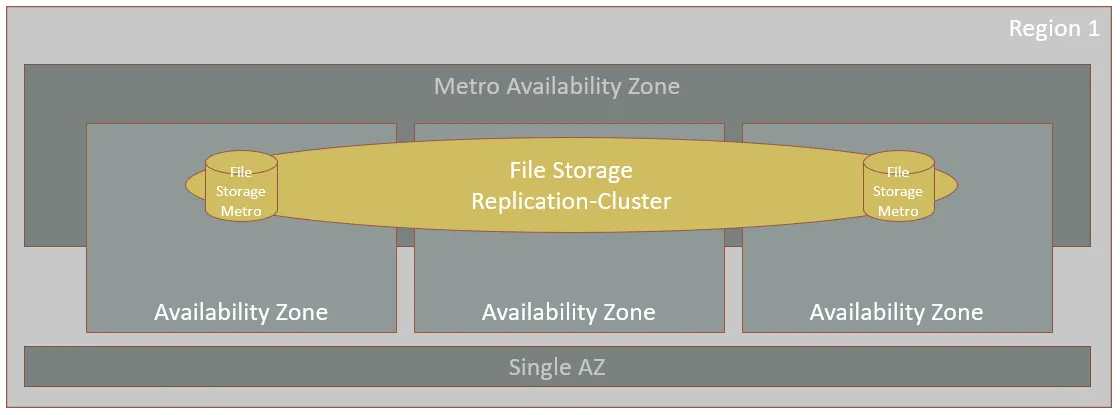
Every Resource Pool that is created in a Metro-Availability Zone (e.g. “eu01-m”) is located on a logical Storage System. These Storage Systems are replicated to another Availability Zone as well to ensure a very good availability of the service.
NFS Shares
Section titled “NFS Shares”An NFS Share is a logically defined file system within a Resource Pool. NFS Shares have access to the entire space of the Resource Pool they live in, so they do not have the notion of “size”. However, you can define a space limit so that you can better control how multiple NFS Shares use the space of the Resource Pool they live in.
NFS Shares can be mounted in read and write mode.
Resource Pool Snapshots
Section titled “Resource Pool Snapshots”A Resource Pool Snapshot is a point-in-time image of the Resource Pool’s data. A Resource Pool Snapshot contains all NFS Shares of a Resource Pool. Keep in mind that a Resource Pool Snapshot consumes real physical space from the Resource Pool.
You can access the snapshots by mounting the Resource Pool and entering the folder “.snapshot”. Please keep in mind, that the API bool flag “snapshotsAreVisible” might prevent you from accessing the snapshots (e.g. for security reasons). Additionally, the access to the snapshots is always controlled by the ACL of the Resource Pool. That means, if the snapshots are visible and the ACL allows reading the Resource Pool, then it also allows reading the snapshots of all shares.
Share Export Policies
Section titled “Share Export Policies”A Share Export Policy is a set of rules that control client access to the data storied in the NFS Shares. This is where you can define which IPs can mount the NFS Shares and which type of access these IPs have.