Datenbanken erstellen
Zuletzt aktualisiert am
Voraussetzungen
Abschnitt betitelt „Voraussetzungen“Um die auf dieser Seite beschriebenen Schritte durchführen zu können, müssen die folgenden Bedingungen erfüllt sein:
-
Ihr Unternehmen hat ein Kundenkonto.
(Siehe: Kundenkonto erstellen) -
Sie haben ein Benutzerkonto mit den erforderlichen Berechtigungen.
(Siehe: Ein Benutzerkonto erstellen) -
Sie haben ein Projekt in Ihrem Kundenkonto.
(Siehe: Ein Projekt erstellen) -
Sie haben ein Dienstkonto erstellt.
(Siehe: Ein Dienstkonto erstellen) -
Sie haben diesem Dienstkonto die erforderlichen Projektberechtigungen zugewiesen.
(Siehe: Berechtigungen für ein Dienstkonto zuweisen) -
Sie haben ein Zugriffstoken für dieses Dienstkonto erstellt.
(Siehe: Authentifizierungstoken einem Dienstkonto zuweisen) -
Sie haben eine SQLServer Flex-Instanz erstellt.
(Siehe: Erstellen einer SQLServer Flex-Instanz) -
Sie sind mit der SQLServer Flex-Instanz verbunden.
(Siehe: Verbindung zu einer SQLServer Flex-Instanz) -
Sie haben zuvor einen Benutzer erstellt und ihm die richtige Serverrolle zugewiesen
(Siehe: Benutzer erstellen)
(Siehe: Server-, Projektrollen und Berechtigungen)
Überlegungen zur Erstellung von Datenbanken auf SQLServer Flex
Abschnitt betitelt „Überlegungen zur Erstellung von Datenbanken auf SQLServer Flex“-
Datenbank-Benamung:
Datenbanknamen dürfen nur alphanumerische Zeichen enthalten (a-z,A-Z,0-9ohne Umlaute)
zusammen mit “_”, andere Sonderzeichen oder Leerzeichen sind nicht erlaubt.
Datenbanknamen sollten höchstens 80 Zeichen lang sein. -
Datenbank-Optionen / Parameter:
Das Anlegen von Datenbanken wird aktuell durch die Angabe des Datenbanknamens, des Eigentümer (OWNER), das Compatibility-level sowie der Collation als Parameter unterstützt. -
Datenbank Initial:
Beim Erstellen von Datenbanken über das Portal oder die API werden die Datenbanken nur mit zwei Dateien erstellt (1 Datendatei und 1 Protokolldatei).
Beim Erstellen von Datenbanken per Transact SQL (T-SQL) können Sie die Datenbanken eigenverantwortlich aufbauen.
Jedoch können sollten die Dateien nur an bestimmten Orten erstellt werden, wobei die folgenden Empfehlungen für eine bessere Festplattenverwaltung gelten:- Die Datendateien müssen an folgendem Ort erstellt werden:
/var/opt/mssql/custdata/. - Die Protokolldateien müssen an folgendem Ort erstellt werden:
/var/opt/mssql/custlog/. - Am besten geben Sie bei der Erstellung keine Pfadangaben ein (auf PRIMARY / LOG on).
Die Größe dieser Dateien beträgt:
- bei Datendatei
128 MB, mitautogrowthof64 MB. - bei Protokolldatei
64 MB, mitautogrowthof64 MB.
- Die Datendateien müssen an folgendem Ort erstellt werden:
-
Datenbank Collation:
Datenbanken können mit beliebigen benutzerdefinierten Collation erstellt werden.
Bitte beachten Sie jedoch, dass die Collation des Servers in der aktuellen Version mit dem WertSQL_Latin1_General_CP1_CI_ASfestgelegt ist.
Die Collation in der tempdb wird also immerSQL_Latin1_General_CP1_CI_ASsein. -
Datenbank Compatibility-level:
Das Datenbank Compatibility-level setzt die Datenbank in den richtigen Feature-Level-Modus für den SQL Server.
Das bedeutet, dass der SQL Server diese Datenbank mit den für den definierten Compatibility-level entwickelten Features ausführt. -
Datenbank Recovery-Modell:
Das Datenbank Recovery-Modell ist standardmäßigFULLund sollten sich immer im FULL-Recovery-Modell befinden, um das im SLA festgelegte RPO-Niveau zu gewährleisten.
Datenbank erstellen
Abschnitt betitelt „Datenbank erstellen“- Navigieren Sie zu SQLServer Flex und wählen Sie den Datenbankserver aus, auf dem Sie eine Datenbank erstellen möchten.
- Erstellen Sie den Datenbankbenutzer für Ihre neue Datenbank.
Siehe: Logins und Benutzer in SQLServer Flex-Instanzen erstellen - Wählen Sie Datenbanken aus dem Menü.
- Klicken Sie auf Datenbank erstellen.
- Geben Sie die Datenbankdaten in das Formular ein.
Siehe: Überlegungen zur Erstellung von Datenbanken auf SQLServer Flex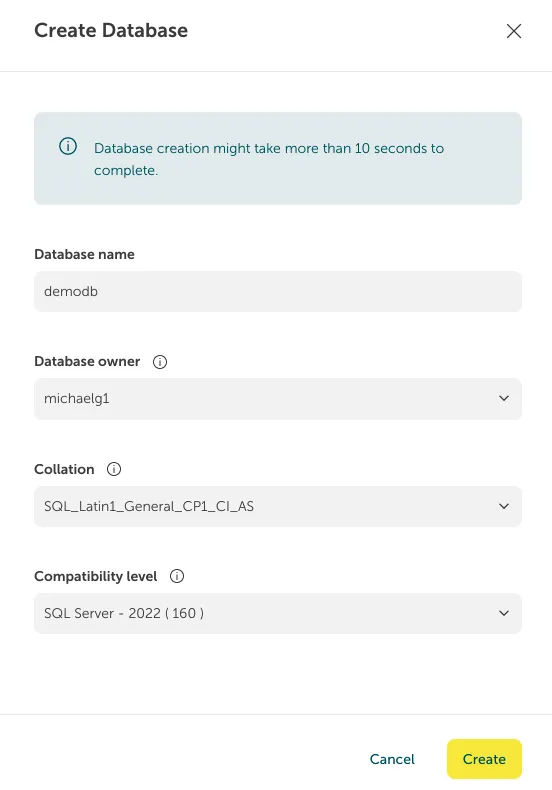
- Klicken Sie auf Erstellen.
Sie können z.B. Postman hier herunterladen.
- Bereiten Sie die JSON payload vor, die ein einfaches JSON-Objekt ist, das den Namen der Datenbank und den Namen des Datenbankbesitzers enthält:
{"name": "dbname","collation": "Latin1_General_CI_AS","options": {"owner": "DBUser","collation": "Latin1_General_CI_AS","compatibility_level": "160"}}
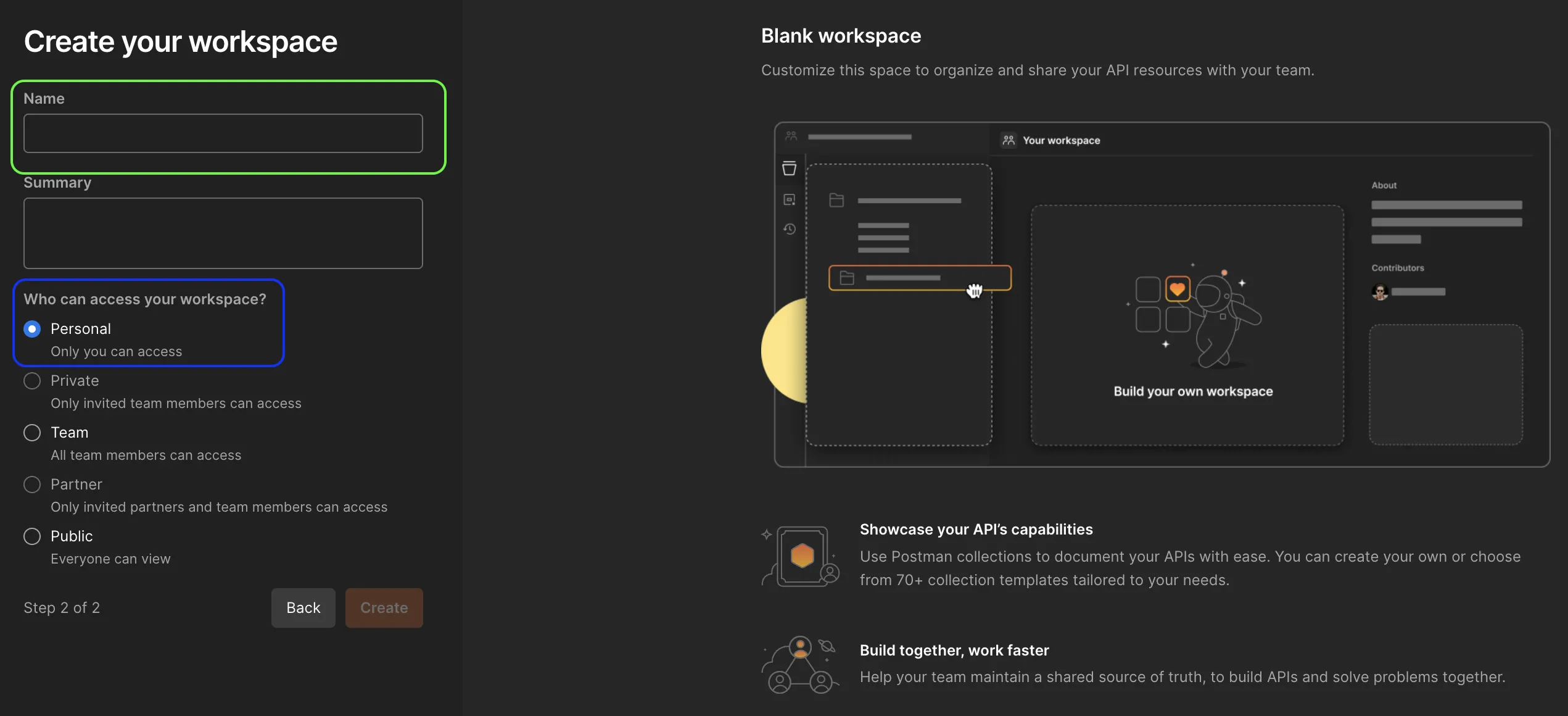
- Öffnen Sie Postman und erstellen Sie einen neuen Arbeitsbereich.

- Benennen Sie den neuen Arbeitsbereich und definieren Sie den Zugriff.
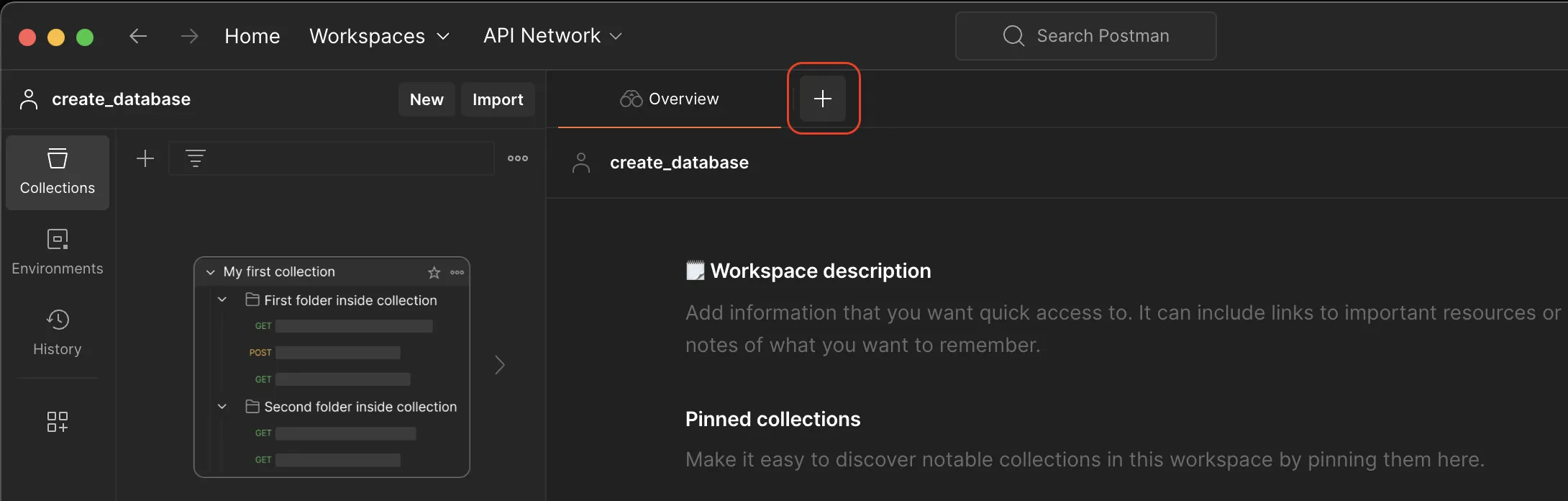
- Gehen Sie zu Collection und drücken Sie das ”+“-Zeichen, um eine neue API-Anfrage zu erstellen.
- Wählen Sie im Anfragefenster die Option POST aus der Dropdown-Liste.
Die benötigte Kompatibilitätsstufe kann über den API-Endpunkt abgerufen werden:
https://mssql-flex-service.api.eu01.stackit.cloud/v1/projects/{projectId}/versions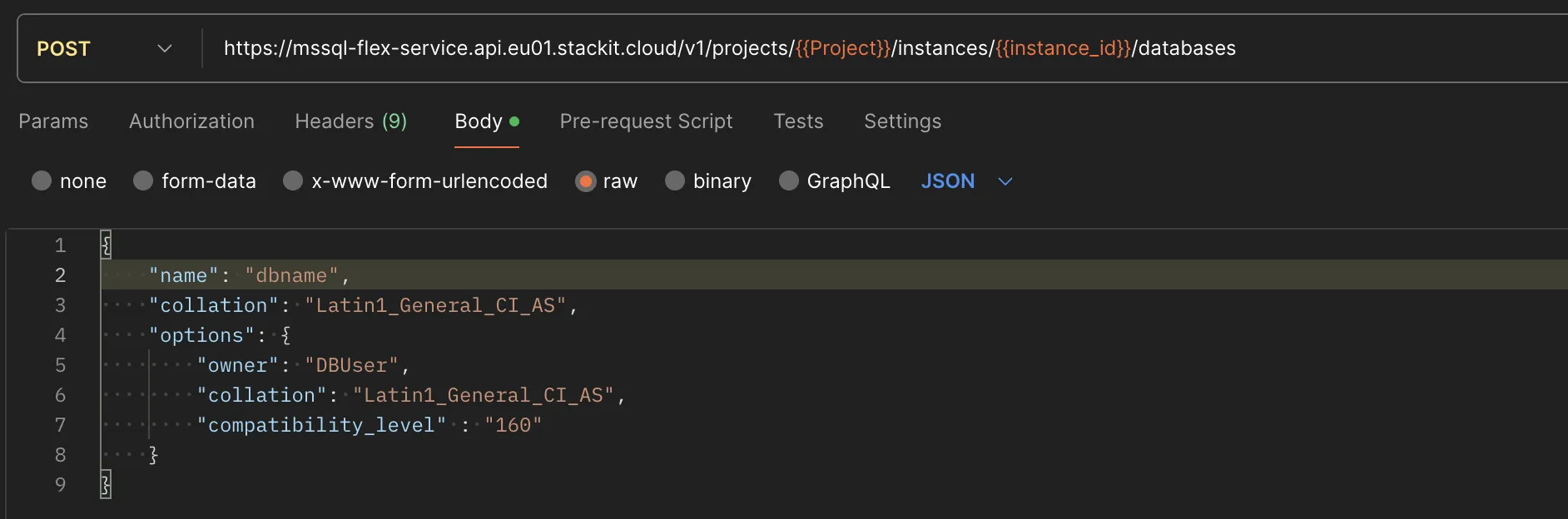
- Fügen Sie die Endpunkt-URL in die Adressleiste ein:
https://mssql-flex-service.api.eu01.stackit.cloud/v2/projects/{PROJECT_ID}/regions/{REGION}/instances/{INSTANCE_ID}/databasesund ersetzen Sie{PROJECT_ID},{INSTANCE_ID}und{REGION}mit der Projekt-ID bzw. der Instanz-ID Ihrer SQL Server-Instanz. - Wo finde ich die Projekt-ID?
Die Projekt-ID wird in der Projektliste des Ressourcenmanagers angezeigt: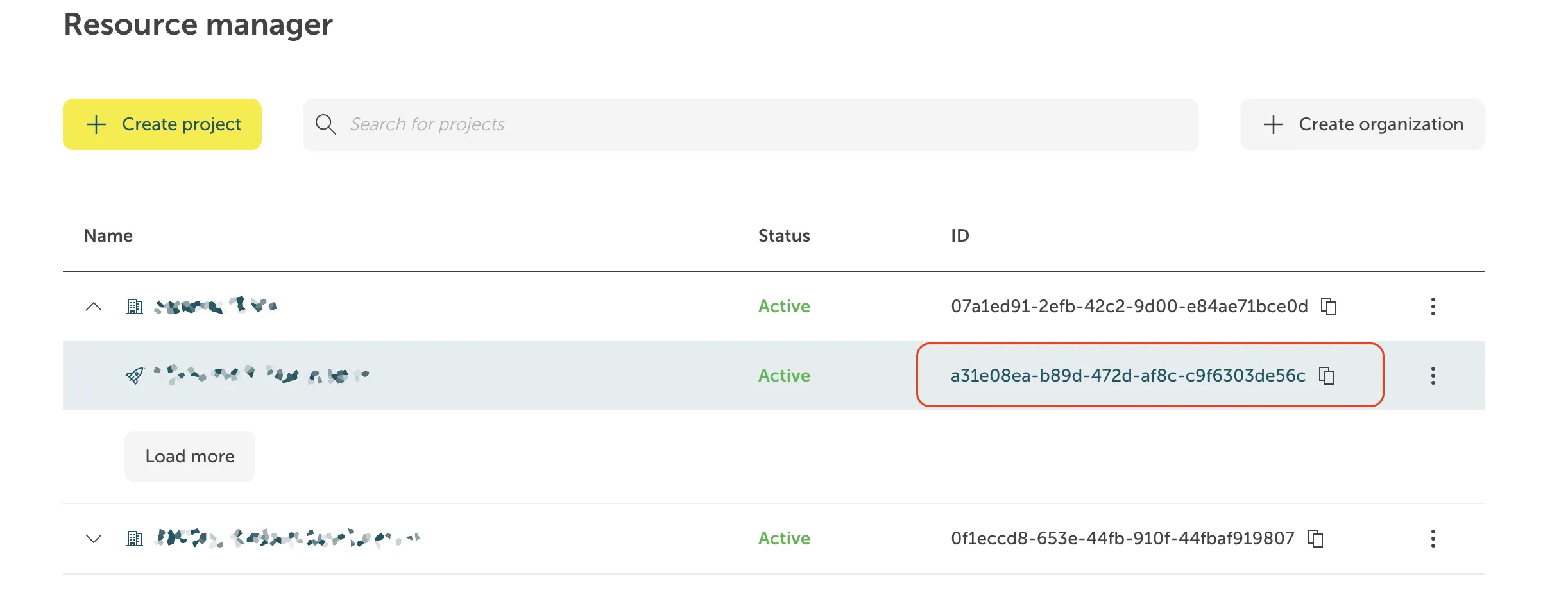 Wo finde ich die Instanz-ID?
Die Instanz-ID hat die Form einer UUID. Sie wird auf der Registerkarte Übersicht Ihrer Instanz im STACKIT-Portal im Abschnitt Allgemeine Informationen angezeigt.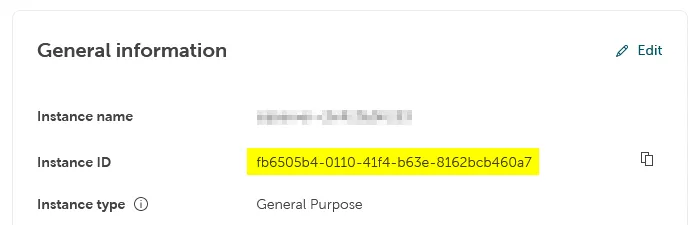 Für einige Produkte ist die Anzeige der Instanz-ID im Portal noch nicht implementiert.
In diesen Fällen ist die Instanz-ID als Teil der Instanz-URL im Adressfeld Ihres Browsers sichtbar, wenn Sie sich auf der Instanzseite im Portal befinden, und kann von dort kopiert werden:
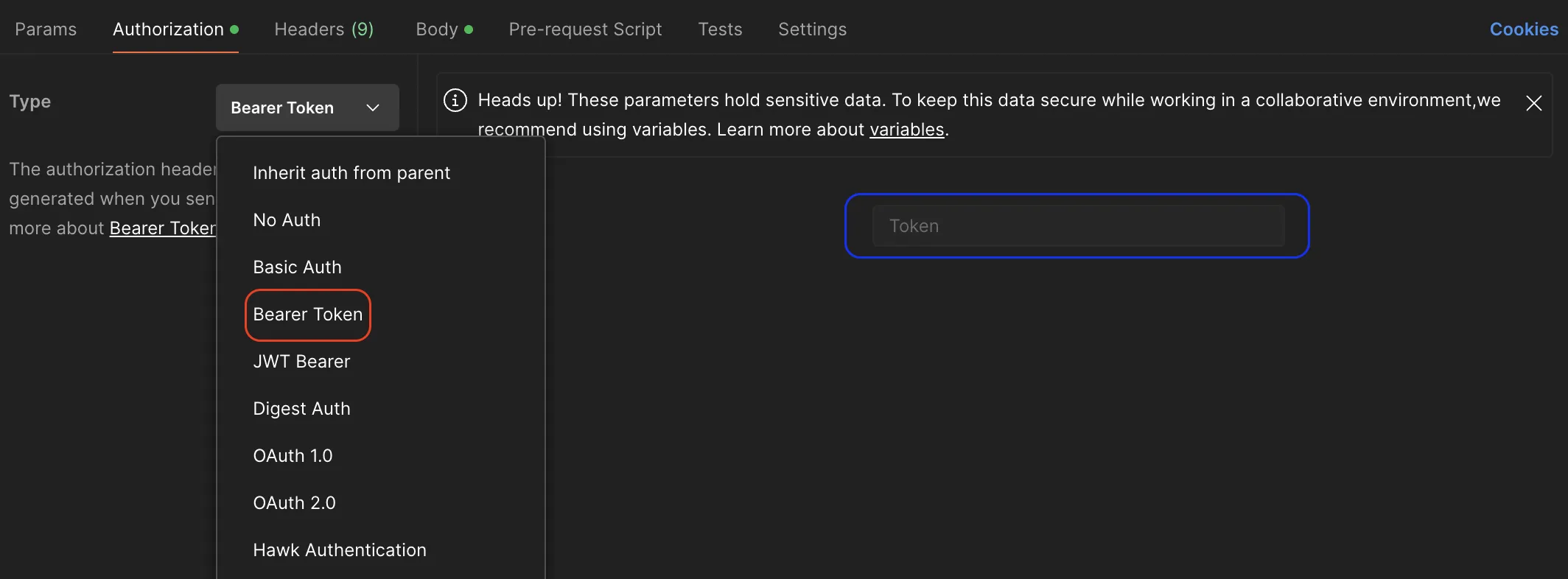
- Gehen Sie zum Abschnitt Autorisierung und wählen Sie Bearer Token aus der Dropdown-Liste Typ.
- Kopieren Sie Ihren Token und fügen Sie ihn in den Abschnitt Token ein, damit es bei der Ausführung der API für den Authentifizierungsprozess verwendet werden kann.
- Wählen Sie die Registerkarte _Körper*.
- Wählen Sie raw und fügen Sie den JSON-Payload, den Sie zuvor vorbereitet haben, in den Eingabebereich ein.
- Senden Sie die Anfrage.
- Öffnen Sie ein Terminal und fügen Sie den unten stehenden Code ein.
- Ersetzen Sie
{PROJECT_ID},{INSTANCE_ID},{REGION}und{TOKEN}durch die Projekt-ID, die Instanz-ID und das Token Ihrer SQL Server-Instanz, in der die Datenbank erstellt werden soll. - Ersetzen Sie
demo_db_1durch den Namen der Datenbank undAdministratordurch den Namen des Datenbankbesitzers Ihrer Wahl mit##STACKIT_DatabaseManager##Zugriffrechten. - Führen Sie den Code aus:
-
Unter macOS / Linux
Terminal-Fenster curl --location --request POST 'https://mssql-flex-service.api.eu01.stackit.cloud/v2/projects/{PROJECT_ID}/regions/{REGION}/instances/{INSTANCE_ID}/databases' --header 'Accept: application/json' --header 'Authorization: Bearer {Token}' --data '{"name": "demo_db_1","options": {"owner": "Administrator","collation": "Latin1_General_CI_AS","compatibility_level": "160"}}' | jq. -
Unter Windows
Terminal-Fenster curl --location --request POST 'https://mssql-flex-service.api.eu01.stackit.cloud/v2projects/{PROJECT_ID}/regions/{REGION}/instances/{INSTANCE_ID}/databases' --header 'Accept: application/json' --header 'Authorization: Bearer {TOKEN}' --data '{"name": "demo_db_1","options": {"owner": "DBAdmin","collation": "Latin1_General_CI_AS","compatibility_level": "160"}}' | ConvertFrom-Json | ConvertTo-Json
-
Einige Funktionen werden innerhalb von Contained Availability Groups (HA) über SQL Server Management Studio (SSMS) nicht nativ in Microsoft SQLServer Versionen < 2025 unterstützt,
wir bieten Stored Procedures als effiziente Alternative an, ohne den Umweg über das Cloud-Portal gehen zu müssen.
Die Stored Procedures können auf den STACKIT Flex SQLServer-Instanzen (Single und HA) verwendet werden,
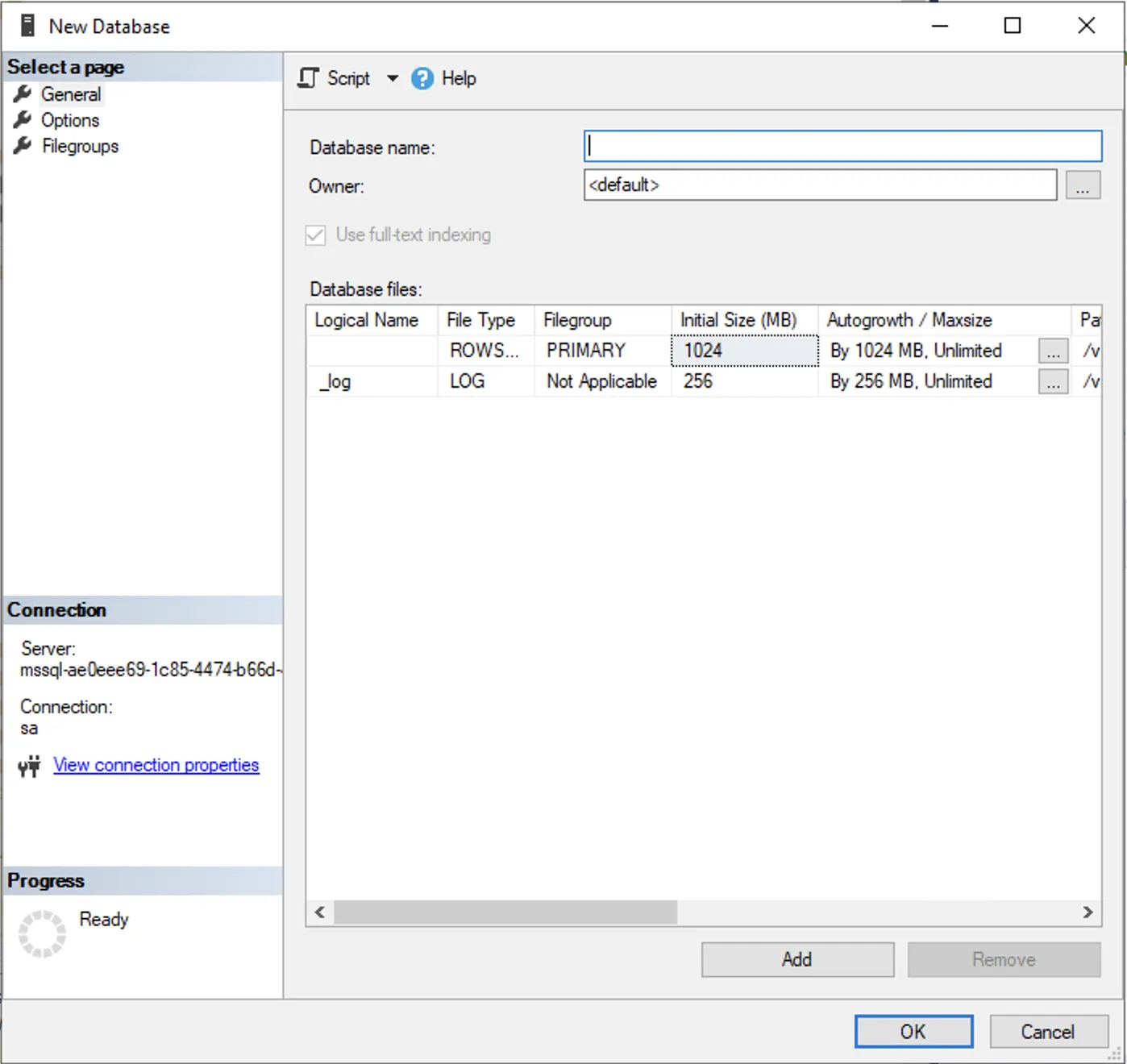
wobei auf Single Instances die Option auch über die nativen SQLServer-Client-Tools unterstützt wird, z.B. SQL Server Management Studio, Azure Data Studio oder jedes andere Client-Tool, das die Verbindung zu SQL Server unterstützt.
Siehe: Datenbank erstellen (T-SQL)
| SQL Server Management Studio (SSMS) | Azure Data Studio |
|---|---|
 | 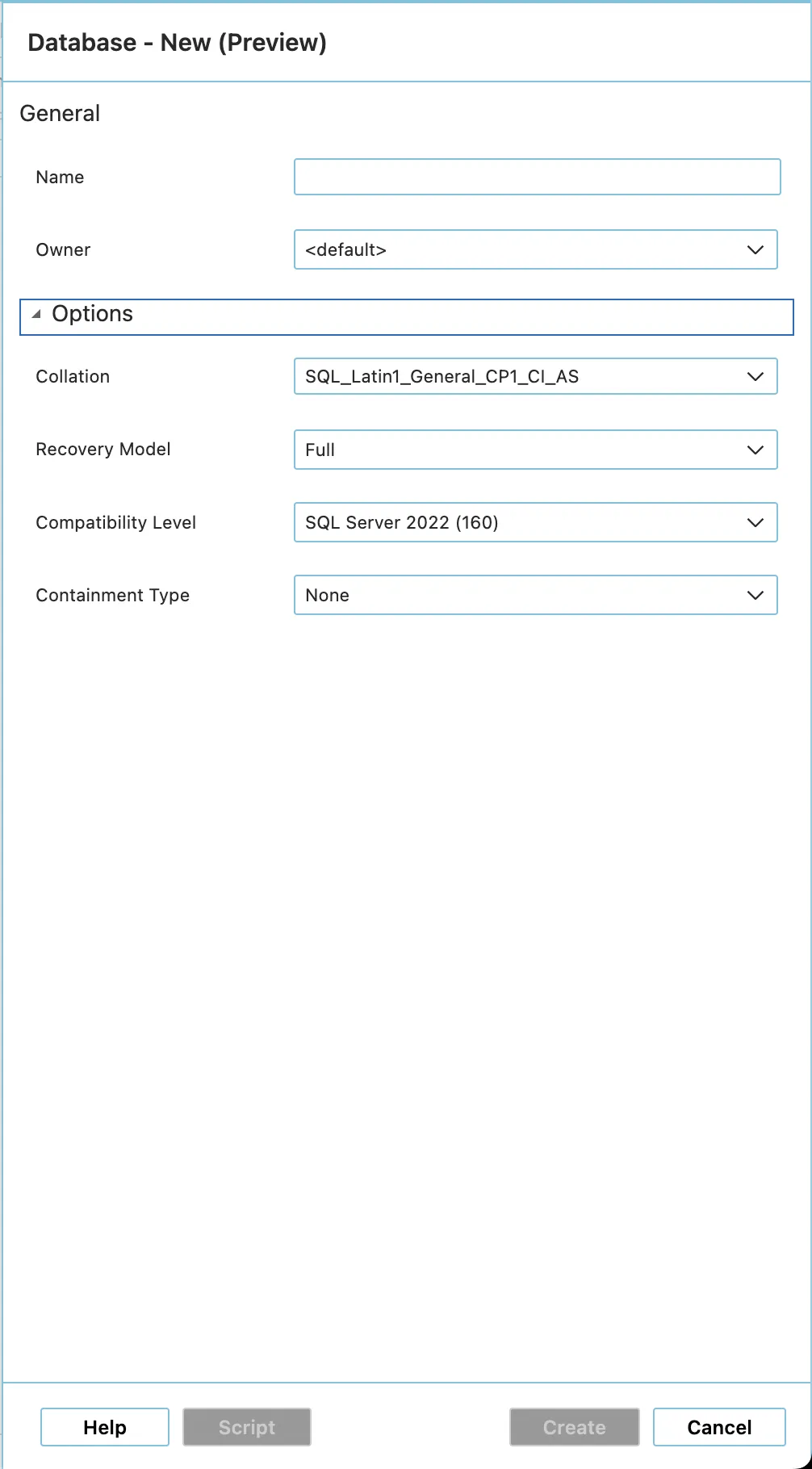 |
Sie können jedes SQL Server-Abfrageausführungswerkzeug verwenden, das T-SQL gegen einen SQL Server ausführen kann, z. B. SQL Server Management Studio, Azure Data Studio oder PowerShell.
-
Single Instanz
- Führen Sie den T-SQL-Befehl
CREATE DATABASEaus.
Weitere Informationen über den Befehl CREATE DATABASE und die Optionen finden Sie unter Offizielle Microsoft-Dokumentation für SQL Server. - Sie können auch die von uns bereitgestellte gespeicherte Prozedur verwenden, siehe 2. .
- Führen Sie den T-SQL-Befehl
-
Replica Instanz (HA - Contained Availability Group)
- Datenbanken können mit der gespeicherten Prozedur
[msdb].[stackit].[create_database]erstellt werden. - Beschreibung der Parameter
Die Prozedur nimmt verschiedene Parameter entgegen
Parameter SQL Datentyp Zwingend Standardwert Beschreibung @database_nameNVARCHAR(80)JA - Name der Datenbank (unter Beachtung der Namenskonventionen). @owner_nameNVARCHAR(128)Nein Aktueller Benutzer Der Eigentümer der Datenbank. @database_size_mbINTNein 128 Anfangsgröße der Datendateien in MB (mind. 128MB). @log_size_mbINTNein 64 Anfangsgröße der Protokolldatei in MB (mindestens 128 MB). @number_of_filesINTNein 1 Anzahl der Datendateien (mindestens 1). @collation_nameNVARCHAR(128)Nein SQL_Latin1_General_CP1_CI_ASSortierreihenfolge der Datenbank. @compatibility_levelINTNein Max. of instance Kompatibilitätsebene der SQL-Engine. - Beispiele
- Minimalkonfiguration (Standard)
Wenn Sie nur den Namen angeben, werden alle Optimierungen (z. B. eine Mindestgröße von 128 MB) automatisch angewendet.EXEC [msdb].[stackit].[create_database]@database_name = 'demo_db_1'; - Erweiterte Konfiguration
Die Parameter können individuell auf die jeweiligen Anforderungen abgestimmt werden.EXEC [msdb].[stackit].[create_database]@database_name = 'demo_db_1',@owner_name = 'Administrator',@database_size_mb = 128,@log_size_mb = 64,@number_of_files = 8,@collation_name = 'SQL_Latin1_General_CP1_CI_AS',@compatibility_level = 160;
- Minimalkonfiguration (Standard)
- Datenbanken können mit der gespeicherten Prozedur