Alerting overview
Zuletzt aktualisiert am
The following tutorial gives you an overview of how alerting with Prometheus and Alertmanager works.
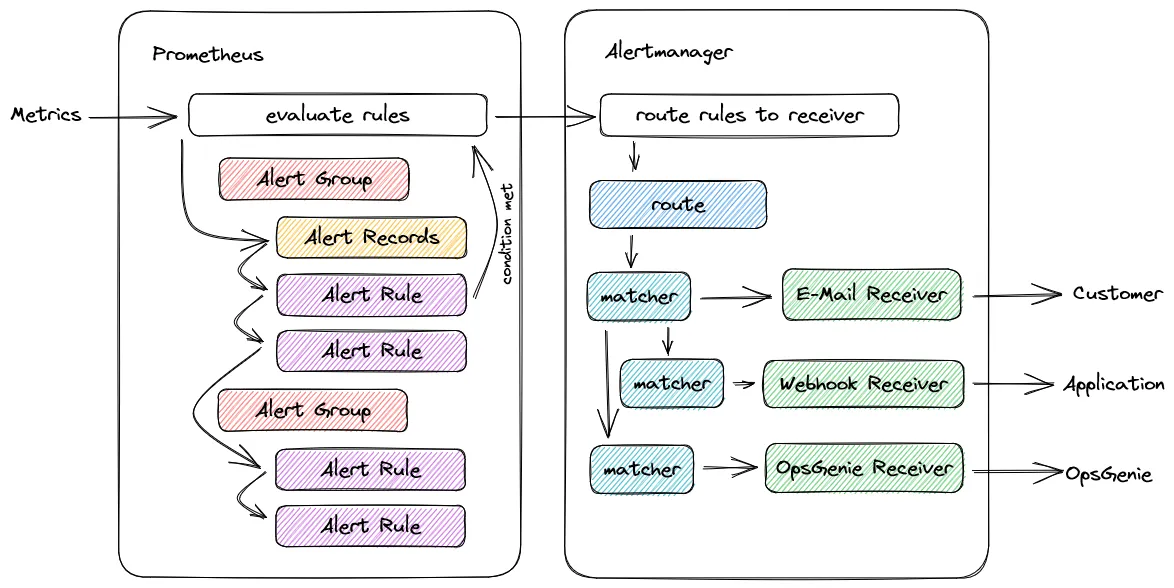
Configuration objects
Section titled “Configuration objects”Prometheus Alerting
Section titled “Prometheus Alerting”- Alert Group: Summary of Alert Rules and Alert Records, which have the same topic and the same check interval.
- Alert Rule: Defines alert conditions based on Prometheus Query Language and sends the notification to an external service.
- Alert Record: Frequently required or computationally intensive expressions are precalculated and save these values as time series.
Alertmanager
Section titled “Alertmanager”- Alertconfigs Routes: A route block defines a node in a routing tree and its children.
- Alertconfigs Receivers: Defines one or more notification channels.
Alerting process
Section titled “Alerting process”-
Prometheus configuration:
- Alert Groups summarize Alert Rules with the same alert category. In addition, the check interval can be selected individually for this Alert Group.
- Prometheus periodically checks all defined Alert Rules to see if their condition is met in the expression (
expr).
The alarm can be provided with a delay (for). An alarm is only triggered if the condition remains fulfilled, for example, for 5 minutes.
Labels are attached to the alarm in order to categorize it for further alerting. An example of this isseverity=warning. The severity label defines the severity of the alert.
The annotation contains an error description (annotations). - It is possible to calculate frequently required or computationally intensive expressions using Alert Records and to save them as time series.
These can be used in the Alert Rules and accelerate the processing of the alerts. - Prometheus has therefore defined an alert and sends it to the Alertmanager for further processing.
-
Alertmanager configuration:
- The Alertmanager takes care of deduplication, grouping, and routing. The configuration is done in the Alertconfigs Routes.
Similar alerts - in terms of content (groupBy) or time (group_wait) - are summarized by the Alertmanager into one message. - Matchers define filters for the labels specified in the Alert Rules. If all labels specified in the matcher match those of the alert, the receiver entered in the routes is selected.
- The receivers are configured using Alertconfigs Receivers. The receiver name (
name) must match the receiver (receiver) of the Alertconfigs Routes.
At least the fields of a receiver must be filled in for an alarm to work. Alerts by email, Opsgenie, and webhook are possible.
- The Alertmanager takes care of deduplication, grouping, and routing. The configuration is done in the Alertconfigs Routes.
Related Documentation
Section titled “Related Documentation”For detailed instructions on executing requests and configuring components, refer to the following guides: