Versionierung im Secrets Manager
Zuletzt aktualisiert am
Eine neue Version erstellen
Abschnitt betitelt „Eine neue Version erstellen“-
Navigieren Sie im STACKIT Portal zu Security > Secrets Manager. Wählen Sie einen Secrets Manager aus der Liste aus.
-
Wählen Sie im Seitenmenü auf der linken Seite Secrets aus. Nun sehen Sie die Liste der Secrets.
-
Erstellen Sie eine neue Version.
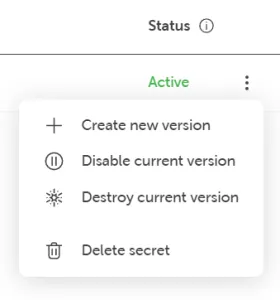
Klicken Sie auf das Kontextmenü des Secrets, für das Sie eine neue Version erstellen möchten. Wählen Sie Neue Version erstellen:
-
Nehmen Sie Änderungen vor (Werte ändern, Schlüssel-Wert-Paar hinzufügen oder entfernen).
-
Lesen Sie die Allgemeinen Geschäftsbedingungen und klicken Sie auf die Schaltfläche Kostenpflichtig bestellen.
Eine spezifische Secret-Version wiederherstellen
Abschnitt betitelt „Eine spezifische Secret-Version wiederherstellen“-
Navigieren Sie im STACKIT Portal zu Security > STACKIT Secrets Manager. Wählen Sie einen Secrets Manager aus der Liste aus.
-
Wählen Sie im Seitenmenü auf der linken Seite Secrets aus, um die Liste der Secrets zu sehen.
-
Wählen Sie das Secret aus, das Sie zurücksetzen möchten, indem Sie in der Secret-Liste darauf klicken.
-
Wählen Sie im Seitenmenü auf der linken Seite Version aus.
-
Stellen Sie eine Version wieder her.
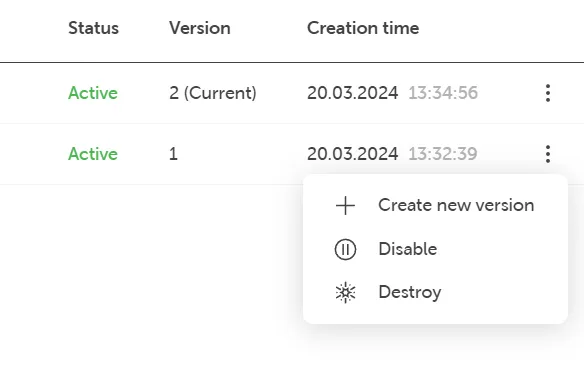
Jede Version verfügt auf der rechten Seite über ein Kontextmenü. Wählen Sie die Version aus, die Sie wiederherstellen möchten, und klicken Sie auf das Kontextmenü der Version. Wählen Sie Neue Version erstellen:
-
Klicken Sie auf die Schaltfläche Kostenpflichtig bestellen, um die gewünschte Version wiederherzustellen. Dies erstellt eine neue Version auf Basis der von Ihnen gewählten Version.