Versionslimit für Secrets Manager festlegen
Zuletzt aktualisiert am
Der STACKIT Secrets Manager ermöglicht es Ihnen, verschiedene Versionen Ihrer sensiblen Daten (Secrets) sicher zu speichern und zu verwalten. Dies ist besonders nützlich, um Änderungen zu verfolgen und bei Bedarf zu älteren Zuständen zurückzukehren. Sie können die Anzahl der zu behaltenden Versionen auf zwei Ebenen definieren:
- Instanz-Ebene: Hier legen Sie ein globales Limit für alle Secrets innerhalb Ihrer aktuellen Secrets Manager-Instanz fest.
- Secret-Ebene: Hier können Sie spezifische Limits für einzelne Secrets festlegen, die von der instanzweiten Einstellung abweichen. Das Standard-Versionslimit auf Instanzen ist unbegrenzt (Wert = 0). Das Standard-Versionslimit für Secrets ist so eingestellt, dass es das Limit der Instanz erbt. Es kann überschrieben werden. Das Secret-Limit überschreibt immer das Instanz-Limit (außer wenn 0/Vererbung eingestellt ist).
Umgebungsvariablen festlegen
Abschnitt betitelt „Umgebungsvariablen festlegen“Um Umgebungsvariablen festzulegen, müssen Sie sich mit einem Secrets Manager-Benutzer anmelden. Die folgenden Umgebungsvariablen können festgelegt werden:
export VAULT_TOKEN=$(vault token lookup --format=json | jq -r.data.id) export VAULT_ADDR="https://prod.sm.eu01.stackit.cloud" export INSTANCE_ID='The ID of your secrets manager instance' export SECRET='The path of the secret you want to change'Instanz-Versionslimit festlegen
Abschnitt betitelt „Instanz-Versionslimit festlegen“Diese Einstellung gilt standardmäßig für alle erstellten Secrets in Ihrer Instanz.
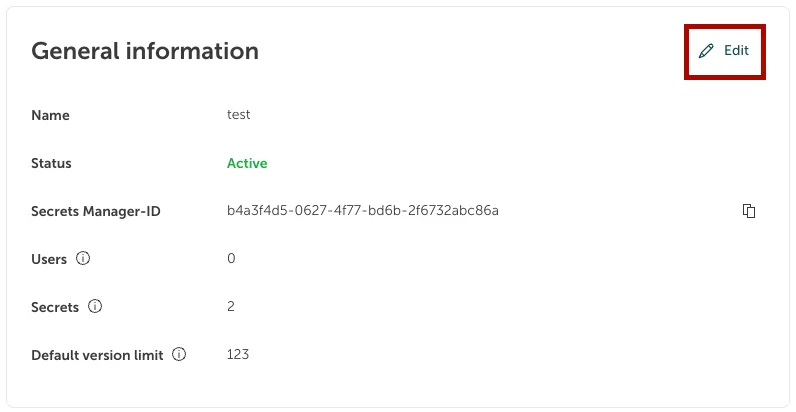
curl --header "X-Vault-Token: $VAULT_TOKEN" --header "Content-Type: application/json" --request POST --data '{"max_versions":100}' $VAULT_ADDR/v1/$INSTANCE_ID/configvault write $INSTANCE_ID/config max_versions=100Das Standard-Versionslimit auf Instanz-Ebene kann beim Erstellen eines Secrets Manager festgelegt werden. Für einen bestehenden Secrets Manager kann es unter Security > Secrets Manager geändert werden. Wählen Sie Ihren Secrets Manager aus der Liste aus, indem Sie darauf klicken. Navigieren Sie im Seitenmenü links zu Übersicht, um die auf der rechten Seite angezeigten Allgemeinen Informationen zu sehen. Klicken Sie neben der Überschrift Allgemeine Informationen auf die Schaltfläche Bearbeiten:
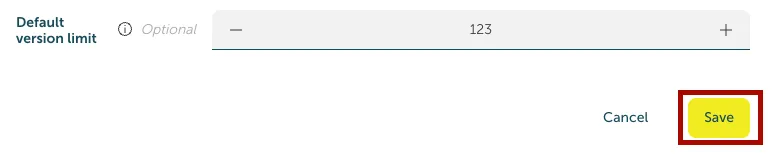
Ändern Sie das Versionslimit. Bitte beachten Sie, dass ein zu niedrig angesetztes Versionslimit zum Löschen älterer Versionen führen kann. Klicken Sie auf Speichern, um die Änderungen anzuwenden:
Instanz Versionslimit prüfen
Abschnitt betitelt „Instanz Versionslimit prüfen“curl --header "X-Vault-Token: $VAULT\_TOKEN" --request GET $VAULT\_ADDR/v1/$INSTANCE_ID/configvault read $INSTANCE_ID/configInformationen über das aktuelle Instanz-Versionslimit finden Sie im Dashboard unter Übersicht > Allgemeine Informationen.
Secret Versionslimit festlegen
Abschnitt betitelt „Secret Versionslimit festlegen“Diese Einstellung ermöglicht es Ihnen, unterschiedliche Versionslimits für spezifische, einzelne Secrets zu definieren. Dies ist nützlich, wenn bestimmte Secrets einen längeren oder kürzeren Verlauf erfordern als andere.
Das Festlegen des Versionslimits kann entweder über eine PATCH- oder eine PUT/POST-Anfrage erfolgen.
Die PUT/POST-Anfrage überschreibt andere Konfigurationen und benutzerdefinierte Metadaten auf der Secret-Ebene. Eine PATCH-Anfrage würde nur das Versionslimit aktualisieren und die anderen Konfigurationen beibehalten.
PUT/POST-Anfrage
Abschnitt betitelt „PUT/POST-Anfrage“curl --header "X-Vault-Token: $VAULT_TOKEN" --header "Content-Type: application/json" --request POST --data '{"max_versions": 50}' $VAULT_ADDR/v1/$INSTANCE_ID/metadata/$SECRETvault kv metadata put -mount=$INSTANCE_ID -max-versions=50 $SECRETPATCH Anfrage
Abschnitt betitelt „PATCH Anfrage“curl --header "X-Vault-Token: $VAULT_TOKEN" --header "Content-Type: application/merge-patch+json" --request PATCH --data '{"max_versions": 50}' $VAULT_ADDR/v1/$INSTANCE_ID/metadata/$SECRETvault kv metadata patch -mount=$INSTANCE_ID -max-versions=50 $SECRETWählen Sie das Secret aus, für das Sie ein individuelles Versionslimit festlegen möchten.
Klicken Sie in den Allgemeinen Informationen auf Bearbeiten. Das Versionslimit kann individuell festgelegt oder zurückgesetzt werden, um weiterhin von der Instanz zu erben.
Beispiel: Ein Versionslimit auf Instanz-Ebene von 123 ist festgelegt. Dies wird auf das Secret angewendet, da seine individuelle Einstellung auf 0 (erben) steht. Nun können Sie das geerbte Versionslimit 123 durch die Einstellung des individuellen Secrets überschreiben. Geben Sie bei den Einstellungen des individuellen Secrets eine Zahl ein, die ungleich 0 ist.
Secret Versionslimit prüfen
Abschnitt betitelt „Secret Versionslimit prüfen“curl --header "X-Vault-Token: $VAULT\_TOKEN" --request GET $VAULT_ADDR/v1/$INSTANCE_ID/metadata/$SECRETvault kv metadata get -mount=$INSTANCE_ID $SECRETWenn ein Secret ausgewählt ist, finden Sie das Versionslimit auf Secret-Ebene unter Übersicht > Allgemeine Informationen.