Drop databases
Last updated on
Prerequisites
Section titled “Prerequisites”In order to follow the steps described on this page, the following conditions need to be met:
-
Your organization has a customer account.
(See: Create a customer account) -
You have a User Account with the necessary permissions.
(See: Create a user account) -
You have a Project in your customer account.
(See: Create a Project) -
You have created a Service Account.
(See: Create a Service account) -
You have assigned the required project permissions to this service account.
(See: Assign permissions to a service account) -
You have created an Access Token for this service account.
(See: Assign authentication token to a service account) -
You have created a SQLServer Flex Instance.
(See: Create a SQLServer Flex Instance) -
You are connected to the SQLServer Flex Instance.
(See: Connect to a SQLServer Flex Instances) -
You have previously created a database.
(See: Create databases in SQLServer Flex instances) -
You previously created a user and assigned the right server role to it.
(See: Create user)
(See: Server and project roles and permissions)
Drop a Database
Section titled “Drop a Database”- Navigate to the list of databases.
- Open the ⋮ menu and select Delete.
- Confirm by entering the name of the database and click Delete.

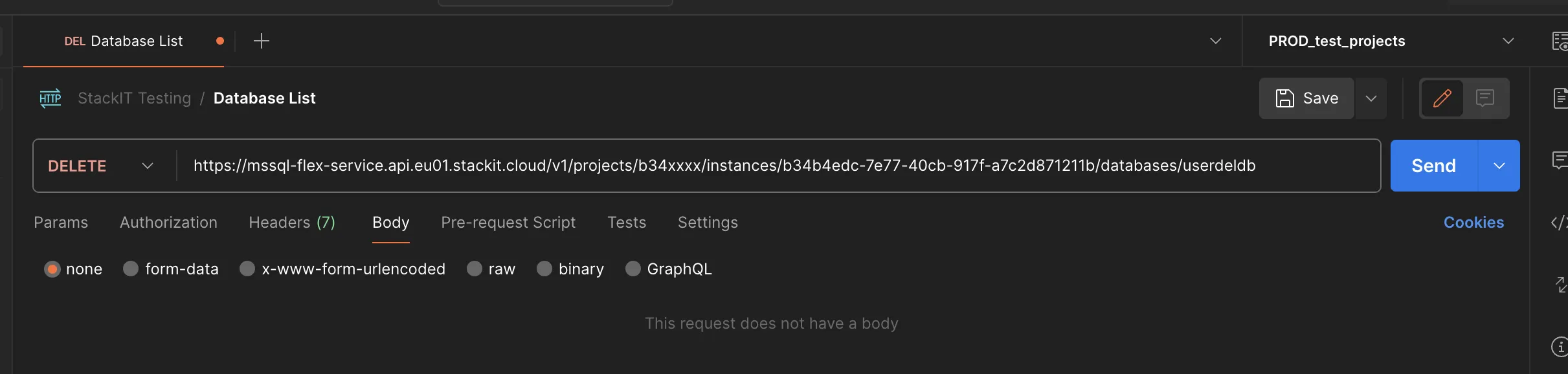
- Paste the endpoint URL into the address bar:
https://mssql-flex-service.api.eu01.stackit.cloud/v2/projects/{PROJECT_ID}/regions/{REGION}instances/{INSTANCE_ID}/databases/{DB_NAME}and replace{PROJECT_ID},{INSTANCE_ID},{REGION}and{DB_NAME}with the project ID, the instance ID and the name of the database of your SQL Server instance, respectively.
Where do I find the Project ID?
The project ID is displayed in the projects list of the Resource manager: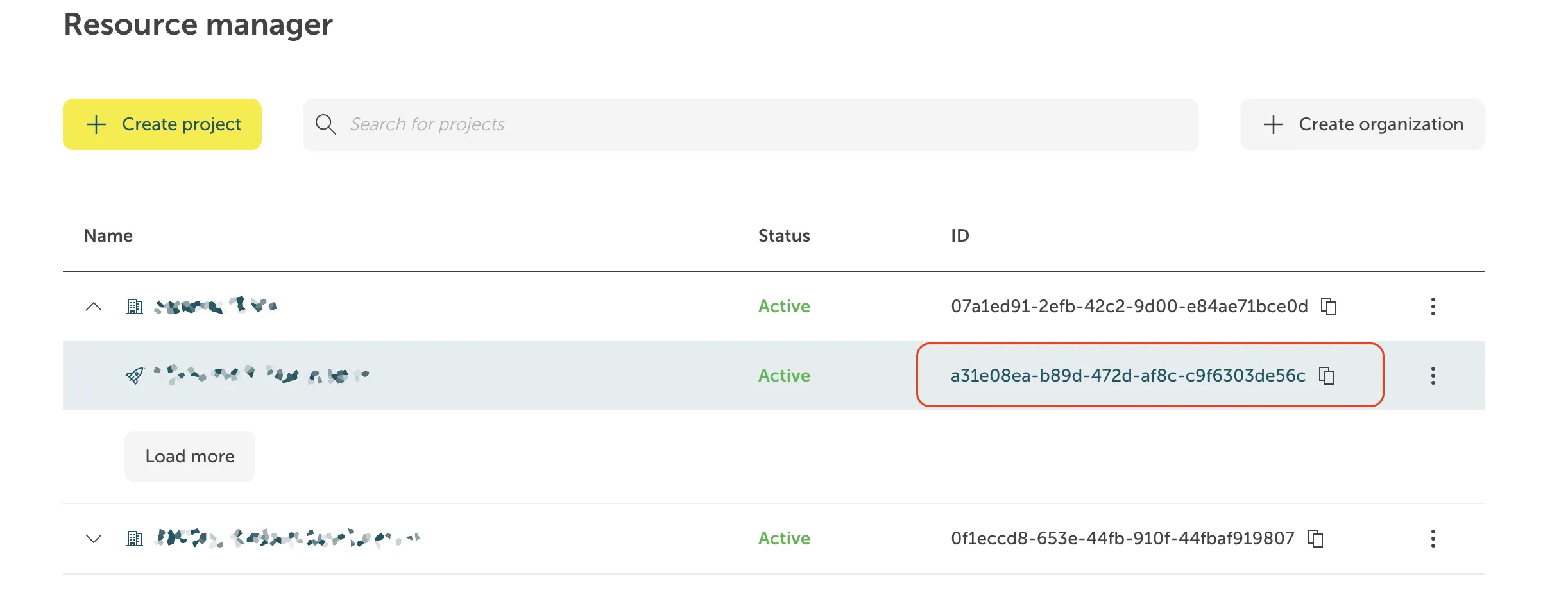 Where do I find the Instance ID?
The instance ID has the form of a UUID. It is displayed in the Overview tab of your instance in the STACKIT portal, in the section General information.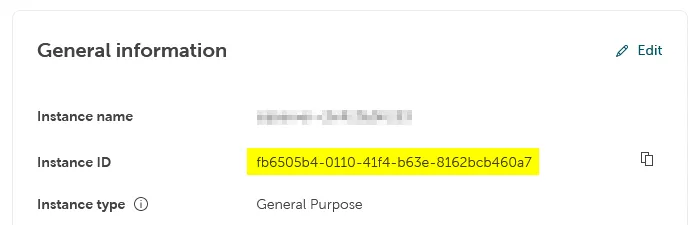 For some products, the display of the instance ID in the portal is not implemented yet. In these cases the instance ID is visible as part of the instance URL in the address field of your browser when you are on the instance page in the portal, and it can be copied from there:

- Select
DELETEin the dropdown in front of the address bar - Run the command by clicking Send.
Some functions within Contained Availability Groups (HA) via SQL Server Management Studio (SSMS) are not natively supported in Microsoft SQLServer versions < 2025,
we offer stored procedures as an efficient alternative without having to take the detour via the cloud portal.
The stored procedures can be used on the STACKIT Flex SQLServer instances (Single and HA),
whereby on Single Instances the option is also supported via the native SQLServer client tools, e.g. SQL Server Management Studio, Azure Data Studio or any other client tool that supports connection to SQL Server.
You can use any SQL Server query run tool that can run T-SQL against an SQL Server, e. g. SQL Server Management Studio, Azure Data Studio, or PowerShell.
-
Single Instance
- Run the
DROP DATABASET-SQL command. For more insights about DROP DATABASE command and options, please visit Microsoft official documentation for SQL Server.
 - You can also use the stored procedure provided by us, see 2. .
- Run the
-
Replica Instance (HA - Contained Availability Group)
- Databases can be dropped with the stored procedure
[msdb].[stackit].[drop_database]. - Parameter description
The procedure accepts various parameters to adapt the database to your requirements
Parameter SQL data type Mandatory Default value Description @database_nameNVARCHAR(80)Yes - Name of the database (observes naming conventions). @force_droppingNVARCHAR(128)No N/A Delete database, even if active sessions or users are logged in. - Examples
-
Minimum configuration (default)
If you only specify the name the database will only be deleted if no session or user is logged in.EXEC [msdb].[stackit].[drop_database]@database_name = 'demo_db_1'; -
Extended configuration
The additional parameter deletes the DB regardless of whether a session or a user exists.EXEC [msdb].[stackit].[drop_database]@database_name = 'demo_db_1', @force_dropping = 1
-
- Databases can be dropped with the stored procedure