Enable Actions in STACKIT Git
Last updated on
Enable Actions using STACKIT centrally-managed runners
Section titled “Enable Actions using STACKIT centrally-managed runners”STACKIT is now offering centrally-managed runners for your STACKIT Git actions. To start using them, please raise a new service request through the STACKIT Help Center clearly indicating what instance should have the runners enabled.
[Estimated response time: 2 days]
Once the STACKIT runner is setup, you will be notified via Support Ticket. The runner is configured with two tags: stackit-ubuntu-20 and stackit-docker.
stackit-ubuntu-20is based on Ubuntu 20.04 and includes Node.js, which is suitable for most GitHub Actions.stackit-dockerincludes a Docker tooling set with full Docker capabilities for building and pushing images. Note that this image has a larger footprint.
To make use of a specific runner tag, make sure to define the runs-on field in your workflow YAML accordingly.
Enable Actions using your own self-hosted runners
Section titled “Enable Actions using your own self-hosted runners”STACKIT Git Actions provides Continuous Integration, with a web interface to show the results. The syntax and semantics of the workflow files will be familiar to people used to GitHub Actions but they are not and will never be identical.
The following guide explains key concepts to help understand how workflows are interpreted, with a set of examples that can be copy/pasted and modified to fit particular use cases.
Quick start
Section titled “Quick start”- Verify that
Enable Repository Actionsis checked. - Add the following to the
.forgejo/workflows/demo.yamlfile in the repository.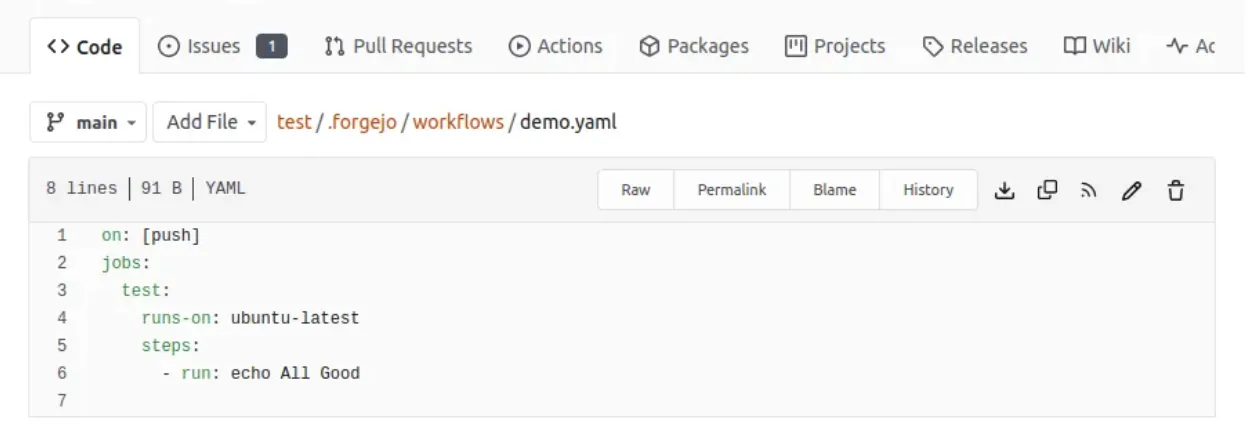
- Go to the
Actionstab of the/{owner}/{repository}/actionspage of the repository to see the result of the run.
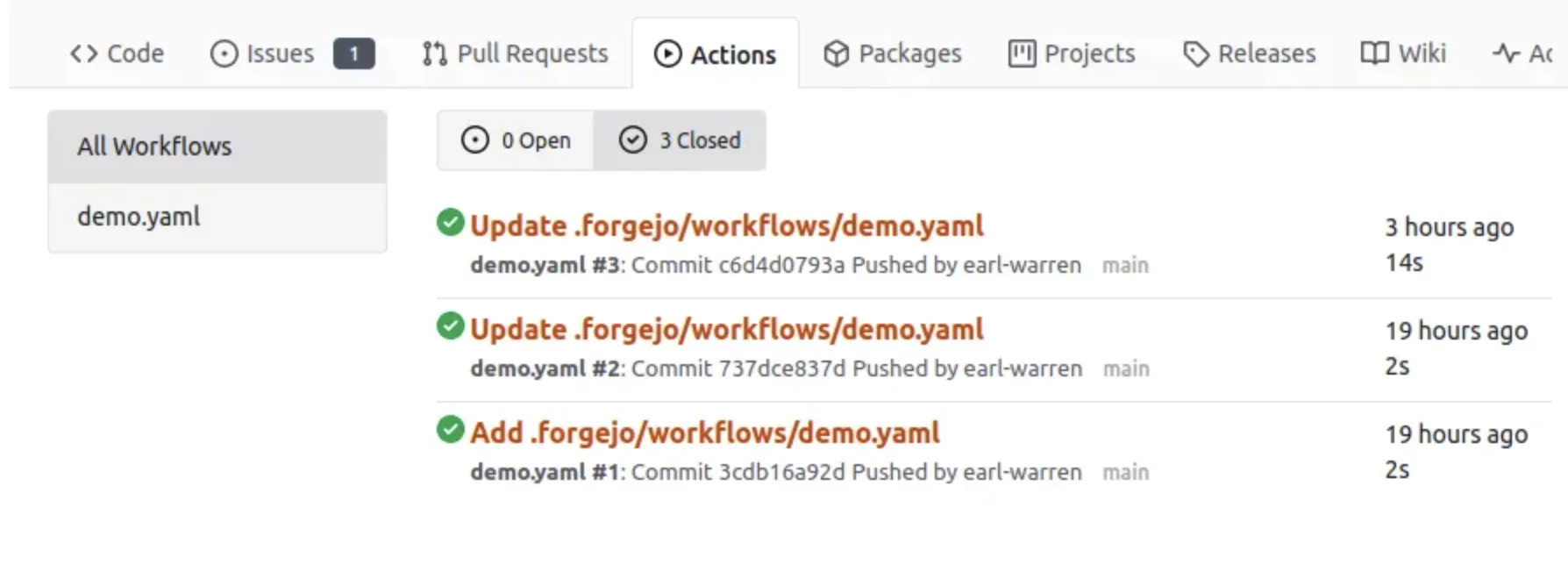
- Click on the workflow link to see the details and the job running logs.
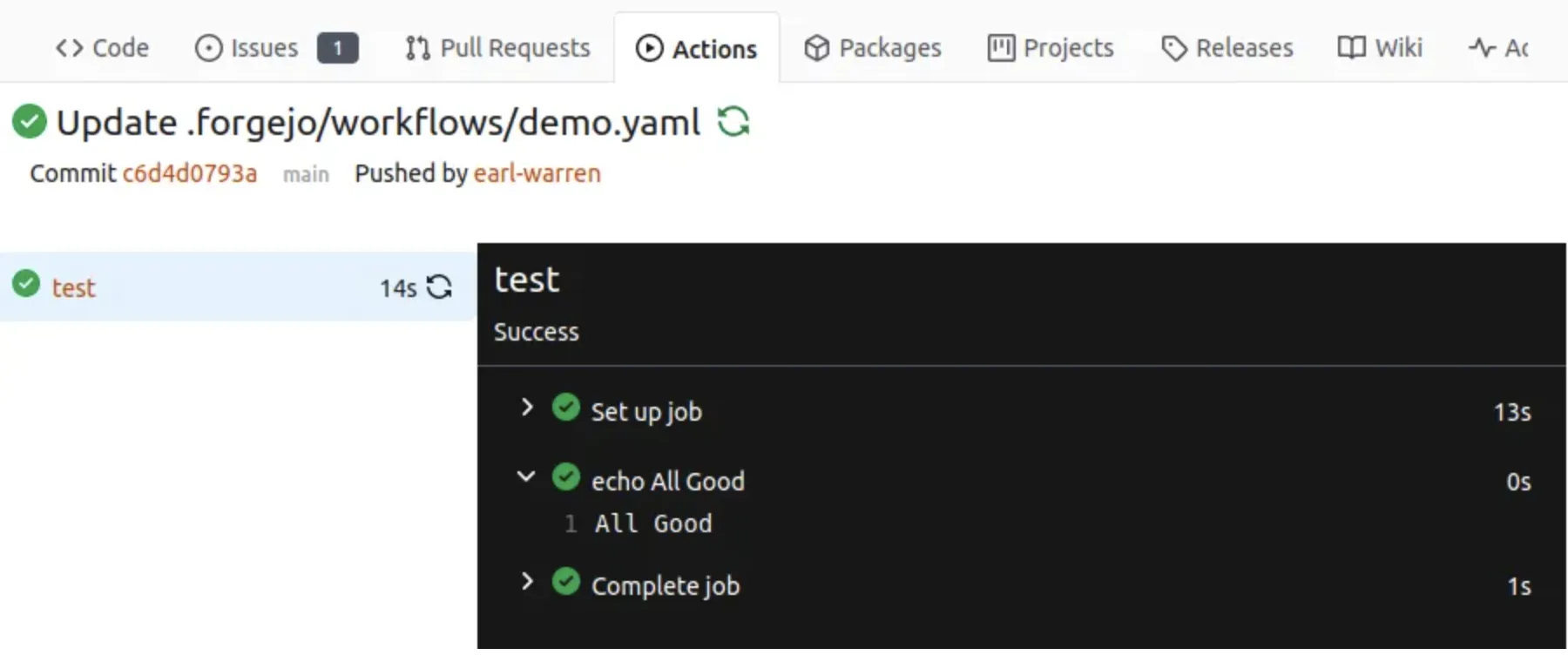
Hierarchy
Section titled “Hierarchy”In STACKIT Git terminology a workflow is a .yml file in the .forgejo/workflows directory of the repository. A workflow has jobs with steps to be run by a Action runner.
Actions
Section titled “Actions”An Action is a repository that contains the equivalent of a function in any programming language. It comes in two flavors, depending on the file found at the root of the repository:
- action.yml: describes the inputs and outputs of the action and the implementation.
Dockerfile: if noaction.ymlfile is found, it is used to create an image withdocker buildand run a container from it to carry out the action.
One of the most commonly used action is checkout which clones the repository that triggered a workflow. Another one is setup-go that will install Go.
Just as any other program or function, an Action has pre-requisites to successfully be installed and run. When looking at re-using an existing Action.
Expressions
Section titled “Expressions”In a workflow file strings that look like ${{... }} are evaluated by the instance runner and are called expressions. As a shortcut, if: ${{... }} is equivalent to if:..., i.e the ${{ }} surrounding the expression is implicit and can be stripped.
Literals
Section titled “Literals”- boolean: true or false
- null: null
- number: any number format supported by JSON
- string: enclosed in single quotes
Logical operators
Section titled “Logical operators”| Operator | Description |
|---|---|
| ( ) | Logical grouping |
| [ ] | Index |
| . | Property de-reference |
| ! | Not |
| < | Less than |
| <= | Less than or equal |
| > | Greater than |
| >= | Greater than or equal |
| == | Equal |
| != | Not equal |
| && | And |
NOTE: String comparisons are case insensitive.
Conditionals
Section titled “Conditionals”Can be used in if: conditionals on jobs and steps.
success(). returns true when none of the previous jobs/steps have failed or been cancelled.always(). causes the job/step to always run, and returns true, even when cancelled. If you want to run a job/step regardless of its success or failure, use the recommended alternative:'!cancelled()'(the expression must be enclosed by quotes to not be interpreted as YAML tag).failure(). returns true when any previous step/job has failed.
Functions
Section titled “Functions”contains( search, item ). Returnstrueifsearchcontainsitem. Ifsearchis an array, this function returnstrueif theitemis an element in the array. Ifsearchis a string, this function returnstrueif theitemis a substring ofsearch. This function is not case sensitive. Casts values to a string.startsWith( searchString, searchValue ). ReturnstruewhensearchStringstarts withsearchValue. This function is not case sensitive. Casts values to a string.endsWith( searchString, searchValue ). ReturnstrueifsearchStringends withsearchValue. This function is not case sensitive. Casts values to a string.format( string, replaceValue0, replaceValue1,..., replaceValueN). Replaces values in thestring, with the variablereplaceValueN. Variables in thestringare specified using the{N}syntax, whereNis an integer. You must specify at least onereplaceValueandstring. Escape curly braces using double braces.join( array, optionalSeparator ). The value forarraycan be an array or a string. All values inarrayare concatenated into a string. If you provideoptionalSeparator, it is inserted between the concatenated values. Otherwise, the default separator,is used. Casts values to a string.toJSON(value). Returns a pretty-print JSON representation ofvalue.fromJSON(value). Returns a JSON object or JSON data type forvalue. You can use this function to provide a JSON object as an evaluated expression or to convert environment variables from a string.
STACKIT Git Pipelines are based on Forgejo. To find more information on how to get more value out of your pipelines, check the Forgejo documentation.