Manage DNS subzones
Last updated on
Introduction
Section titled “Introduction”DNS subzones, also known as child zones, are subdivisions of a primary DNS zone. They allow for more granular control over DNS records within an organization or project. For example, if you have a primary zone called example.com, you might create subzones such as sales.example.com or dev.example.com to manage DNS records for different departments or stages separately. This documentation covers the creation, management, and movement of DNS subzones within our system.
Prerequisites
Section titled “Prerequisites”- You have a STACKIT DNS zone: Manage DNS Zones
Create a DNS subzone
Section titled “Create a DNS subzone”To create a DNS subzone, follow the same process as creating a regular DNS zone. Detailed instructions can be found in the documentation: Manage DNS subzones.
Moving a DNS subzone to a different project
Section titled “Moving a DNS subzone to a different project”If you need to move a DNS zone to another STACKIT project, you can use the regular zone move mechanism documented here: Move a DNS zone. This process transfers all associated DNS records and subzones to the new project without interruption of the DNS service. Billing for that zone is adjusted to the new project accordingly.
Creating a subzone in a different project using DNS delegation
Section titled “Creating a subzone in a different project using DNS delegation”Alternatively, if you need to create a subzone in a different STACKIT project without moving the parent zone, you can use DNS delegation.
Steps to delegate a Subzone
Section titled “Steps to delegate a Subzone”- Set Up DNS Delegation in the Parent Zone:
- Access the DNS management interface for the parent zone.
- Create a delegation record (NS record) pointing to the STACKIT nameserver:
ns1.stackit.cloudandns2.stackit.zone: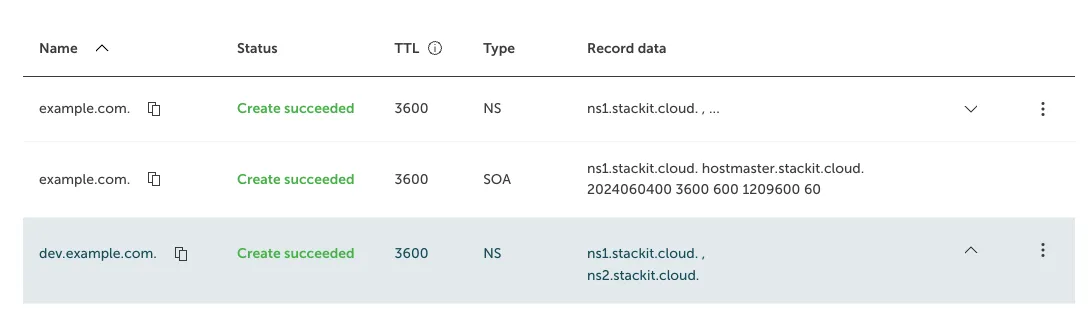
- Configure the Subzone in the Target Project:
- In the target project, access the DNS management interface.
- Now you can create the subzone with the delegated name, in this case it is: dev.example.com
Benefits of DNS Delegation
Section titled “Benefits of DNS Delegation”- Cross-Project Management: Allows subzone creation and management across different projects.
- Flexibility: Provides more flexibility in organizing DNS zones according to project-specific needs.