FOCUS report storage and invoice data
Last updated on
After you create a FOCUS export schedule, STACKIT stores the FOCUS report in your Object Storage. This page explains how STACKIT accesses your bucket, where you find the report files, and when STACKIT updates existing reports.
How STACKIT stores the FOCUS report
Section titled “How STACKIT stores the FOCUS report”To store the FOCUS report in your Object Storage, STACKIT requires access to the Object Storage data plane. STACKIT achieves this through the following process:
- STACKIT creates a service account using the
stackit-focusprefix. - STACKIT assigns the
object-storage.adminrole to the service account. - The service account creates a new credential group within the Object Storage control plane. The credential group name follows the schema
focus-<random id>. - STACKIT creates an access key inside the credential group.
- STACKIT uses this access key to place the FOCUS file into your provided bucket.
Report storage location
Section titled “Report storage location”STACKIT provides the FOCUS report daily at 12:00 UTC. You cannot download FOCUS reports directly through the STACKIT Portal. The STACKIT Object Storage is S3 compatible, so you can access your reports programmatically or with a standard S3-compatible file transfer client. For instructions, see Download FOCUS reports from Object Storage.
STACKIT stores the FOCUS report according to your schedule settings.
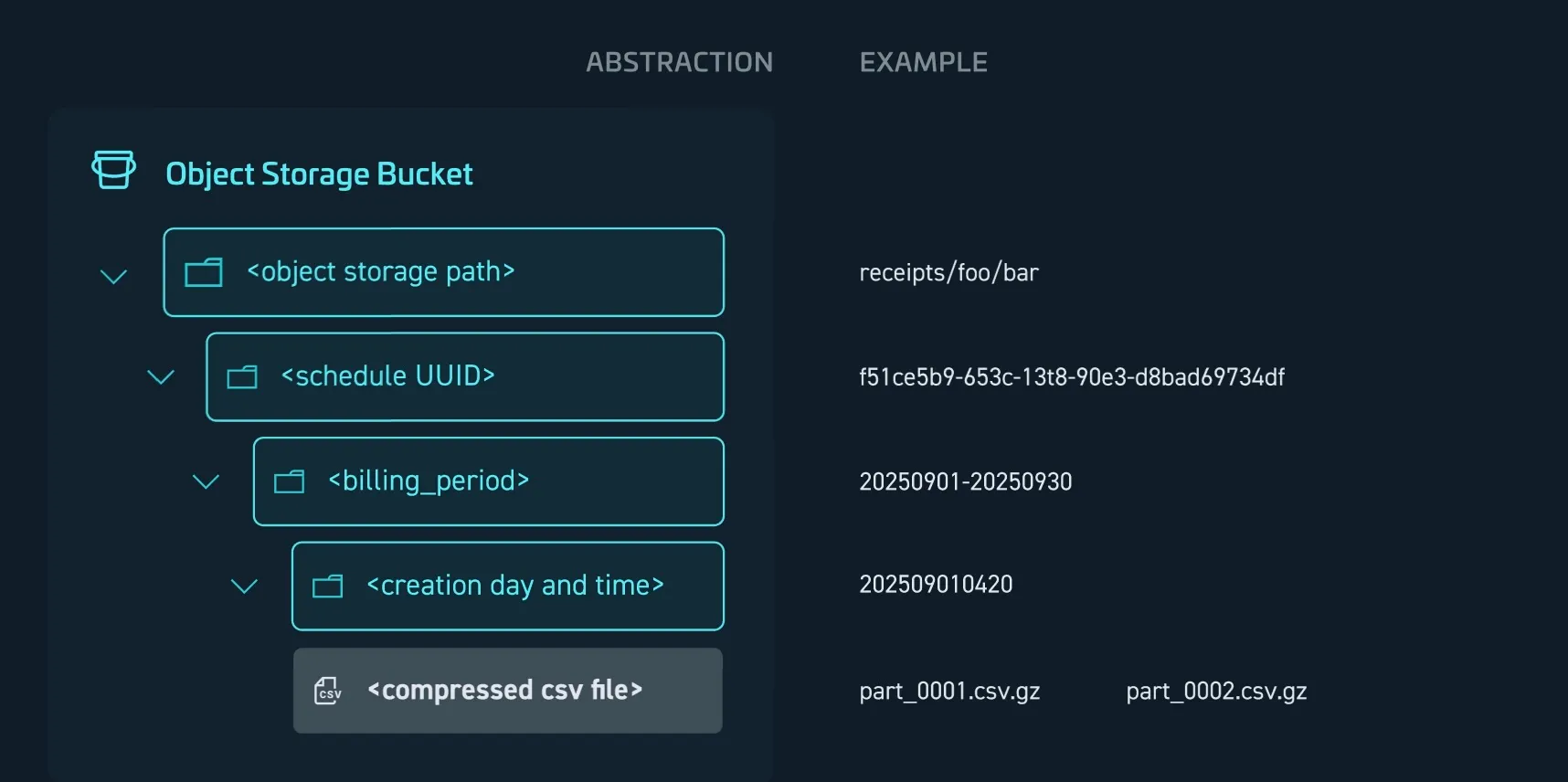
Picture 1: FOCUS Report storing schema for daily creation without overwriting
The following table explains the storage path placeholders:
| Placeholder | Description | Example |
|---|---|---|
<object storage path> |
The bucket location defined by the user. | reports/focus/billing |
<schedule UUID> |
A folder created for the schedule. The folder name contains the schedule UUID. | f51ce5b9-653c-13t8-90e3-d8bad69734df |
<billing_period> |
Defines the period the report covers, using the format yyyymmdd-to:yyyymmdd. | 20250901-20250930 |
<creation day and time> |
Specifies when the folder was generated, using the format yyyymmddhhmm |
202509010420 |
<compressed CSV file> |
The actual report file(s), which can be one or multiple compressed CSV files. | part_0001.csv.gz |
The compressed CSV file name is predefined and cannot be changed. The filename consists of a day and time indicator which is followed by the incrementing numerical value.
The first files contains _0001.csv.gz. After one million records the report is split and an additional file is created. Those additional files contain _0002.csv.gz, _0003.csv.gz and so on.
Invoice information
Section titled “Invoice information”STACKIT invoices become available around the fifth day of each month. Once available, we recreate the FOCUS reports for the affected month to include the corresponding InvoiceId and any applied credits.
The BilledCost values in the FOCUS report have up to 11 decimal places, while STACKIT rounds the costs on the invoice per project and SKU.
To calculate amounts that match your invoice, see Reconcile FOCUS costs with your invoice.