My subscriptions
Last updated on
The My subscriptions page is your central point of contact in the STACKIT Marketplace for managing and keeping track of your purchases. Here you will find all the information about your orders, subscriptions and software licenses. You can find it by navigating within the main navigation. Simply click on the STACKIT Marketplace menu item - then, select the sub-item My subscriptions.
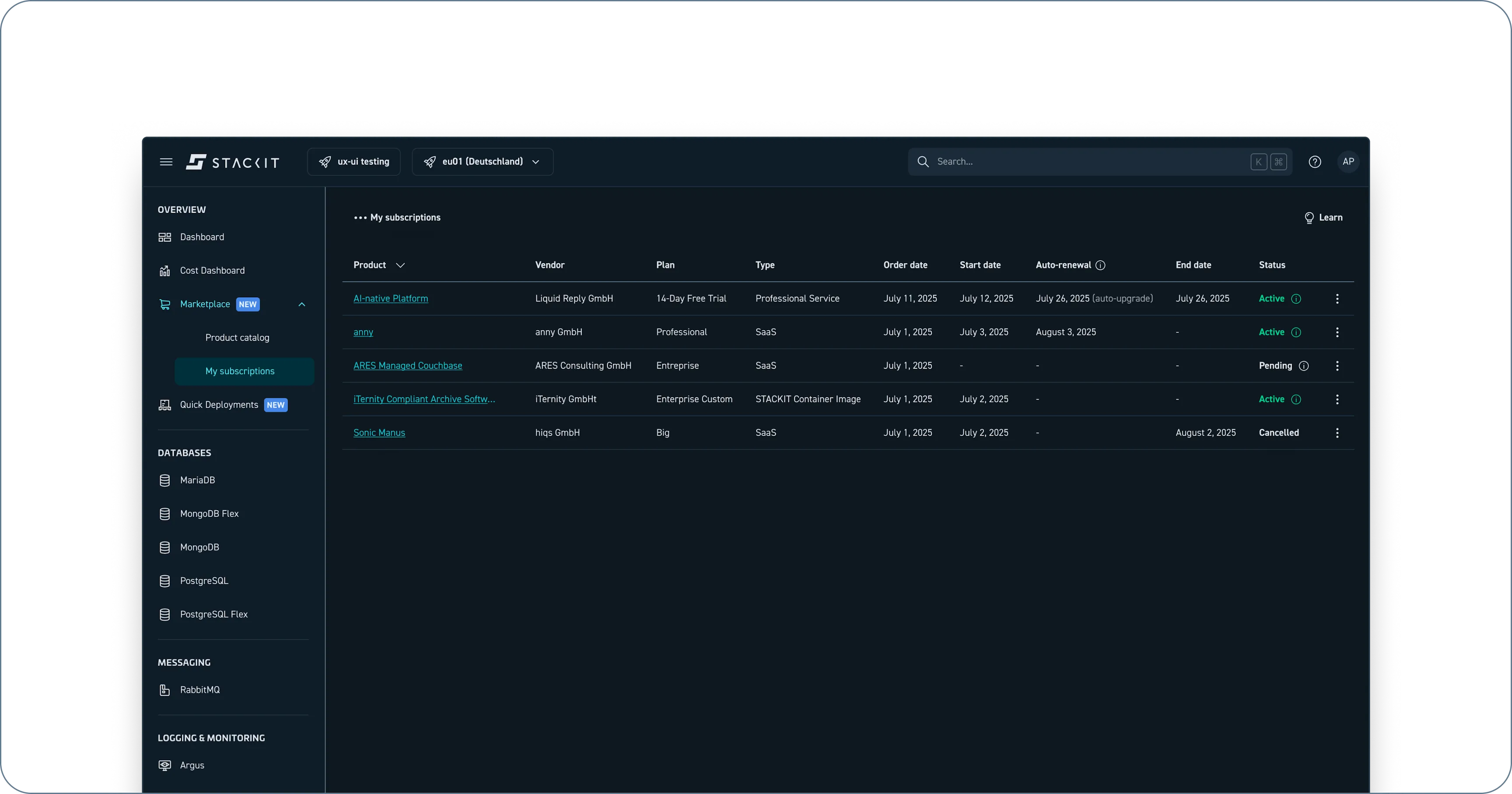
My subscriptions page under the main navigation item “Marketplace”.
Key columns explained
Section titled “Key columns explained”The My subscriptions page provides important information about each of your subscriptions through the following columns:
- Product: The name of the cloud service or product you have subscribed to.
- Vendor: The name of the cloud vendor offering the service (e.g., any GmbH).
- Plan: The pricing option you chose.
- Order date: The date you order has been placed.
- Start date: The date on which your subscription became active.
- Available until: The date your plan runs out (depending on the pricing option).
- Status: The current lifecycle state of your subscription (explained in detail below).
- Actions: A column with a button that allow you to perform actions related to your subscription (e.g., view details, cancel).
Subscription lifecycle states
Section titled “Subscription lifecycle states”The Status column reflects the current stage of your subscription. Understanding these statuses is crucial for managing your orders. Here’s a breakdown:
- Pending: The order has been placed but is not yet active. The service is being set up by the vendor. It could indicate that payment processing, service creation or integration is underway.
- Active: The subscription is fully provisioned and the service is available for you to use. Billing is ongoing.
- Suspended: Your subscription is not currently active but could be restored. This might be caused by a payment issue or by an administrative action by you or the service provider.
- Cancelled: The subscription is no longer active, and you will no longer be billed. The service is deactivated.
- Resigned: The subscription is ended and there is no possibility to restore it.
- Error: There was an issue setting up or managing the subscription. Please contact customer support with your Order ID for assistance.
Actions You Can Take
Section titled “Actions You Can Take”The My subscriptions page allows you to perform the following actions on your subscriptions:
- View Details: Clicking this will lead to the products detail page.
- Cancel Subscription: Allows you to cancel an active subscription. Please note that cancellations usually take effect at the end of your current billing cycle, and cancellation policies may vary based on the product and provider. When cancelling, you will be asked to confirm your action.